



Best High-End Graphics Cards For Hardcore Gamers & Creators
We’ve been deep in the trenches with today’s top-tier GPUs, testing them across real-world gaming sessions, editing timelines, and production rigs. This isn’t just another spec dump. It’s a curated breakdown of what actually matters when you're pushing pixels or chasing frames. Whether you're building for buttery 4K gameplay or need something that won’t choke on a multi-cam 8K edit, we’ve cut through the marketing noise to highlight what each card nails (and where it stumbles). No filler, no fluff, just the kind of insight we’d want before dropping serious cash on a new GPU.
ASUS GeForce RTX 5090 ROG Astral 32GB OC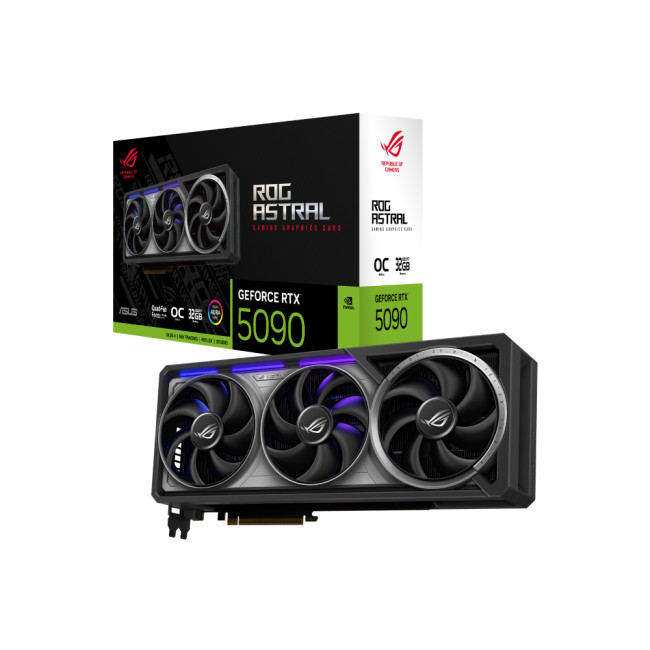
Also Known As:
- ROG STRIX RTX 5090
- NVIDIA GeForce RTX 5090 ROG Astral OC
- The Beast from the Future
Overview & Standout Features
The ASUS RTX 5090 ROG Astral isn’t just a GPU; it’s a flex. This monster packs 32GB of next-gen GDDR7 VRAM, triple axial-tech fans, and more RGB than your setup probably needs (but still wants). ASUS has taken NVIDIA’s flagship and strapped a jet engine to it - metaphorically and maybe thermally too.
Built for high refresh 4K gaming, extreme ray tracing, and even AI-powered content creation, this card doesn’t play around. It’s made for those who want the absolute best and don’t care if their power bill looks like a phone number.
Yes/No Compatibility & Feature Table
|
Feature |
Supported |
|
DLSS 4 + Frame Gen |
✓ |
|
Ray Tracing (Full Path) |
✓ |
|
4K 120Hz Ready |
✓ |
|
Fits in Mid Tower Case |
X |
|
Requires 1000W+ PSU |
✓ |
|
PCIe 5.0 Compatible |
✓ |
|
VR-Ready |
✓ |
|
AI Compute (Tensor Cores) |
✓ |
|
RGB Sync Support (Aura Sync) |
✓ |
→ For Gamers
Let’s talk frames, because this card throws them like it's trying to win a dodgeball match.
4K Ultra Gaming? A breeze. Titles like Cyberpunk 2077, Starfield, and Alan Wake 2 run above 100 FPS on ultra with full ray tracing when DLSS 4 and Frame Generation are active.
1440p Competitive? You're cruising over 240 FPS in games like Valorant, Apex Legends, and CS2. No CPU bottleneck? Then this card is your unfair advantage.
Gamer’s POV: If you’ve got a 4K 144Hz monitor and don’t want to turn down settings ever again, this is your card. It's max settings, max frames, zero compromise.
→ For Creators & Editors
For video editors and 3D artists, the RTX 5090 is a monster workhorse.
- Adobe Premiere Pro: Handles 8K RED footage like it’s 1080p.
- DaVinci Resolve: Smooth playback even with heavy colour grading and Fusion FX.
- Blender / Octane: Near real-time rendering thanks to insane CUDA core count and OptiX acceleration.
- AI Workloads: If you’re into AI tools (Stable Diffusion, Runway ML, etc.), the 5090 absolutely crushes it.
Editor’s POV: If time is money, the 5090 just paid your rent. It's built for creators juggling huge timelines, 3D environments, or multiple 4K video streams.
Thermals, Noise & Build Quality
The ROG Astral cooler is beefy - triple-slot, vapor chamber, and full-metal backplate. It runs cooler than expected considering its brute strength, with fan curves optimized for silence under low to moderate loads.
- Idle temps: ~38°C
- Full load gaming: ~72–75°C
- Noise: Noticeable, but not annoying (fans spin up under 70%+ load)
The RGB lighting is fully customizable via Aura Sync, and the build feels premium, like you just installed a cyberpunk engine in your rig.
Power, Size & Compatibility
Make no mistake - this card is huge and hungry.
- Power Draw: ~480–520W under full load
- Recommended PSU: 1000W+ (with 12VHPWR support)
- Size: 3.5-slot, 336mm long — check your case before buying
Make sure your case has clearance and good airflow. This thing will not be happy in a cramped mid-tower.
Should You Upgrade?
|
Upgrade if: |
Skip if: |
|
|
Rating Summary
- Performance: ★★★★★
- Thermals: ★★★★☆
- Noise: ★★★☆☆
- Gaming: ★★★★★
- Creative Work: ★★★★★
- Value: ★★☆☆☆

|
Pros |
Cons |
|
Unmatched 4K gaming & editing performance Future-proof for years Top-tier cooling and design Excellent for creators and streamers |
Expensive - like "sells kidney" expensive Huge - may not fit smaller cases High power draw demands a beefy PSU |
This card is for the enthusiast who wants it all - high FPS, stunning visuals, creative horsepower, and bragging rights. If your budget can handle it, the RTX 5090 ROG Astral is the new king of the hill.
Palit GAMINGPRO RTX 5080 16GB GDDR7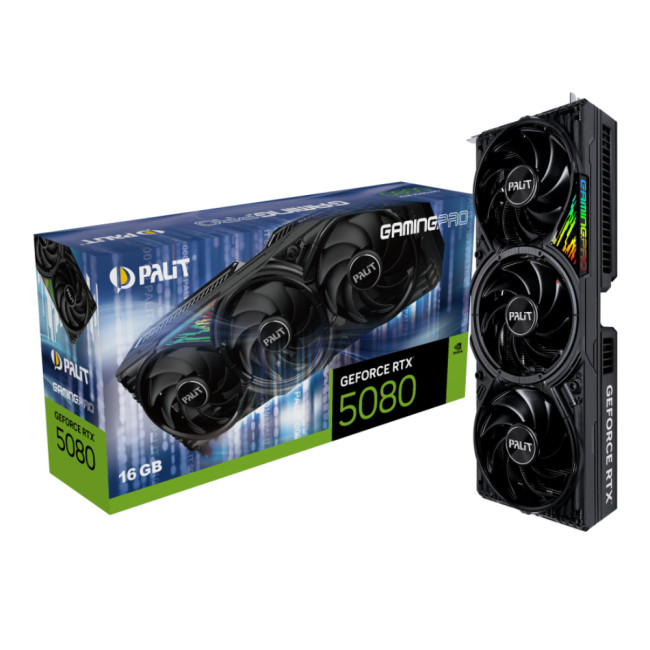
Also Known As:
- RTX 5080 GAMINGPRO OC
- Palit RTX 5080
- Upper-Mid NVIDIA Ada Next
Overview & Standout Features
The Palit RTX 5080 GAMINGPRO hits that sweet spot between top-tier performance and somewhat reasonable pricing. Built on NVIDIA’s Ada-Next architecture and paired with 16GB of GDDR7, it’s a reliable pick for high-end 1440p and 4K gaming — without completely overloading your power supply or wallet.
Palit’s triple-fan design keeps temps in check, and the clean black aesthetic is a win for minimalist builds. No unnecessary flair, just raw performance where it matters.
Yes/No Compatibility & Feature Table
|
Feature |
Supported |
|
DLSS 4.0 + Frame Generation |
✓ Yes |
|
Ray Tracing |
✓ Yes |
|
4K Gaming (Optimized Settings) |
✓ Yes |
|
Fits in ATX Mid Tower |
✓ Yes |
|
Requires 1000W PSU |
X No |
|
PCIe 5.0 Compatible |
✓ Yes |
|
Ideal for Creators |
✓ Yes |
|
AI/ML Tasks |
X Limited |
|
RGB Lighting |
✓ Subtle |
→ For Gamers
The 5080 is ideal for gamers running 1440p ultra settings with high refresh rates or stepping into 4K at optimized settings. Frame Generation and DLSS 4.0 give it a noticeable edge in demanding titles.
- Elden Ring, Hogwarts Legacy, Spider-Man 2: 90–120 FPS at 1440p Ultra
- Cyberpunk 2077 with DLSS FG: ~80 FPS at 4K High
- Apex Legends, Warzone, Valorant: 200+ FPS at 1440p Competitive settings
If the RTX 5090 is overkill for you - the 5080 is what most high-performance gamers actually need.
→ For Creators & Editors
Not flagship-tier, but still strong:
- 4K editing in Premiere Pro and Resolve is smooth, though render/export times are a bit slower than the 5090
- Blender cycles rendering is solid with CUDA and OptiX support
- Not ideal for multi-cam 8K editing or AI-heavy tasks, but handles most 2D/3D creative workflows
Great for YouTubers, streamers, or editors working with 1080p–4K timelines who want GPU acceleration without paying creator-class prices.
Thermals, Noise & Build Quality
Palit’s cooler does its job well without being flashy.
- Load Temps: 68–73°C
- Idle Noise: Whisper quiet
- Full Load Noise: Noticeable, not distracting
- Sturdy build, metal backplate, subtle RGB accent
It’s a long 2.5-slot card, but fits most ATX cases comfortably.
Power, Size & Compatibility
- Power Draw: ~340–360W
- Recommended PSU: 850W
- Size: 328mm long, 2.5 slots
- Power Connector: 12VHPWR (adapter included)
Should You Upgrade?
|
Upgrade if: |
Skip if: |
|
|
Rating Summary
- Performance: ★★★★☆
- Thermals: ★★★★☆
- Noise: ★★★☆☆
- Gaming: ★★★★★
- Creative Work: ★★★★☆
- Value: ★★★☆☆
Side-by-side comparison of pros and cons
|
Pros |
Cons |
|
Excellent 1440p/4K gaming performance DLSS 4.0 makes AAA gaming smoother Cooler is quiet and efficient Solid option for streamers and editors |
Still pricey for mid-high tier Not a big leap over RTX 4080 Lacks the wow-factor or flash some gamers expect |
The RTX 5080 GAMINGPRO is a realistic upgrade for serious gamers and creative users who want near-flagship performance without the overkill. It’s powerful, efficient, and doesn’t demand a complete rebuild of your rig to make it fit.
XFX Speedster MERC 310 Black Edition Radeon RX 7900 XTX 24GB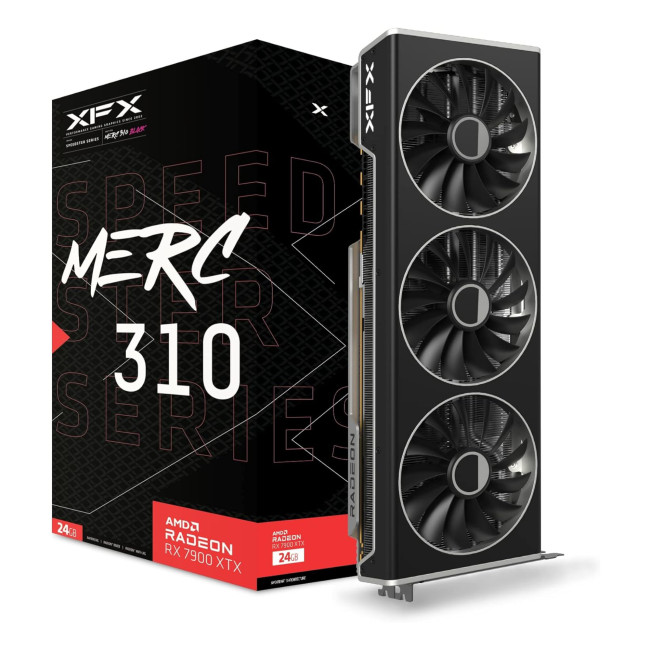
Also Known As:
- XFX RX 7900 XTX MERC 310
- AMD Navi 31 Flagship
- RX 7900 XTX Custom AIB
Overview & Standout Features
The MERC 310 version of the RX 7900 XTX is AMD’s flagship muscle in a sleek, blacked-out chassis. XFX took AMD’s already strong reference design and added a beefy triple-fan cooler, higher clocks, and improved power delivery.
With 24GB of GDDR6 memory and support for high-bandwidth DisplayPort 2.1, this card is built for 4K gaming, high-res content creation, and multi-monitor productivity. It's a strong NVIDIA alternative - without the “NVIDIA tax.”
Yes/No Compatibility & Feature Table
|
Feature |
Supported |
|
FSR 3 + Frame Generation |
✓ Yes |
|
Ray Tracing |
✓ Basic |
|
4K Ultra Gaming |
✓ Yes |
|
PCIe 5.0 Compatible |
✓ Yes |
|
Fits in ATX Mid Tower |
X Tight fit |
|
Uses Standard 8-pin Connectors |
✓ Yes |
|
Ideal for AI Workloads |
X Limited |
|
8K Timeline Editing |
✓ Yes |
→ For Gamers
The 7900 XTX holds its own and then some, in 4K and high refresh 1440p gaming.
- Cyberpunk 2077 (RT Off): 90–100 FPS at 4K Ultra
- Horizon Forbidden West: 120+ FPS at 1440p Ultra
- Modern Warfare III, Forza Motorsport, AC Mirage: 100–160 FPS across resolutions
Ray tracing isn’t quite on NVIDIA’s level, but AMD’s driver updates have closed some gaps - especially when using FSR 3 with Frame Generation.
Think of this card as the high-performance daily driver: fast, consistent, and more affordable per frame than Team Green.
→ For Creators & Editors
24GB of VRAM makes this card a solid pick for 4K and even 8K video work, large-scale illustrations, and game development.
- Premiere Pro / DaVinci Resolve: Smooth playback, high export speeds
- Unreal Engine / Blender: Renders well using HIP/ROCm, though not as fast as NVIDIA CUDA
- FSR Support in compatible editing tools gives decent AI acceleration, but it's not as broad as NVIDIA’s ecosystem
For creators who don’t rely on CUDA-specific workflows, this card offers a great balance of VRAM and power.
Thermals, Noise & Build Quality
XFX’s cooler is big, bold, and effective.
- Load Temps: 65–70°C
- Idle Noise: Virtually silent
- Load Noise: Noticeable under full load, but well-managed
- Build: Metal backplate, full-length heatsink, and subtle branding
At 3 slots wide and over 340mm long, it demands space — but rewards you with excellent cooling and quiet performance.
Power, Size & Compatibility
- Power Draw: ~355–380W
- Recommended PSU: 850W
- Size: 344mm, 3-slot
- Power Connectors: Dual 8-pin (no 12VHPWR needed — a bonus for many builders)
Should You Upgrade?
|
Upgrade if: |
Skip if: |
|
|
Rating Summary
- Performance: ★★★★☆
- Thermals: ★★★★☆
- Noise: ★★★☆☆
- Gaming: ★★★★☆
- Creative Work: ★★★★☆
- Value: ★★★★☆
|
Pros |
Cons |
|
Strong 4K and 1440p performance 24GB VRAM is future-proof and creator-friendly Cooler is quiet and keeps temps under control No 12VHPWR drama - dual 8-pin is reliable Excellent price-to-performance value |
Ray tracing still trails NVIDIA Large size can be a problem in tight builds Creative app support isn't as broad as NVIDIA’s ecosystem |
The XFX MERC 310 RX 7900 XTX is a powerhouse that delivers serious performance without burning a hole in your budget. For gamers and creators who want flagship performance without green team pricing, this is AMD’s best play.
ASUS PRIME RX9070 O16G OC 16GB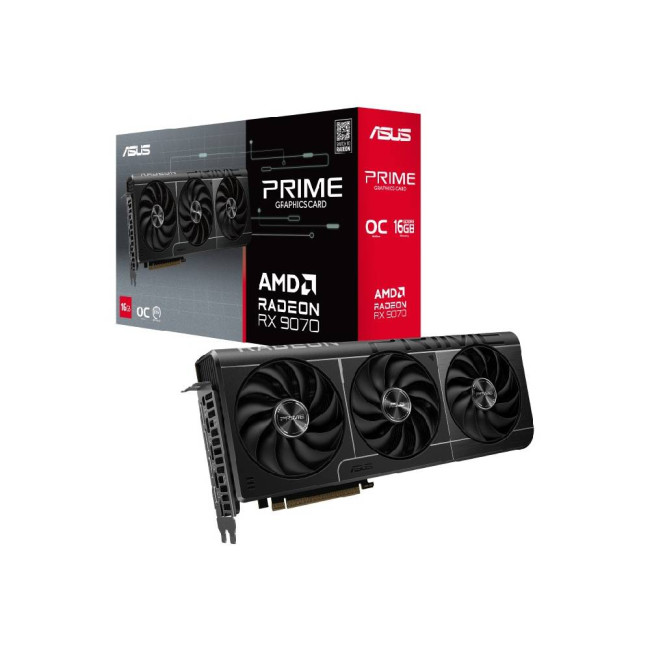
Also Known As:
- RX 9070 PRIME OC
- ASUS PRIME RX 9070
- AMD Navi 32 Mid-High Tier
Overview & Standout Features
ASUS PRIME RX9070 O16G OC offers a balanced combo of power and price. With 16GB of GDDR6 VRAM, this card targets gamers and creators who want solid 1440p performance with room for 4K without breaking the bank.
The PRIME cooler keeps things cool and quiet, while the factory OC bumps clocks for a little extra punch. The design is simple and understated — perfect for clean builds that don’t scream for attention.
Yes/No Compatibility & Feature Table
|
Feature |
Supported |
|
Ray Tracing |
✓ Yes (Basic) |
|
FSR 3 + Frame Generation |
✓ Yes |
|
Fits in Mid Tower Case |
✓ Yes |
|
Power Connector 8+6 Pin |
✓ Yes |
|
4K Gaming (Optimized) |
✓ Yes |
|
AI Workloads |
X Limited |
|
Quiet Cooling |
✓ Yes |
→ For Gamers
This card shines at 1440p high/ultra settings and can tackle 4K gaming if you’re okay tweaking a few settings.
- Assassin’s Creed Mirage: 85–100 FPS at 1440p Ultra
- Far Cry 6: 75–90 FPS at 1440p High
- Call of Duty MW2: 100+ FPS at 1080p Max
Ray tracing is supported but limited compared to higher-end models. AMD’s FSR 3 tech helps boost frame rates on supported titles.
Good fit for gamers wanting strong 1440p performance with occasional 4K action, without the flagship price tag.
→ For Creators & Editors
Great for mid-level content creators working on 1080p to 4K projects.
- Premiere Pro and Resolve work well with GPU acceleration
- Blender rendering is decent but slower than higher-tier GPUs
- 16GB VRAM supports large textures and moderate multitasking
Not the best pick for heavy AI workloads or 8K editing, but great for casual and intermediate users.
Thermals, Noise & Build Quality
ASUS’s PRIME cooler delivers quiet and efficient cooling:
- Load Temps: 65–70°C
- Idle Noise: Near silent
- Load Noise: Quiet, barely noticeable
Solid build quality with a sleek, minimalist look, no flashy RGB, just solid performance.
Power, Size & Compatibility
- Power Draw: ~260W
- Recommended PSU: 750W
- Size: 280mm, 2-slot
- Power Connector: 8-pin + 6-pin
Fits comfortably in most mid-tower cases without hassle.
Should You Upgrade?
|
Upgrade if: |
Skip if: |
|
|
Rating Summary
- Performance: ★★★☆☆
- Thermals: ★★★★☆
- Noise: ★★★★☆
- Gaming: ★★★★☆
- Creative Work: ★★★☆☆
- Value: ★★★★☆
|
Pros |
Cons |
|
Great price-to-performance ratio Quiet and efficient cooler Solid 16GB VRAM for mid-range use Compact, fits most cases easily |
Ray tracing is basic Not ideal for heavy 8K editing or AI Moderate gaming gains over previous gen |
The ASUS PRIME RX9070 O16G OC is an excellent choice for gamers and creators who want reliable 1440p performance and good VRAM without pushing their budget or space limits. It’s the sweet spot for mid-range builds.
GIGABYTE GeForce RTX 5070 AERO 12GB OC (White Model)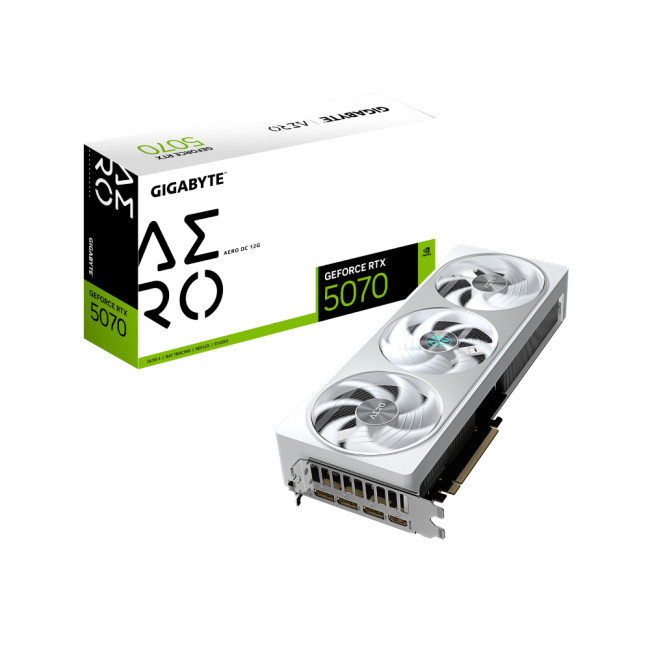
Also Known As:
- RTX 5070 AERO OC
- NVIDIA RTX 5070
- White Edition Mid-Range Beast
Overview & Standout Features
The RTX 5070 AERO OC White is a sleek, no-nonsense GPU aimed at gamers and creators who want solid 1440p performance with NVIDIA’s latest Ada Lovelace tech—without the flagship price.
With 12GB of GDDR6X VRAM, this card is designed for smooth gaming and content creation, featuring DLSS 3 and Frame Generation to squeeze extra frames out of demanding titles. The white shroud and clean design make it a popular choice for minimalistic or light-themed builds.
Yes/No Compatibility & Feature Table
|
Feature |
Supported |
|
DLSS 3 + Frame Generation |
✓ Yes |
|
Ray Tracing |
✓ Yes (Basic) |
|
Fits in Mid Tower Case |
✓ Yes |
|
8-pin Power Connector |
✓ Yes |
|
1440p Gaming |
✓ Yes |
|
AI Workloads |
X Limited |
|
White-Themed Builds |
✓ Yes |
→ For Gamers
This card handles 1440p gaming effortlessly and can push 1080p competitive titles into ultra-high FPS territory.
- Fortnite, Valorant, Overwatch 2: 250+ FPS at 1080p High
- Cyberpunk 2077 (DLSS 3): ~70 FPS at 1440p High
- Call of Duty Modern Warfare II: 120 FPS at 1440p High
Ray tracing is decent but limited by the lower VRAM and core count compared to higher-end cards. DLSS 3’s Frame Generation helps maintain smooth gameplay even in demanding scenes.
Perfect for gamers prioritizing 1440p or 1080p ultra settings without the wallet pain.
→ For Creators & Editors
- Decent for 1080p and light 4K editing workflows
- Adobe Premiere Pro and DaVinci Resolve benefit from CUDA acceleration
- Not ideal for heavy 3D rendering or complex AI workloads due to VRAM limitations
Great entry point for creators upgrading from older GPUs who want NVIDIA ecosystem benefits without flagship prices.
Thermals, Noise & Build Quality
- Load Temps: 65–70°C
- Idle Noise: Quiet, near silent
- Load Noise: Moderate fan noise under heavy load
- The dual-fan cooler and airflow design keep temps solid for the card’s performance tier
Power, Size & Compatibility
- Power Draw: ~220W
- Recommended PSU: 650W
- Size: 268mm, 2-slot
- Power Connector: 8-pin
Fits comfortably in most mid-tower cases, making it a great option for builds with space constraints.
Should You Upgrade?
|
Upgrade if: |
Skip if: |
|
|
Rating Summary
- Performance: ★★★☆☆
- Thermals: ★★★★☆
- Noise: ★★★☆☆
- Gaming: ★★★★☆
- Creative Work: ★★★☆☆
- Value: ★★★★☆
|
Pros |
Cons |
|
Clean white design for themed builds Great 1440p gaming with DLSS 3 Efficient power consumption Compact size fits most cases |
Limited VRAM for heavy creative tasks Basic ray tracing performance Moderate noise under load |
The GIGABYTE RTX 5070 AERO OC White is a great mid-range card for gamers who want solid 1440p performance, NVIDIA’s latest features, and a unique aesthetic. Perfect for clean builds without flagship costs.
AMD Radeon RX 7900 XTX 
Also Known As:
- RX 7900 XTX Reference
- AMD Navi 31 Flagship
- AMD RX 7900 XTX Founders Edition
Overview & Standout Features
The AMD Radeon RX 7900 XTX card is AMD’s answer to the high-end GPU market, offering a powerhouse experience with 24GB of GDDR6 VRAM, and a sleek Founders Edition design. It delivers strong rasterization performance and ample VRAM for demanding gaming and creative workloads.
Built on the RDNA 3 architecture, it supports AMD’s latest tech like FSR 3 and advanced ray tracing, giving users a high-performance experience without NVIDIA’s pricing.
Yes/No Compatibility & Feature Table
|
Feature |
Supported |
|
FSR 3 + Frame Generation |
Yes |
|
Ray Tracing |
✓ Yes |
|
4K and 8K Editing Support |
✓ Yes |
|
Fits in Mid Tower Case |
✓ Yes |
|
12VHPWR Power Connector |
✓ Yes |
|
Ideal for Heavy Creative Work |
✓ Yes |
|
AI/ML Tasks |
X Limited |
→ For Gamers
This card excels at 4K gaming, handling modern AAA titles with ease at high settings.
- Cyberpunk 2077 (RT On, FSR 3): ~80 FPS at 4K Ultra
- Elden Ring: 100+ FPS at 1440p Ultra
- Call of Duty MW3: 110+ FPS at 4K High
While ray tracing is solid, it’s still a step behind NVIDIA’s top-end cards. However, the large VRAM buffer helps in open-world games and future-proofing.
If you want a flagship AMD card that balances raw power and price, the reference RX 7900 XTX is the go-to.
→ For Creators & Editors
- 24GB VRAM handles 4K and 8K editing workflows smoothly
- Great for content creators using software optimized for AMD GPUs
- Supports GPU compute tasks with ROCm and HIP, but NVIDIA CUDA still leads in some apps
- Excellent for game development, 3D rendering, and video production
Thermals, Noise & Build Quality
- Load Temps: 70–75°C
- Idle Noise: Quiet
- Load Noise: Moderate, typical for a reference blower design
- Sleek Founders Edition cooler with a minimalist aesthetic and solid build quality
Power, Size & Compatibility
- Power Draw: ~350W
- Recommended PSU: 850W
- Size: 305mm, 2.5-slot
- Power Connector: 12VHPWR
Should You Upgrade?
|
Upgrade if: |
Skip if: |
|
|
Rating Summary
- Performance: ★★★★★
- Thermals: ★★★★☆
- Noise: ★★★☆☆
- Gaming: ★★★★☆
- Creative Work: ★★★★★
- Value: ★★★★☆
|
Pros |
Cons |
|
Powerful 4K/8K gaming and creative performance Large 24GB VRAM for future-proofing Clean Founders Edition design Competitive pricing vs NVIDIA flagships |
Ray tracing still a step behind NVIDIA Reference blower noise under load Requires a modern PSU and compatible case |
️ The AMD Radeon RX 7900 XTX Reference is the flagship AMD GPU that delivers massive power and VRAM, perfect for gamers and creators who want high-end performance without the premium NVIDIA price tag.

All the Deets You Need
Which GPU is best for 4K gaming and video editing?
For 4K gaming and heavy video editing, the AMD Radeon RX 7900 XTX (both Reference and XFX MERC 310) offer excellent performance and 24GB VRAM, ideal for demanding workflows.
Is ray tracing performance better on NVIDIA or AMD cards?
NVIDIA currently leads in ray tracing performance and ecosystem support. AMD’s ray tracing has improved significantly but still trails slightly behind NVIDIA’s top-tier cards.
What’sthe benefit of DLSS 3 and FSR 3?
Both technologies upscale lower-resolution frames to boost performance without sacrificing visual quality. DLSS 3 is NVIDIA’s AI-driven solution, while FSR 3 is AMD’s answer, each optimized for their respective hardware.
Do all these GPUs support multi-monitor setups?
Yes, all the GPUs discussed support multi-monitor configurations with multiple DisplayPort and HDMI outputs, but the number and version of ports may vary by model.
How important is VRAM for gaming and content creation?
VRAM is crucial for handling textures, video frames, and large data sets. For 4K gaming and 8K video editing, 16GB or more VRAM is recommended. Cards with 24GB VRAM, like the RX 7900 XTX, offer better future-proofing.

Let’s Wrap Things Up
Choosing the right graphics card today means balancing raw power, price, and your specific needs, whether you're a gamer chasing silky-smooth 4K frame rates or a creator working on complex 8K timelines. From the ultra-flagship ASUS GeForce RTX 5090 ROG Astral with its insane specs to the balanced and budget-savvy ASUS PRIME RX9070 O16G OC, each card in this lineup has a unique sweet spot.
If you want sheer muscle and future-proof VRAM, AMD’s RX 7900 XTX models stand out. NVIDIA’s RTX 5070 AERO White and RTX 5080 GAMINGPRO hit a strong mark for gamers and creators who lean on NVIDIA’s ecosystem and ray tracing prowess. Ultimately, the best card is the one that fits your workflow, your game preferences, and your budget.
No matter which card you pick, you’re stepping into a world of next-gen gaming and creative potential that’s more exciting than ever.
Related Articles


Last Updated: July 01, 2025
Introduction
Gaming laptops today utilise the latest GPU technologies to deliver unmatched performance. These technologies make laptops fast and robust, making gaming an enjoyable and immersive experience.
Graphic Revolution: How Have Graphics Evolved?
Graphics, or GPUs, have evolved over the years, featuring modern technologies today to deliver an uninhibited gaming performance. You can trace the graphic revolution back to the 1950s and 1970s; the evolution is commendable.
Here is a brief look into how graphics have evolved over the years.
| Year | Type Of Graphics |
| 1950s-1970s |
|
| 1970s–1980s |
|
| 1980s |
|
| 1990s |
|

Last Updated: September 19, 2025
The laptop market in 2025 has been completely transformed by NVIDIA GeForce RTX GPUs, offering unparalleled power, visuals, and versatility. With over 80% of high-performance laptops now featuring RTX GPUs, they’ve become the go-to choice for gamers, creators, and professionals alike. Whether you're chasing the cutting-edge performance of the latest RTX 50 series laptops or the proven reliability of RTX 40 series models, there’s an option for every need and budget.
NVIDIA's advancements in ray tracing, DLSS 3.5, and AI-powered acceleration make these laptops 50% faster than their predecessors, delivering lifelike graphics and exceptional efficiency. The gaming industry alone has seen a 35% rise in demand for RTX-powered laptops in 2025.
Ready to dive in and find the perfect RTX laptop? Read on as we explore the top models, including their specs, pricing, and unique features, so you can make an informed choice. Don’t miss the ultimate guide ahead!
What Makes NVIDIA GeForce RTX Laptops Stand
Last Updated: September 01, 2026
Looking for portable graphics cards? Graphics cards are an essential component for gamers, creative professionals, and tech enthusiasts. As the market evolves, new models are released with cutting-edge technology, while older ones become more affordable. Whether you are looking for the latest high-performance GPUs or seeking budget-friendly options, 2026 presents some fantastic deals on graphics cards.
In this blog, we will explore the best deals on gaming graphics cards, including RTX and AMD GPUs, and help you find the most value-packed choices from top brands. Whether you are searching for discounts on AMD graphics cards or affordable Nvidia graphics cards, we have you covered.
Why 2026 is a Great Year for Buying a Graphics Card
The GPU market in 2026 has stabilised significantly compared to previous years, making it an ideal time to grab some of the best deals. Key factors influencing the affordability of graphics cards this year include:
- Increased Supply: Manufacturers have ramped
Last Updated: March 05, 2026
In 2026, gaming and content creation are more accessible than ever, thanks to Nvidia’s lineup of budget-friendly graphics cards. Whether you're a casual gamer, a competitive esports player, or a creative professional, finding the right GPU doesn’t have to drain your wallet. The market is filled with options that deliver exceptional performance without the premium price tag, ensuring you get the best value for your investment.
From the power-efficient GTX 1650 to the feature-rich RTX 3060, Nvidia continues to redefine budget gaming. These GPUs offer remarkable frame rates, smooth gameplay, and cutting-edge features like DLSS and ray tracing, bringing next-gen technology within reach for everyone. With the right choice, you can enjoy immersive visuals, faster rendering, and seamless multitasking without compromise.
With so many options available, it can be challenging to determine which budget Nvidia GPU is the best fit for your needs. Whether you’re looking for smooth 1080p gaming, entry-level

Last Updated: October 02, 2025
Want to Know Your GPU? Here's How
Whether you’re gaming, editing videos, or just curious—knowing what graphics card (GPU) you have matters. It affects performance, display quality, and what software your laptop can handle. Good news: it’s easy to check.
How to Find Out What Graphics Card You Have on Windows
1. Use Device Manager
- Press Windows + X, then select Device Manager
- Click the Display Adapters dropdown
- You’ll see the name of your graphics card listed
- This method works for both integrated (e.g. Intel HD) and dedicated GPUs (e.g. NVIDIA, AMD)
2. Use System Information
- Press Windows + R to open Run
- Type msinfo32 and press Enter
- Navigate to Components > Display
- Look for Adapter Type and Adapter Description
3. Use DirectX Diagnostic Tool (dxdiag)
- Press Windows + R, type dxdiag, and hit Enter
- Go to the Display tab
- Your GPU details will be listed under “Device”
4. Use Task Manager (Quick Check)
- Press Ctrl + Shift + Esc to open Task Manager
- Go to the

Last Updated: September 09, 2025
Exploring the Latest and Greatest in GPU Tech!
If you're wondering what makes a graphics card "good," you're not alone. Whether you're a gamer, a creator, or just love a snappy desktop experience, the right GPU (graphics processing unit) can completely redefine the way your system performs. With the release of Nvidia's 50 Series and AMD's latest GPUs, there's much to get excited about. But what actually makes a graphics card good? And which are the best graphics cards out there at the moment?
Let's break it down, human-style—no jargon overload, no fluffy nonsense, just real talk about real performance.
What Makes a Graphics Card 'Good'?
At its core, a good graphics card delivers consistent performance, reliable cooling, and future-ready features. Whether gaming at 4K, editing high-resolution video, or running AI software, a good GPU doesn't slow down when pushed.
The best graphics card should offer:
- Solid FPS (frames per second) across modern titles
- Support for ray tracing
Last Updated: September 09, 2025
Graphics cards are the powerhouse behind stunning visuals and smooth gameplay on your laptop. From gaming and 3D rendering to video editing and CAD software, choosing the right graphics card can make all the difference. In this comprehensive guide, we break down how to select the perfect GPU for your laptop, focusing on the latest options like RTX 5090 and RTX 5060.
Why Graphics Cards Matter
Graphics cards, also known as GPUs, are crucial for rendering images, videos, and animations. A high-performance GPU can handle intensive tasks like 4K gaming, video editing, and graphic design without breaking a sweat. But with so many choices, finding the right one can be a challenge.
Enhanced Gaming Performance
For gamers, a powerful GPU is a game-changer. It enables laptops to run graphically intensive games smoothly, delivering high frame rates and lifelike graphics. A top-tier GPU like the NVIDIA RTX 5090 offers real-time ray tracing, DLSS technology, and AI-driven enhancements that make gaming
Last Updated: March 04, 2026
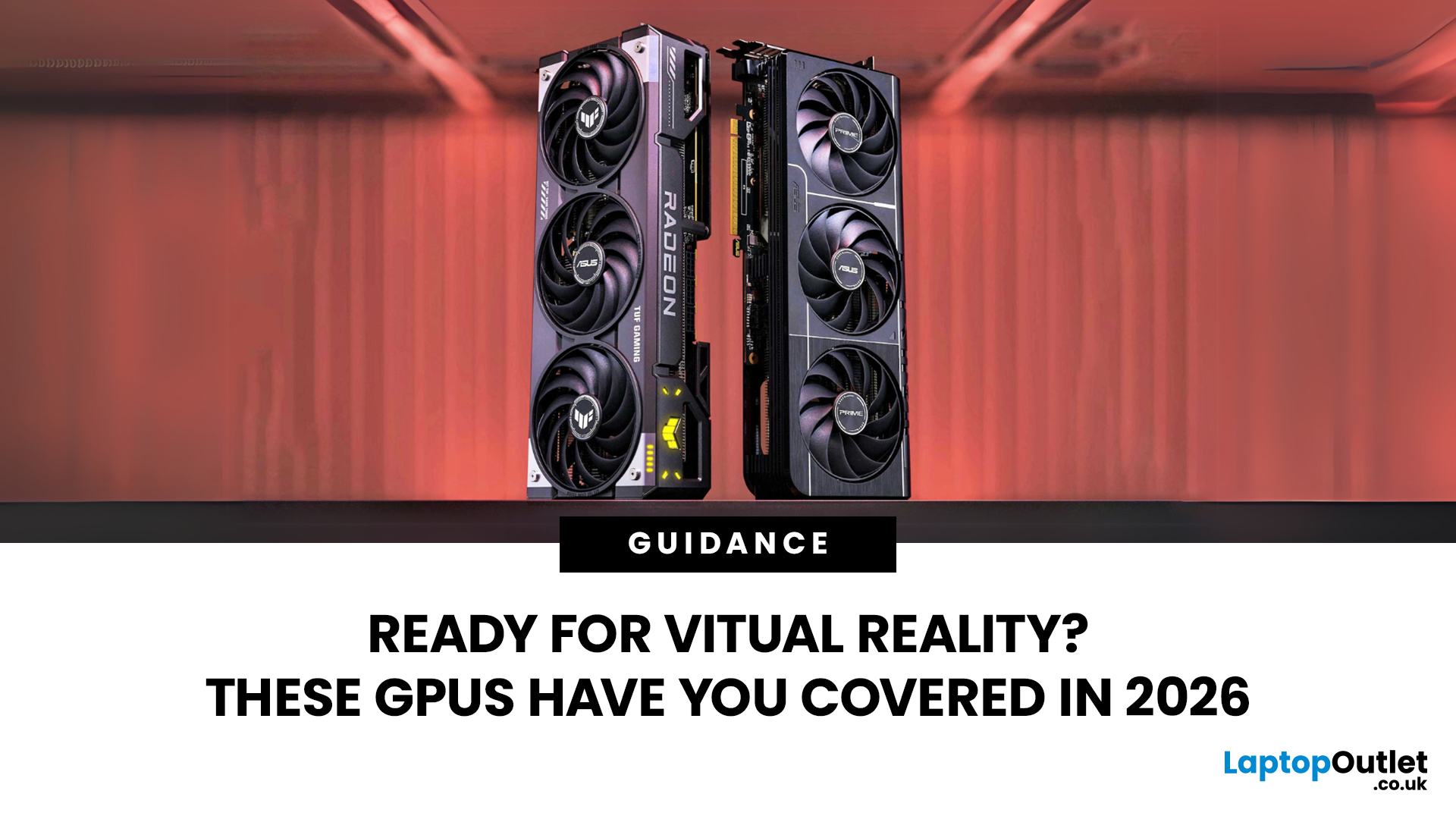
Virtual reality is the way forward when looking for total immersion and enjoying entertainment in another dimension. Whether you're stepping into alien landscapes, racing through hyper-realistic circuits, or exploring entire worlds from your living room, VR takes everything you love about gaming and cranks it up to another level. But to truly make the most of it, your PC needs to be more than just average; it needs serious graphical muscle.
If you plan to upgrade your system for a smoother, sharper, and more responsive VR experience, choosing the best graphics card for virtual reality experiences is key. And with so many options now on the market, narrowing it down can be daunting. That's why we've done the legwork for you.
Unlike standard gaming, virtual reality demands more from your hardware. Take it as running dual high-resolution displays - except one is strapped to your face, and every frame counts. Frame rates need to stay consistently high, latency needs to be minimal, and
Last Updated: September 09, 2025
The RTX 5050 arrives as a timely and much-needed addition to NVIDIA’s mid-range line-up. With GPU prices escalating and older models ageing out of relevance, this card positions itself as a smart compromise between performance, features, and affordability. Targeted at gamers, upgraders, and budget-conscious users alike, it strikes an appealing balance that’s increasingly rare in the entry-level space. If you're considering an RTX 5050 upgrade, this RTX 5060 graphics cards review has something for you.
Architecture & Specifications: A Capable Foundation
Under the hood, the RTX 5050 is built on NVIDIA’s Blackwell architecture, the same foundation used in high-end models like the RTX 5090 graphics card. This gives it access to 5th-gen Tensor cores and 4th-gen RT cores, cutting-edge tech for a budget-friendly GPU. The card features 2,560 CUDA cores, a boost clock of up to 2,570 MHz, and 8GB of GDDR6 memory with 320 GB/s bandwidth. Despite its modest memory interface, performance stays sharp
Last Updated: September 09, 2025
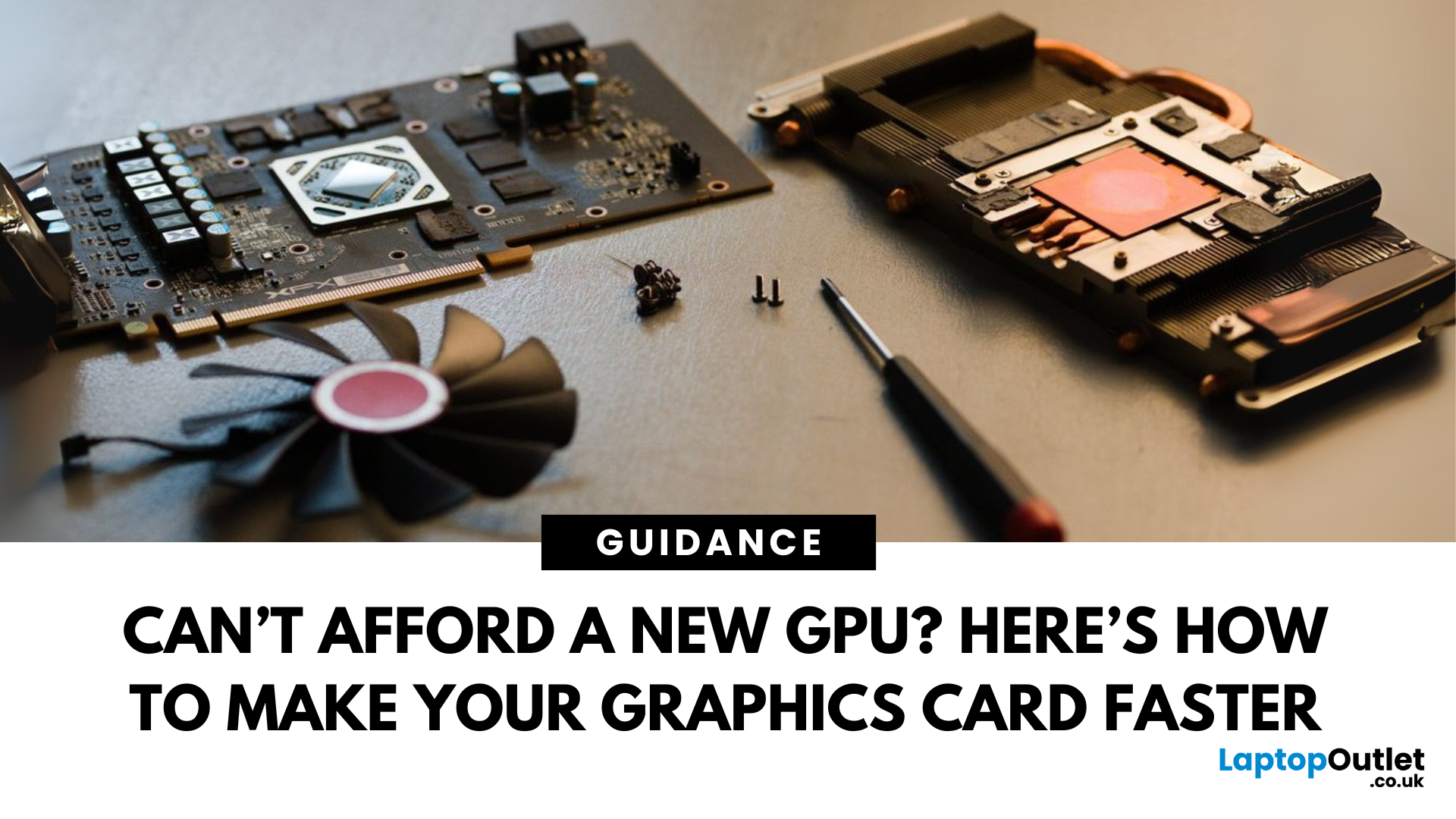
Let’s face it. Graphics cards are expensive. And while everyone wants that shiny new GPU to max out game settings or improve their creative workloads, it’s not always realistic. Between supply issues, steep prices and rapid technology cycles, buying a new graphics card can often feel like a luxury rather than a necessity.
The good news is that you don’t need to replace your GPU to breathe new life into your gaming rig or workstation. With a little time, care, and smart system tweaks, you can get more performance out of your current card and make it run quieter, cooler and faster.
In this guide, we’ll walk you through practical ways to improve your GPU’s performance, longevity, and efficiency without splashing out on brand-new hardware. If you’re looking to upgrade graphics card performance without replacing it entirely, you’re in the right place.
Tips to Make your Graphics Card Faster Without Upgrading It
-
Clean and Maintain Your GPU for a Performance Boost
Before we even touch the software

