



AOC Monitors
Finance available
Free Delivery *
Finance available
Finance available
Finance available
Finance available
Free Delivery *
Finance available
Free Delivery *
Finance available
Free Delivery *
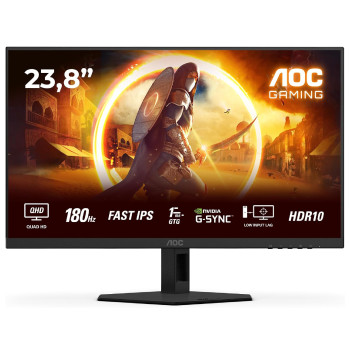
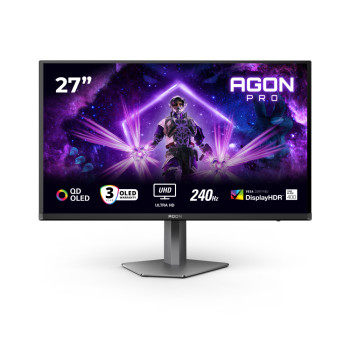
Finance available
Free Delivery *
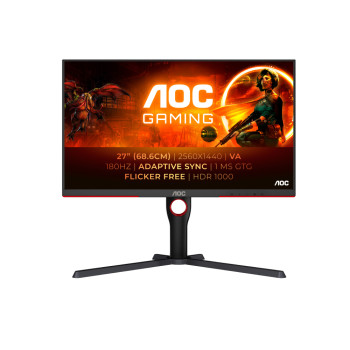
Finance available
Free Delivery *
Finance available
Free Delivery *
Finance available
Finance available
Finance available
Free Delivery *
Showing 15 of 49 Items
Shop AOC Monitors for Work & Everyday Use
Looking for an AOC monitor that gives you more for your money? From straightforward Full HD displays for everyday work and study to sharper QHD screens and high-refresh models for gamers, Laptop Outlet has AOC display for every type of setup.
For a dependable everyday upgrade, an AOC PC screen with Full HD delivers clear, comfortable viewing without paying for features you don't need. Shop our Full HD monitor range to find your next display.
Need more screen space, sharper detail or smoother performance? Step up to QHD, 4K or a high-refresh AOC monitor and get a display that can keep up with the way you actually use your PC.
Which AOC Monitor Should You Buy?
Rather than choosing a monitor simply because it has the biggest specification, think about what you want to improve.
Need more room for work? A 27-inch or 32-inch display can make spreadsheets, timelines and side-by-side applications much easier to manage.
Want sharper detail? QHD gives you more screen resolution than Full HD without necessarily requiring the jump to a premium 4K display.
Play fast-paced games? A high refresh rate such as 144Hz can make movement feel noticeably smoother than a conventional 60Hz screen.
Watch films or prefer an immersive setup? A curved display can make a larger screen feel more engaging, particularly when you're sitting directly in front of it.
This is why there isn't one “best” AOC monitor for everyone. The best model is the one where the features you are paying for actually improve the way you use your screen.
When Is a Higher-Resolution AOC Monitor Worth It?
Full HD remains a sensible choice for everyday computing. If your main activities are office applications, browsing, video calls and streaming, you can get everything you need without moving to a higher resolution.
But QHD becomes more useful when you need more workspace and finer detail. A 27-inch QHD AOC monitor, for example, gives you more pixels to work with, which can make text, images and detailed interfaces look sharper while giving you more usable desktop space.
That extra resolution can be particularly useful when you're regularly switching between several applications or working with visual content.
If that sounds more like your setup, take a look at our high-resolution QHD monitors.
When Does 4K Make Sense?
An AOC 4K monitor is worth considering when image detail genuinely matters to you.
For photo and video editing, detailed creative work, large spreadsheets or high-resolution media, 4K provides four times the pixel count of Full HD. On a suitably sized screen, the difference can be immediately useful rather than simply looking impressive on a specification sheet.
For general email and web browsing, however, 4K may be more capability than you need.
That distinction is important: buy 4K because you will benefit from the extra detail, not simply because 4K sounds better.
You can compare options in our Ultra HD monitors range.
24, 27 or 32 Inches? Choose Based on Your Setup
Screen size changes how you interact with your computer, so it is worth considering your desk as well as your budget.
An AOC 24 inch monitor is a practical option when desk space is limited, or you mainly need a straightforward display for work and everyday computing. It can also make sense when you want a dual-monitor setup without needing a huge desk.
A 27 inch AOC monitor is often the more versatile choice. You get noticeably more room for documents, browser windows and creative applications without the footprint becoming excessive. For many home-office and mixed-use setups, 27 inches provides a particularly comfortable middle ground.
If you regularly work across multiple windows, handle large spreadsheets or simply want a more expansive viewing experience, an AOC 32 inch monitor gives you considerably more screen real estate.
The important thing is not to assume that bigger is automatically better. A 32-inch screen on a shallow desk may feel too close, while a 24-inch display can be exactly right for a compact workspace.
Want a More Immersive AOC Display?
A flat screen isn't your only option. An AOC curved monitor can make sense when you want a more immersive viewing experience, particularly with larger screens or wider formats.
The curved design brings the edges of the display slightly closer into your field of view, which can make it more natural to look across a wide screen. This can be especially appealing for premium graphics, films and setups where you keep several windows open side by side.
If you like the idea of a curved setup, browse our curved computer screens to compare different display sizes and specifications.
AOC 144Hz Monitors: Is the Higher Refresh Rate Worth It?
Refresh rate is one of those specifications that matters much more to some users than others.
For emails and spreadsheets, moving from 60Hz to 144Hz isn't essential. But if you game regularly, a higher refresh rate can make fast movement and camera transitions appear smoother and more responsive.
An AOC 144Hz monitor can therefore be a sensible upgrade for someone who wants one screen for both work and high-end tasks. If you play competitive titles where responsiveness matters, you may want to go further with a 240Hz or 300Hz model.
This is also where AOC's gaming range becomes particularly interesting, with models designed around higher refresh rates, fast response times and graphics-focused features.
If gaming is a major part of your setup, shop AOC gaming monitors to compare the dedicated range.
IPS or VA: Which AOC Panel Is Better for You?
The panel type can have a bigger impact on your experience than you might expect.
IPS panels are a strong all-round choice if you care about colour reproduction and consistent viewing angles. They work particularly well for office work, creative applications and general everyday use.
VA panels typically offer stronger contrast and deeper blacks, which can make them appealing for films, games and other content where contrast matters.
Neither is automatically better. If you regularly edit images or work with colour-sensitive content, IPS may be the more natural choice. If you prioritise contrast and immersive entertainment, VA may suit you better.
What Else Should You Look for in an AOC Computer Screen?
Once you've narrowed down the size, resolution and panel, look at the features you'll actually use.
Connectivity is an obvious one. HDMI and DisplayPort are common, while selected AOC models offer USB-C, which can make connecting a compatible laptop considerably easier.
Ergonomics matter too, particularly if you're sitting at your monitor for hours every day. Height adjustment, tilt and VESA compatibility can help you position the screen more comfortably instead of having to adapt your desk around a fixed stand.
And if you're comparing two otherwise similar displays, this is where the small differences can justify choosing one model over another.
Why Buy AOC Monitors from Laptop Outlet?
Laptop Outlet offers AOC monitors for every budget, typically ranging from £60 to £500+, covering everything from everyday Full HD screens to advanced QHD, 4K and high-refresh models. Keep an eye on our seasonal sales and limited-time AOC deals for the chance to pick up a higher-spec monitor for less, whether you're upgrading your screen size, resolution or high-end performance. With flexible payment options on eligible purchases, UK delivery, warranty support and easy returns, there's even more reason to shop with confidence.
Ready to Find Your AOC Monitor?
Start with how you use your screen.
For straightforward home and office work, Full HD can give you excellent everyday value. For more workspace and sharper detail, QHD is a worthwhile step up. If you're working with high-resolution content, 4K can make a genuine difference.
The right AOC monitor isn't necessarily the one with the longest specification list. It's the one that gives you the features you'll notice every day.
Read More:
AOC Monitors Buying Guide 2026: How to Choose the Right Screen?
AOC Monitors Explained: Brand Overview, Key Series & Best Uses in 2026
Curved vs Flat AOC Monitors: Which Is Better for Gaming, Work and Everyday Use?
Read more