



HyperX Gaming Laptop Setup Guide for Beginners

Setting up your new HyperX gaming laptop is one of the most exciting parts of stepping into PC gaming. If you've just unboxed your device and you're unsure where to begin, this beginner-friendly breakdown will walk you through everything you need to know. From optimising software to boosting cooling performance, you’ll find everything you need to unlock the full potential of your new machine. Many first-time gamers skip key setup stages, leaving their devices underpowered or inefficient. This guide ensures you’re not one of them.
1. Getting Started: The Essential First Steps
Before diving into settings and performance tweaks, it’s important to take care of the basics. Begin by connecting your laptop to a reliable power source. Gaming laptops, especially HyperX devices designed for high performance, require stable power for initial configurations and updates. Allow your system to complete its first-time boot optimally, as this ensures firmware, BIOS settings, and essential drivers are prepared correctly.
Once your laptop powers on, connect to a stable internet network. A wired connection is ideal if available, but a fast and secure Wi-Fi connection works just as well. This connection is essential not only for downloading updates but also for activating software licences and accessing support tools.
Next, create or sign into your Microsoft account. This gives you seamless access to OneDrive, Windows updates, security features, and synchronised settings across devices. The goal is a smooth starting experience that sets up your HyperX laptop with long-term convenience and easy recovery options.
2. Key HyperX Laptop Setup Tips Every Beginner Should Know

Now that the essentials are sorted, let’s look at key laptop setup tips that ensure your device is ready for performance-heavy tasks.
Start by updating Windows. This is the foundation for system stability, especially if you're gaming. Updated systems experience fewer crashes, better compatibility with modern games, and enhanced security.
Next, update your GPU drivers. Whether your laptop uses NVIDIA or AMD graphics, up-to-date drivers ensure optimal performance with the latest titles and productivity applications. Laptops often come with automatic update tools, use them to make this process quicker and easier.
Finally, remove unnecessary bloatware. Some pre-installed apps occupy background resources without offering real benefits. A cleaner system is a faster system, so don’t hesitate to uninstall what you don’t need.
3. HyperX Gaming Laptop Configuration for Maximum Performance
To elevate your gaming experience, fine-tune your HyperX gaming laptop configuration for optimal results. Begin with the Windows power plan settings. Switch to high-performance or custom performance mode to ensure maximum CPU and GPU utilisation.
Then open your GPU control panel. NVIDIA users can adjust settings such as Low-Latency Mode, Texture Filtering, and V-Sync. AMD users can tweak Radeon Anti-Lag, Radeon Boost, and image sharpening. These adjustments directly improve frame rates and responsiveness.
Next, configure in-game settings based on your laptop’s GPU strength. Spending a few minutes adjusting texture quality, shadows, and refresh rate can dramatically improve gameplay smoothness.
Lastly, enable hardware-accelerated GPU scheduling in Windows. This offloads some work from the CPU to the GPU, boosting FPS during high-demand sessions. In addition, you can read our guide to HyperX gaming laptops for more information.
4. HyperX Laptop Performance Optimisation Techniques
One of the biggest advantages of modern gaming laptops is the ability to customise performance. Here’s how to achieve effective HyperX laptop performance optimisation:
A. Use aPerformanceMonitoring Tool
HyperX laptops are compatible with multiple performance-monitoring apps such as MSI Afterburner or OMEN Gaming Hub. These tools give insights into GPU temperature, CPU load, fan speed, and clock frequencies.
B. Enable Game Mode in Windows
Game Mode prioritises your game by reducing background tasks and allocating more system resources to improve performance. It helps stabilise FPS and prevents interruptions during gameplay. Turning it on is simple and provides an immediate boost for most titles.
C. OptimiseStartupPrograms
Many apps start automatically and slow your laptop down without offering any gaming benefit. Disabling unnecessary startup programs frees RAM and CPU power for smoother gameplay. This also helps your laptop boot faster and stay responsive during gaming sessions.
D. Keep storage clean
A cluttered SSD can slow downloading times, cause stuttering, and reduce overall system performance. Regularly clearing temporary files and unused apps helps your laptop run more efficiently. A clean drive ensures games load faster and run more smoothly. Furthermore, if you want the best gaming laptop for yourself, you can read our guide: Best HyperX Gaming Laptops for Competitive Gamers in 2025.
5. Essential HyperX Laptop Software Setup You Shouldn’t Skip
A strong HyperX laptop software setup ensures a smooth gaming experience right from the start. Install the following essentials:
- Antivirus software: Choose a lightweight yet powerful option that protects without slowing the system.
- HyperX Support Assistant: This ensures your BIOS, drivers, and firmware remain updated.
- Cloud Backup Tools: OneDrive or Google Drive prevents loss of game saves and important files.
- Gaming Platforms: Install Steam, Epic Games Launcher, EA App, Ubisoft Connect, and Xbox Game Pass PC if applicable.
- Communication Tools: VoIP apps such as Discord are essential for online gaming, community joining, and co-op teamwork.
You might be thinking about whether it’s right to spend money on gaming laptops. Read our guide on the importance of HyperX gaming laptops for detailed information.
6. HyperX Gaming Accessories Setup for an Enhanced Experience

Accessories complete your gaming ecosystem. A good HyperX gaming accessories setup improves comfort, accuracy, and immersion. Begin by connecting your gaming mouse and keyboard. Wired accessories offer the fastest response times, but HyperX wireless gear is engineered for exceptionally low latency.
Next, set up your audio. HyperX headsets are well-known for immersive sound profiles, detachable mics, and excellent comfort. Calibrate your headset through Windows audio settings or the manufacturer’s tuning software for the best spatial audio experience.
Now connect any additional tools such as external drives, webcams, or controllers. Make sure all accessories run on their latest firmware updates to ensure stability and peak performance.
7. Adjusting HyperX Laptop Gaming Settings for Better Gameplay
Perfecting your laptop gaming settings ensures smooth and responsive gameplay. Start with display settings. Set your refresh rate to the highest available which are120Hz, 144Hz, or even 165Hz on premium models. Enable variable refresh rate (VRR) or FreeSync if supported.
Next, adjust brightness and colour profiles. Many HyperX gaming laptops offer vivid colour depth modes that enhance visual clarity without draining performance.
Then set game-specific configurations. Tailor each game’s settings to match your laptop’s GPU capability. Competitive gamers often lower graphic quality to achieve the highest FPS, while casual players may prefer visual quality upgrades.
8. HyperX Laptop Cooling Setup for Stable Performance
Effective cooling is vital for high-performance gaming. A strong HyperX laptop cooling setup ensures low temperatures and consistent FPS. Always place your laptop on a firm, flat surface. Soft surfaces restrict ventilation and trigger thermal throttling.
Use a cooling pad if possible. Designed with airflow in mind, cooling pads significantly reduce heat buildup under strain. Adjust your fan profiles through the OMEN gaming hub or BIOS settings. Many modern gaming laptops allow custom fan curves that automatically react to temperature changes.
Finally, clean your vents regularly to prevent dust accumulation. A well-cooled system is more durable, more stable, and far more reliable in long gaming sessions.
9. The Ultimate HyperX Laptop Beginner Guide
As a final step in this HyperX laptop beginner guide, here’s a simple checklist to follow:
- Update Windows and GPU drivers
- Activate gaming mode and performance profiles
- Install essential software and gaming platforms
- Connect and configure gaming accessories
- Optimise display, graphics, and audio settings
- Enhance cooling for long-term stability
- Keep your laptop clean, updated, and well-maintained
This ensures your HyperX-powered gaming laptop delivers top-tier performance for years to come.

Wrapping Up
With HyperX now fully integrated into the HP gaming ecosystem, setting up your Omen or HyperX gaming laptop is easier and more streamlined than ever. Gamers also invest in gaming graphics cards, but laptop users appreciate the convenience of built-in mobile GPUs. Accessories such as HyperX gaming mice and HyperX gaming headsets complete the setup for an immersive, modern gaming experience. This guide gives you clear, simple steps to get the best performance from your new machine, whether you’re tuning your settings, improving cooling, or pairing your device with HyperX accessories. Follow these steps, and you’ll be ready to game with confidence, right from day one.

FAQs
How do I optimise my HyperX gaming laptop for better performance?
Start with updating Windows and GPU drivers, adjust your laptop’s performance mode, optimise in-game settings, and use tools like OMEN Gaming Hub for performance tuning.
Do I need external accessories for a better gaming experience?
While not required, accessories like gaming mice, headsets, and cooling pads significantly enhance accuracy, immersion, and system stability.
What is the best power setting for gaming on my laptop?
Use High Performance mode or your laptop’s custom gaming profile for maximum CPU and GPU utilisation.
How can I reduce overheating during long gaming sessions?
Elevate your laptop, use a cooling pad, clean vents regularly, and customise your fan speed settings.
Can beginners easily configure a HyperX gaming laptop?
Yes. With intuitive software tools and simple optimisation steps, even beginners can configure and fine-tune their laptop in minutes.
| Read More: |
| The Ultimate Buying Guide to HP Laptops: Models, Features, and Usage |
| Common HP Laptop Problems and Easy Fixes |
| How to Choose the Right HP Laptop Based on Your Needs |
Related Articles


Last Updated: December 12, 2025
If you are serious about PC gaming, esports, or even streaming, you will undoubtedly have heard the name HyperX. This brand is synonymous with high-quality, durable, and exceptionally comfortable gaming hardware. For nearly two decades, HyperX has set the industry standard for peripherals used by competitive gamers and everyday enthusiasts alike.
This comprehensive guide offers a complete HyperX brand overview. We will explore its origins, its current ownership under HP Inc., and break down the best HyperX gaming gear across all major categories. By the end, you will understand exactly what HyperX is about and why it remains the favourite choice for countless players globally.
The HyperX Brand Overview
To truly understand what HyperX is today, we must look at where it came from and how a massive industry shift led to a major change in ownership.
The Kingston Years (2002–2021)
HyperX was officially launched in 2002 as the high-performance division of Kingston Technology, a global leader

Last Updated: February 26, 2026
Before diving into specs and comparisons, it’s important to understand where HyperX fits in the gaming laptop ecosystem. HyperX started as a premium gaming accessory brand known for headsets, keyboards, and memory modules. Their products were built for competitive players and quickly gained global traction.
Today, HyperX’s gaming DNA influences HP’s gaming ecosystem. Many of the performance standards and design philosophies seen in HyperX products carry over into HP’s Omen series. This is why HyperX laptops are often associated with, or based on, Omen builds, because HP owns HyperX and integrates their performance-first design approach.
If you’ve ever researched gaming laptops, you’ve likely come across HP, widely recognised as a top tech brand with strong, long-lasting hardware. Their Omen series, featured here at HP laptops, is built on the same principles that define HyperX: high performance, durability, smart cooling, and competitive-edge engineering.
So, when we talk about HyperX

Last Updated: December 12, 2025
For years, HyperX has been one of the most recognised names in gaming, known for high-performance headsets, keyboards, memory modules and accessories trusted by both casual players and esports professionals. But as HyperX’s influence expands into the laptop world through the HP products ecosystem, many buyers are now asking the big question:
Are HyperX Gaming Laptops Worth It?
The short answer: Yes, if you want strong performance, gaming-focused features, durable build quality, and reliable long-term value.
For the detailed answer, you need to scroll down and read it all. Below, you’ll find a complete analysis of HyperX laptop pros and cons, performance, features, durability, and how HyperX compares to other brands. We’ll also examine whether these laptops deliver genuine value, and offer a full HyperX laptop guide to help you decide if they’re right for you. Let’s explore what makes these laptops unique and when they might not be the best option.
What Are HyperX Gaming Laptops? Understanding
Last Updated: March 04, 2026
The world of competitive gaming moves fast. If you are serious about rising through the ranks in 2026, your gear must keep pace. This is where high-performance HyperX Gaming Laptops come into their own.
HyperX, known for engineering some of the best memory and peripherals in the world, has become central to the OMEN and Victus gaming lines. These machines combine reliable, high-speed components with premium display technology. They offer the raw power needed for modern AAA titles and the precision required for esports.
If you are hunting for serious hardware, this guide explores the best options for 2026. We look at HyperX gaming laptop specs to ensure you find the ultimate machine for competitive dominance.
Understanding the HyperX Ecosystem
When you search for the best HyperX laptops, you are primarily looking at the pinnacle of HP’s gaming division: OMEN and Victus.
It is crucial to understand the relationship between these brands:
- HyperX: This is a premium gaming brand renowned
Last Updated: February 26, 2026
If you're looking to elevate your gaming experience in 2026, HyperX is one of the most exciting names to watch. Now operating under HP, HyperX is known for its premium gaming accessories and enthusiast-grade components, and it is now making a strong mark in the desktop PC space. This complete breakdown covers HyperX gaming PC specs, performance capabilities, and feature sets.
Best HyperX Gaming PCs in 2026: Top Picks
If you’re after powerful, prebuilt desktops that deliver high-end gaming performance and match or even surpass many systems often paired with HyperX accessories, it’s important to note that HyperX itself does not manufacture gaming PCs. Instead, HP, the parent company behind HyperX, produces some of the strongest desktop gaming machines on the market. Among them, the two HyperX OMEN towers below stand out. They offer top-tier specs, modern cooling solutions, and excellent upgrade potential.
OMEN 35L GT16-0034na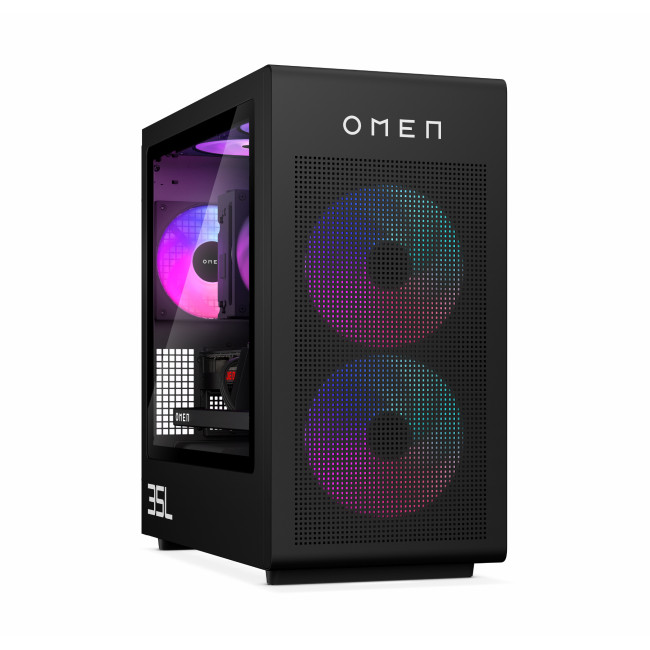
- CPU: Intel Core Ultra 7 265K (20-core)
- GPU: NVIDIA

