



Microsoft Surface Tablets: Best Models, Features & Performance in 2026

There’s a reason people still say “Just get a Surface” when someone asks for a serious Windows tablet.
In a world full of Android slates, experimental hybrids, and ultra-cheap tablets that barely last a year, Microsoft Surface tablets have carved out a very specific reputation:
clean design, proper productivity, and devices that feel like Windows was made for touch - because, well, it was.
In 2026, Surface tablets aren’t trying to chase trends. They’re refining what they already do best: turning tablets into genuinely useful computers that flex between work, study, creativity, and everyday life.
Why Microsoft Surface Tablets Still Set the Standard
When Microsoft launched the first Surface, it wasn’t just another tablet. It was a statement:
Windows doesn’t belong to laptops only.
Fast forward to 2026, and Microsoft Surface 2-in-1 tablets are still the reference point for the entire category. Whether you’re looking at Detachable tablets, Surface 2-in-1 devices, or Windows touchscreen tablets, almost every competitor is responding to what Surface already does.
That includes:
- ASUS 2-in-1 Tablets with OLED displays
- HP Detachable Tablets built for business
- Lenovo Yoga Tablets pushing flexible form factors
But Surface remains the most “Windows-native” experience you can get in tablet form.
Surface Tablet Features: Why They Feel So Polished

Surface tablets don’t overwhelm you with features and that’s intentional.
A Display Built for Work and Creativity
Surface displays focus on clarity, accuracy, and touch responsiveness rather than chasing extreme specs. The PixelSense panels are sharp, well-calibrated, and incredibly comfortable for long sessions, whether you’re editing documents, sketching with the Surface Pen, or binge-watching after hours.
This makes Surface tablets feel calmer and more professional than many consumer-focused Samsung tablets with S pen, which often prioritise entertainment first.
The Keyboard + Pen Combo That Actually Works
Surface keyboards are still among the best detachable keyboards on any tablet. They’re stable, responsive, and don’t feel like accessories you tolerate, they feel essential.
Add the Surface Pen, and suddenly Surface tablets become:
- Notebooks
- Sketchpads
- Presentation tools
- Full productivity machines
This is why Surface dominates conversations around detachable tablets and Surface Pro tablets.
Build Quality That Feels Premium Without Being Fragile
Magnesium alloy bodies, precise hinges, and minimalist design give Surface tablets a premium feel but they’re still practical enough for daily use. Toss one in a bag, move between classes or meetings, or work from cafés without worrying it’ll fall apart.
This makes Microsoft Surface one of the best tablet PCs for business professionals in the UK, combining portability, security, and full Windows productivity.
Surface Tablet Performance: What It’s Like in Real Life
Here’s the honest truth: Surface tablet performance isn’t about being the fastest, it’s about being the smoothest.
Surface tablets are tuned for consistency. Apps open reliably. Multitasking feels controlled. Windows touch gestures behave the way they’re supposed to. Even under load, Surface devices tend to feel predictable rather than chaotic.
That matters more than raw benchmarks for most users.
For students and professionals, this makes Surface tablets some of the best Windows touchscreen tablets available, especially when reliability matters more than headline numbers.
Surface Pro Tablets: The Flagship Experience
If there’s one device that defines the brand, it’s the Surface Pro.
Surface Pro tablets are designed to replace laptops not sit next to them. They run full Windows, support desktop software, and handle everything from Office work to creative apps with ease.
They’re especially popular with:
- University students
- Remote workers
- Designers and note-takers
- Anyone who wants one device instead of two
Compared to many ASUS 2-in-1 tablets, Surface Pro devices focus less on experimental hardware and more on refinement. You don’t need to “learn” how to use them, they just fit into existing workflows.
Surface Go Tablets: Small, Light, Surprisingly Useful
Not everyone wants a full-sized productivity tablet and Microsoft knows that.
Surface Go tablets are compact, lightweight, and far more capable than they look. They’re ideal if you want:
- A portable Windows device
- A secondary work tablet
- Something lighter than a Surface Pro
They’re often compared with affordable android tablets, but the difference is simple: Surface Go runs full Windows. That makes it especially appealing for students who need desktop apps but don’t want a bulky laptop.
In discussions about affordable Surface tablets, the Surface Go line is usually where value-conscious buyers land.
Where Surface Fits Among Other Tablet Brands
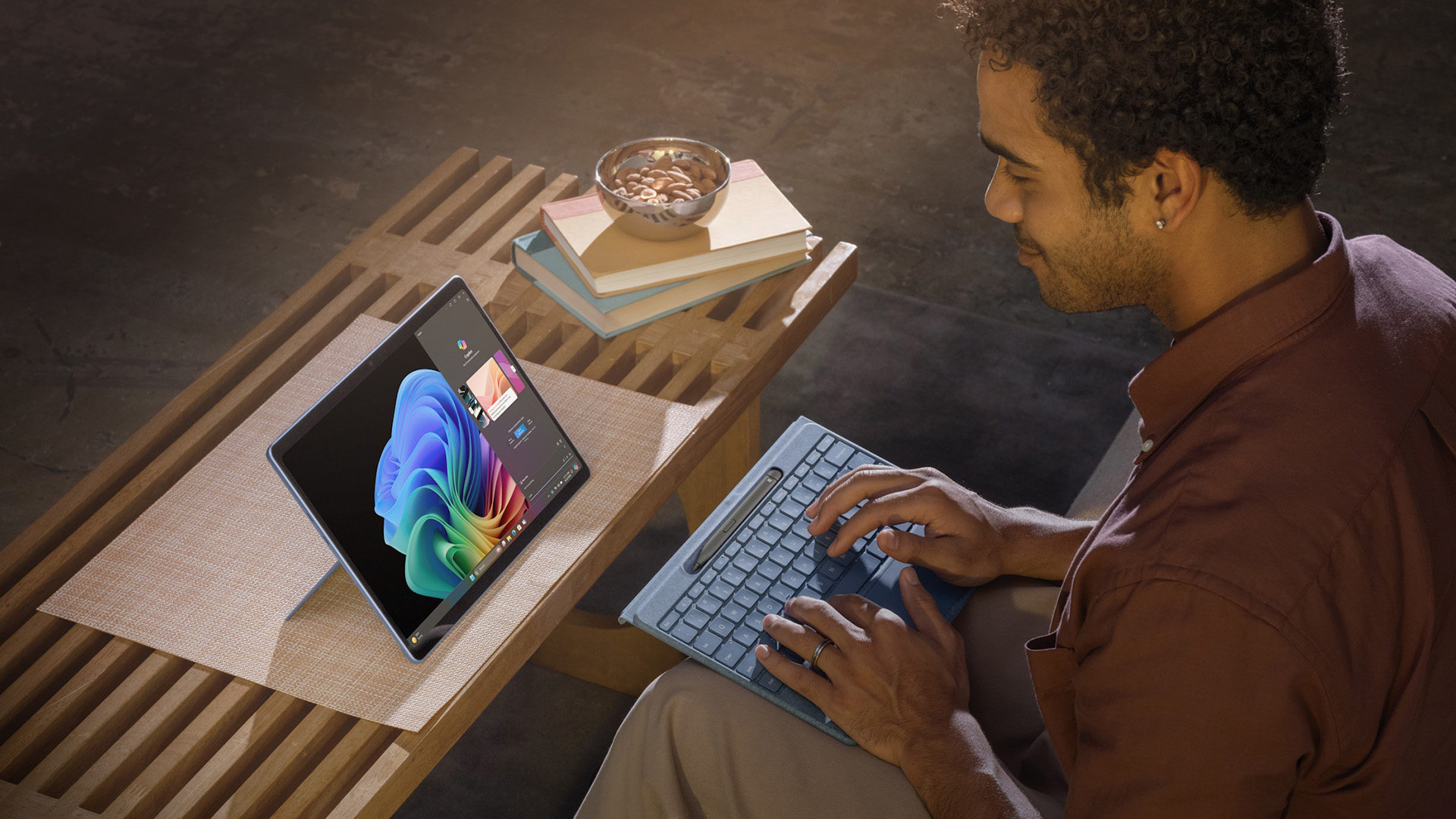
Surface doesn’t exist in a vacuum.
If you’re comparing options, you’ll likely cross paths with:
- Samsung Tablets with S Pen for Android-first creativity
- Lenovo Yoga Tablets for flexible form factors
- HP Detachable Tablets for business environments
- ASUS 2-in-1 Tablets for performance-driven users
Surface sits right in the middle, not the cheapest, not the most experimental, but often the most balanced for Windows users.
If you’re unsure which Surface model suits you, learning how to measure tablet screen size accurately for any tablet helps avoid choosing a display that feels too small or too bulky.
And What About the Surface Laptop?
It’s worth addressing this, because many buyers hesitate between a tablet and a traditional laptop.
The Surface Laptop isn’t a tablet, but it exists in the same ecosystem. If you don’t need touch-first workflows, detachable keyboards, or pen input, the Surface Laptop offers a more traditional experience.
But if flexibility matters drawing, note-taking, touch navigation, Surface tablets remain the better choice.
The Best Microsoft Surface Tablets to Buy in 2026
Microsoft’s Surface lineup is clean on purpose. There aren’t dozens of confusing models, just a few devices that each do a very specific job really well. The trick is choosing the one that matches your workflow.
Surface Pro Tablets: The “One Device” Crowd Favourite
If you want a tablet that genuinely replaces a laptop, Surface Pro tablets are still the gold standard.
They run full Windows, handle serious multitasking, and work seamlessly with the Surface Keyboard and Pen. Writing essays, coding, designing, presenting, or jumping between work and study, it all feels natural. This is why Surface Pro continues to dominate conversations around Surface 2-in-1 devices and detachable tablets.
Compared to many ASUS 2-in-1 tablets, Surface Pro prioritises refinement over experimentation. Everything feels intentional, predictable, and polished, especially for people who live inside Microsoft apps.
Best for:
Students, professionals, creatives, remote workers
Surface Go Tablets: Small, Smart, and Surprisingly Capable
The Surface Go tablets don’t try to be everything, and that’s exactly why they work.
They’re compact, lightweight, and perfect if you want a Windows tablet you can throw into a bag and forget about until you need it. While they won’t match Surface Pro performance, they handle browsing, Office apps, streaming, and light productivity comfortably.
For buyers cross-shopping affordable android tablets, the Surface Go is often the moment of realisation: “Oh - I actually need Windows.”
Best for:
Students, secondary devices, portability-first users
Affordable Surface Tablets: What “Affordable” Really Means Here
Let’s be real, Surface isn’t budget tech. But affordable Surface tablets exist if you know where to look.
Older Surface Pro generations, entry-level Surface Go models, and refurbished units offer excellent value without sacrificing the core Surface experience. You still get build quality, Windows optimisation, and accessory support, just at a more reasonable price.
For students weighing up Windows tablets for students, Surface often lands in the “worth stretching for” category rather than the cheapest option.
Compared to the best Android tablet PC in the UK, including top-rated and gaming tablets, Surface devices focus far more on productivity than entertainment.
Microsoft Surface Tablet Comparison: How Surface Competes in 2026

Choosing a Surface usually means you’re also looking at other big names. Here’s how Surface stacks up in the real world.
Surface vs Lenovo Yoga Tablets
Lenovo Yoga tablets are flexible and often more affordable. Surface tablets, however, feel more refined and better optimised for Windows. If reliability and polish matter more than price, Surface usually wins.
Surface vs ASUS 2-in-1 Tablets
ASUS tablets pushes innovation hard, OLED screens, high refresh rates, experimental designs. Surface counters with consistency. For users who want a predictable Windows experience, Surface still feels safer.
Surface vs HP Detachable Tablets
HP detachable tablets are business-focused and solid, but often heavier and more corporate. Surface strikes a better balance between professional and personal use.
Surface vs Samsung Tablets with S Pen
Samsung tablets excel in Android creativity and media. Surface excels in productivity and desktop workflows. If you live in Office, OneNote, and Windows apps, Surface makes more sense.
Top Microsoft Surface Tablet Picks for 2026
Microsoft doesn’t flood the market with endless models, instead, it refines a few devices really well. These three Surface tablets stand out as the best picks right now, each aimed at a slightly different type of user, from professionals to power users.
1. Microsoft Surface Pro X (SQ1, 8GB RAM, 256GB SSD)
13" Display | Windows 10 Pro
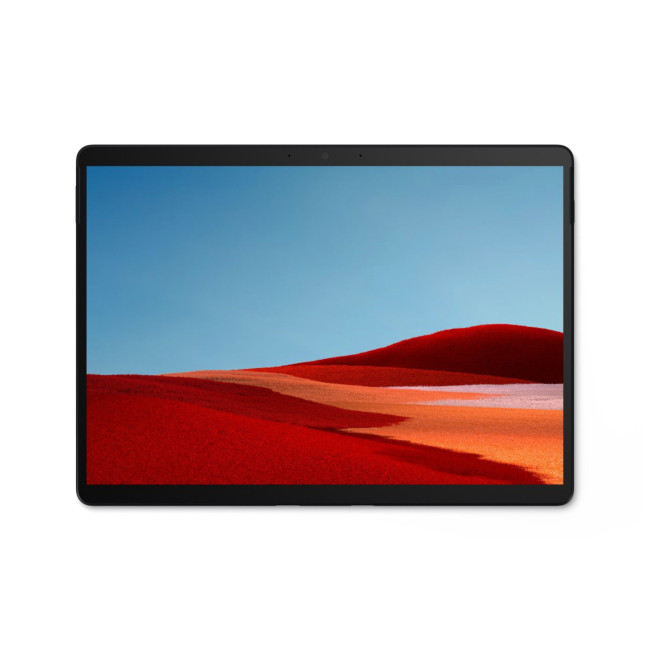
Highlights:
- SQ1 Processor
- LPDDR4 Memory
- 13" , 2880 x 1920 Max. Resolution
- 8 GB RAM, 256 GB SSD, 256 GB Storage
- 5 MP Front Camera
- USB-C
- Black Colour
The Surface Pro X is Microsoft’s most design-forward Surface tablet, slim, lightweight, and built for people who value portability just as much as productivity.
Powered by Microsoft’s custom SQ1 processor, this model is optimised for everyday Windows tasks like document work, browsing, emails, and video calls. It’s not trying to be a brute-force performance machine; instead, it focuses on efficiency, silent operation, and all-day usability.
With Windows 10 Pro onboard, it’s also well-suited to business users who need enterprise features in a highly portable form factor. If you want a Surface that feels genuinely “tablet-first” but still runs full Windows, this is a strong and still-relevant choice.
Best for:
Business users, professionals, frequent travellers, lightweight productivity
2. Microsoft Surface Pro 11 Copilot+ (Snapdragon X1P, 16GB RAM, 256GB SSD)
13" Display | Windows 11 Pro
This is where Surface steps firmly into the future.
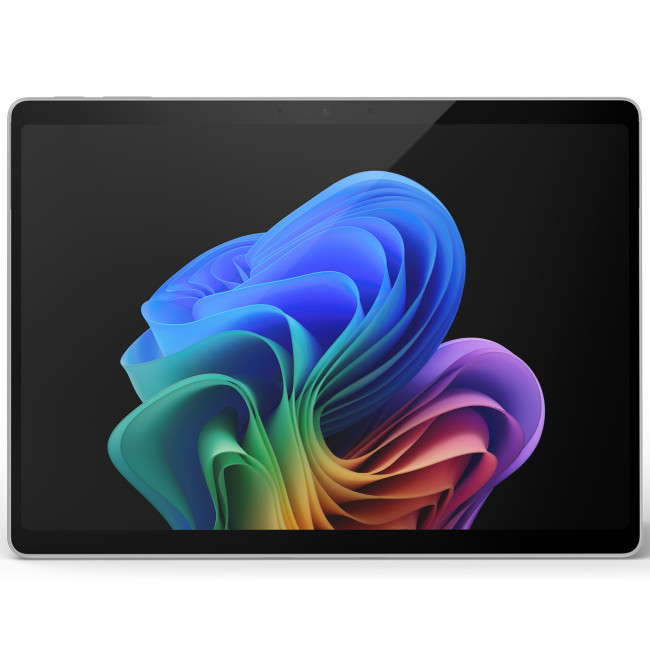
Highlights:
- OLED display
- 10MP Ultra HD rear facing camera
- Power multiple monitors with 2x USB-C/USB4 ports
- 13" OLED Display, PixelSense, 2880 x 1920 Max. Resolution
- 16 GB RAM, 256 GB Storage
- 12 MP Front Camera
- Qualcomm Adreno Graphics
- Platinum Colour
The Surface Pro 11 Copilot+ powered by Qualcomm’s Snapdragon X1P processor represents a major shift in Surface tablet performance. It delivers faster multitasking, significantly better battery efficiency, and built-in AI acceleration designed for the new generation of Windows features.
With 16GB of RAM, this model handles demanding workflows comfortably, from heavy multitasking to professional software, while still maintaining the slim, detachable form factor Surface is known for. Windows 11 Pro adds business-grade security and productivity tools, making this an excellent choice for power users who want a modern, future-ready Windows tablet.
Best for:
Professionals, power users, remote workers, Windows-first workflows
3. Microsoft Surface Pro 11 Copilot+ OLED (Snapdragon X1E, 16GB RAM, 1TB SSD)
13" OLED Display | Windows 11 Home
If you want the ultimate Surface tablet experience, this is it.
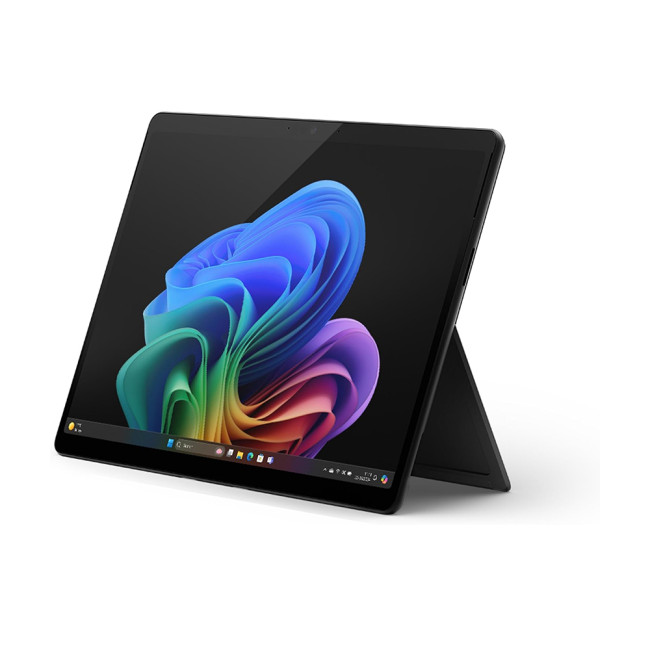
Highlights
- Qualcomm Snapdragon Processor
- LPDDR5X Memory
- 13" , OLED, 2880 x 1920 Max. Resolution
- 16 GB RAM
- 7029 mAh Battery Capacity
- USB4
- Black Colour
This high-end Surface Pro 11 Copilot+ model pairs Qualcomm’s more powerful Snapdragon X1E processor with a stunning 13-inch OLED display and a massive 1TB of storage. Everything about this device is premium, from the screen quality to the responsiveness to the sheer amount of space for files, apps, and creative projects.
The OLED panel takes Surface visuals to another level, making it ideal for creators, designers, and users who care deeply about display quality. Combined with AI-ready hardware and excellent battery life, this Surface feels less like a tablet and more like a next-generation laptop that just happens to detach.
Best for:
Creators, designers, premium users, long-term investment buyers
Surface Tablet Performance vs Android Tablets: The Honest Difference
This is where many buyers pause.
Android tablets - especially affordable ones, are brilliant for entertainment, casual apps, and light use. If that’s your priority, browsing affordable Android tablets makes sense.
But Surface tablet performance is built around productivity. Full desktop apps. Better file management. True multitasking. Keyboard-first workflows. It’s the difference between watching and doing.
That’s why Surface tablets are often chosen over Android when work or study enters the picture.
For buyers learning how to choose the best convertible tablets, including 2-in-1 laptops and touchscreen options, Surface offers a more natural tablet-first experience.
Who Should (and Shouldn’t) Buy a Microsoft Surface Tablet
Surface tablets aren’t for everyone and that’s okay.
You should buy a Surface if:
- You want a real laptop replacement
- You rely on Windows apps
- You value keyboard + pen workflows
- You want a premium but practical device
You might want something else if:
- You only stream and browse
- You want the cheapest tablet possible
- You’re deeply tied into Android apps
In those cases, Android tablets or budget Lenovo options may suit you better.
Microsoft Surface tablets continue to lead with best-in-class models, features, and performance designed specifically for Windows users.

Final Thoughts: Why Microsoft Surface Tablets Still Matter
In 2026, Microsoft Surface tablets continue to do something very few devices manage:
they make Windows feel right on a tablet.
They’re not the cheapest. They’re not the flashiest. But they’re reliable, polished, and designed for people who actually get things done. Whether you’re choosing between Surface Pro tablets, Surface Go tablets, or comparing across Windows touchscreen tablets, Surface remains the benchmark.

Quick Answers For Microsoft Surface Tablets
Are Microsoft Surface Tablets good laptop replacements?
Yes, Microsoft Surface Tablets are designed to replace traditional laptops for many users. Models like the Surface Pro tablets offer full Windows functionality, detachable keyboards, and strong multitasking performance, making them ideal for work, study, and creative tasks.
What is the difference between Surface Pro and Surface Go tablets?
The main difference is power and size. Surface Pro tablets are built for productivity and heavier workloads, while Surface Go tablets focus on portability and affordability. Both are Microsoft Surface 2-in-1 tablets, but the Pro series offers more performance and features.
Are Microsoft Surface Tablets worth the price in 2026?
For users who need a reliable Windows tablet, Surface devices are still worth the investment in 2026. While they cost more than affordable Android tablets, Surface tablets offer better productivity, full desktop apps, and longer usability, especially for students and professionals.
How does Surface tablet performance compare to other brands?
In any Microsoft Surface tablet comparison, Surface stands out for smooth performance and Windows optimisation. While brands like ASUS or Lenovo may offer more experimental hardware, Surface tablets deliver a more refined and consistent Windows experience.
Which Microsoft Surface Tablet should I buy?
The best choice depends on your needs. Surface Pro 11 models are ideal for power users and professionals, while Surface Go tablets suit students and casual users. If display quality and performance matter most, higher-end Surface Pro models with OLED screens are the best option.
Related Articles


Last Updated: April 06, 2026
We have gathered all the best Microsoft deals on laptops and tablets so you pay the lowest price on your favourite Surface device.
The Microsoft Surface line has high-performance devices ranging from the sleek 2-in-1 Surface Pro that combines a laptop's functionality with a tablet's convenience to the Surface Hub 2, an interactive office screen. Each device's hardware is of high quality and built to last longer.
Use coupon code 'LETSSURF' to enjoy savings of up to £100 on dedicated Microsoft Surface laptops at Laptop Outlet. The Microsoft Surface laptops available on Laptop Outlet are the most advanced and powerful laptops on the market. They feature stunning screens, an ultra-thin form factor, and powerful internals. Plus, the Surface Pen and optional Type Cover make staying productive on the go easy.
Whether you're a student, a business professional, or a tech enthusiast, our Microsoft Surface laptop deals have you covered. So why wait any longer? Explore our hottest deals

Last Updated: April 06, 2026
Although refurbished tablets cannot be compared to their brand-new counterparts for eye-catching style and multitasking power, they offer vibrant displays and long-lasting battery life, arguably the two essential features to look for when buying a tablet without breaking the bank.
In this guide, we'll explore the best refurbished tablets available. We have curated a list of the best refurbished tablets that combine affordability with excellent features. Whether you need a tablet for streaming, gaming, or productivity, there's a refurbished option tailored to your needs. Let's dive in and help you find your ideal tablet while keeping your wallet happy!
Microsoft Surface Pro 8: The Best 2-in-1 Tablet!
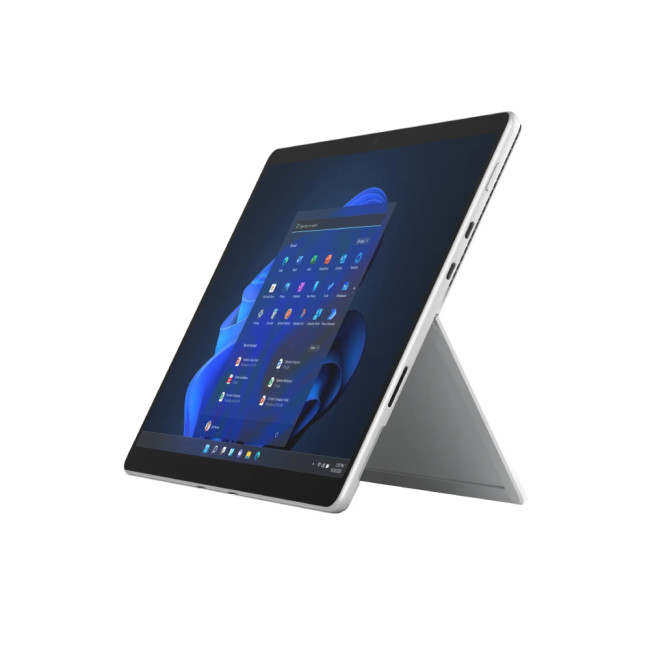
Specifications
- Intel Core i5 Processor
- LPDDR4x-SDRAM Memory
- 13 in Full HD Display, PixelSense, 2880 x 1920 Max. Resolution
- 8 GB RAM, 512 GB Storage
- 5 MP Front Camera
- Intel Iris Xe Graphics
- Windows 11 Home
- USB | Surface Connect
- Graphite Colour
- 1 Year Warranty

Last Updated: October 24, 2025
If you seek a new tablet but find the price tag too steep, a refurbished tablet is the next best thing. Buying a refurbished tablet can be a smart choice as it gives you the advantage of owning a fully functional tablet without breaking the bank.
The key is understanding what to look for and where to find a trustworthy option. To guide you through this process, we'll outline the essential information you need when buying a refurbished tablet.
What is a Refurbished Tablet?
First, let's discuss what a refurbished tablet is. The refurbished computer tablets refer to previously pre-owned tablets that have been restored to a like-new condition by either the manufacturer or a retailer before being resold at a reduced price. These devices come from various sources, such as customer returns, display models, or units with minor cosmetic flaws. What sets them apart is that they undergo a thorough inspection, necessary repairs, and testing to ensure they function just like a brand-new tablet.
Some
Last Updated: September 24, 2025
So, you've got yourself a refurbished tablet. Maybe it was a bargain deal, or you wanted to be more eco-friendly. Either way, buying refurbished is a smart choice! Refurbished tablets are durable and deliver the same functionality and excitement as new ones. However, as with other electronics, a refurbished device needs proper care and attention to operate smoothly for years.
Think of your tablet like a car. If you drive it recklessly and never service it, it won't last long. But if you take good care of it, it can keep going for decades. Let's talk about some simple ways to maintain refurbished tablets' performance, ensuring they remain as efficient and reliable as brand-new ones.
Keep It Clean
Tablets are magnets for fingerprints, dust, and bacteria. Over time, dirt can accumulate and affect the touchscreen's performance. Regular cleaning is essential for maintaining the longevity of your device.
- Use lint-free cloths to clean the screen and body when cleaning your tablet.
- Avoid harsh
Last Updated: October 02, 2025
A tablet is more portable than a laptop but has a larger screen than a smartphone, making it a worthwhile purchase for many individuals. However, you might be reluctant to spend much money on one unless it's your main productivity device. Opting for a refurbished tablet lets you enjoy premium features at a fraction of the cost. The key? Buying from a trusted retailer and knowing what to look for.
At Laptop Outlet, we've done the hard work for you by evaluating and enlisting the best refurbished tablets that offer performance, reliability, and value for money. Whether you need a budget-friendly device for streaming or a powerhouse for multitasking, we've something in these refurbished tablets review.
Why Choose Refurbished Tablets?
Before diving into specific models, it’s important to understand why refurbished tablets such a popular choice in 2025 is.
Cost Savings Without Compromise
Refurbished devices are priced significantly lower than brand-new counterparts. This makes it easier to
Last Updated: October 02, 2025
New gadgets come out every year, and it's easy to get caught up in the excitement of using brand-new technology. However, behind each new device is a hefty price tag and an unspoken environmental cost. Manufacturing new electronics like phones, tablets, and laptops requires a lot of energy and raw materials, and discarded electronics, e-waste contributes to the ultimate global waste crisis.
One simple way to reduce this impact is to think reconditioned or used. More and more consumers are using refurbished devices. Although the word "refurbished" may sound concerning to some, these devices have several benefits that make them an excellent choice for those looking to save money while being environmentally conscious.
In this article, we'll discuss the key advantages of buying reconditioned tablets and why they are a worthwhile consideration over brand-new alternative.
1. Significant Cost Savings
One of the biggest reasons people choose reconditioned tablets is the price reduction. Brand-new

Last Updated: April 02, 2026
Black Friday is nearly here, and if you’re hoping to pick up a reliable tablet without breaking the bank, this is the moment to start doing your homework. Every year, the market floods with “bargain” black Friday tablet deals under 250 pounds, and some are genuinely impressive, others barely worth unboxing. Knowing the difference can save you a lot of regret later.
This guide takes you through what to expect from a tablet in this price range, the standout models to look out for, and where Laptop Outlet fits into the picture with its Black Friday tablet deals.
What to Expect from a £250 Tablet in 2025

A few years ago, a £250 tablet meant a compromise on nearly every front. That’s no longer the case. Entry-level Android tablets have become much more capable, especially with MediaTek and Snapdragon mid-range chips powering smooth day-to-day use. At this price, you can expect decent performance for web browsing, streaming, social media, and light productivity tasks.
However, the specifications
Last Updated: December 08, 2025
Cyber Monday is here! It’s the perfect time to grab a fantastic deal on a new tablet, whether you need a simple device for streaming or a powerful machine to replace your laptop.
This year, Cyber Monday tablet deals are bigger than ever. With more people using tablets for work, learning, and entertainment, manufacturers have stepped up their game. You'll find great discounts on everything from high-end professional models to super-affordable budget picks.
Why a Tablet is a Smart Purchase This Cyber Monday
Tablets have become essential tools, bridging the gap between a smartphone and a laptop. They are brilliant for entertainment, perfect for students, and highly capable when paired with the right accessories.
- For Entertainment: A large, vibrant screen is ideal for catching up on your favourite shows. They're much more comfortable for long reading sessions than a phone.
- For Productivity: Add a keyboard case and a stylus, and suddenly your tablet transforms into a highly portable workstation.

Last Updated: December 05, 2025
Tablets are one of the most versatile and well-loved tech gifts you can give at Christmas. Lightweight, portable, and easy to use, they’re perfect for all ages - from kids who love educational games to adults who enjoy streaming, sketching, reading, or working on the go. With this year’s Christmas Tablet Deals, high-quality devices are more affordable than ever, making tablets and iPads a brilliant choice for anyone on your festive gift list.
Whether you're searching for a practical family device, a powerful tablet for a creative friend, or a budget-friendly option for a student, this guide will highlight the best tablets and iPads to gift this year, along with tips to help you choose the right one for every recipient.
Why Tablets Make the Perfect Christmas Gift
Gifting a tablet means giving someone a device they’ll use every single day. With a wide range of apps, entertainment options and productivity tools, tablets are more than just portable screens, they’re digital notebooks, drawing

Last Updated: December 31, 2025
New year, new goals, and the perfect new tablet to help you reach them. Whether you want to be more productive at work, excel in your studies, or simply enjoy better entertainment, the New Year tablet deals at Laptop Outlet are officially live.
This season, our New Year tech sale brings a massive shift in value, where "budget" no longer means "basic." From the latest iPads at great prices and cheap tablets running Android to the best Microsoft Surface tablet PC deals, there has never been a better time to upgrade.
If you have been waiting for the right moment to grab a bargain, your wait ends here.
Top New Year Tablet Deals for 2026
We have curated a list of the top six tablets available right now. These devices represent the best balance of price, performance, and features.
1. TCL NXTPAPER 11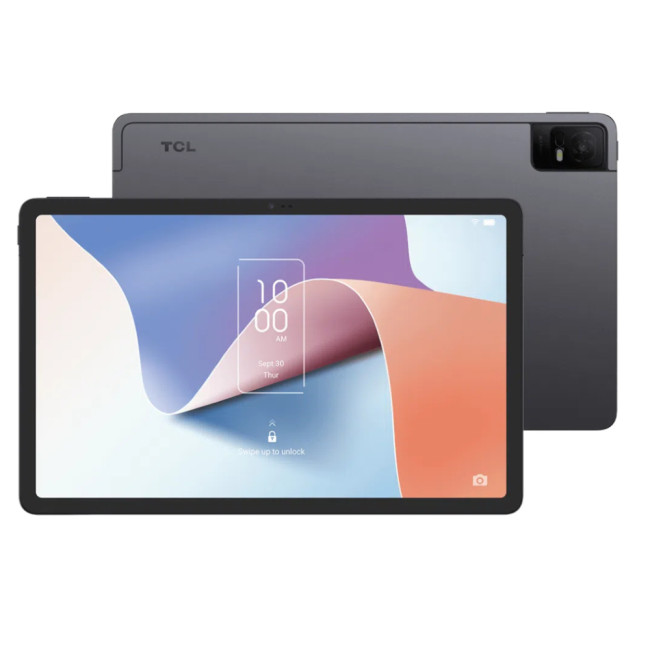
- Processor: MediaTek Helio P60T Octa-core
- Memory: 4GB RAM
- Storage: 128GB
- Display: 10.9-inch 2K (2000 x 1200) NXTPAPER 2.0 Technology
- Graphics: PowerVR GE8320
- Cameras: 8MP Rear, 8MP Front

