



How to Measure Tablet Screen Size Accurately for Any Tablet

Choosing the right tablet starts with understanding its screen size, yet many buyers misunderstand what tablet screen size actually means. If you’ve ever wondered how to measure tablet screen size properly, you’re not alone. Whether you’re comparing 7 inch tablets, 8 inch tablets, or larger 10, 11, and 12 inch tablets, knowing how screen sizes are measured will help you make a confident buying decision.
In this comprehensive UK guide, we’ll explain exactly how tablet screen size is measured, what the numbers really represent, how to measure your own tablet at home, and how different tablet sizes compare in real-world use. By the end, you’ll be able to choose the right tablet size for your needs, without confusion.
What Does Tablet Screen Size Actually Mean?
Tablet screen size refers to the diagonal measurement of the display, taken from one corner of the screen to the opposite corner. This measurement is always expressed in inches, which is why you’ll see categories such as 7 inch tablets, 8 inch tablets, and 10 inch tablets.
Importantly, tablet screen size:
- Does not include bezels
- Does not reflect the tablet’s full physical size
- Is the same measurement method used across all brands
This standardised method allows consumers to compare tablets easily, even if the overall body dimensions differ between models.
Why Knowing How to Measure Tablet Screen Size Matters
Understanding how to measure tablet screen size is useful in several situations:
- Comparing tablets across different brands
- Buying screen protectors or cases
- Choosing the right size for work, entertainment, or travel
- Understanding comfort, portability, and usability
For example, a 7 inch tablet is far more compact and portable than a 12 inch tablet, even though the numerical difference may not seem large at first glance.
How to Measure Tablet Screen Size Step by Step

If you want to measure a tablet yourself, follow these simple steps.
Step 1: Turn Off the Tablet
Switch off the tablet or ensure the screen is black so the display edges are clearly visible.
Step 2: Identify the Screen Corners
Only measure the active display area, not the bezels or outer frame.
Step 3: Measure Diagonally
Using a ruler or tape measure, measure from:
- Bottom-left corner of the screen
- To the top-right corner of the screen
(or vice versa)
Step 4: Convert to Inches if Needed
If you measure in centimetres, divide by 2.54 to convert to inches.
This diagonal measurement is the official tablet screen size.
Common Mistakes When Measuring Tablet Screen Size
Many people incorrectly measure tablets by:
- Measuring the width or height instead of diagonally
- Including bezels
- Measuring the full device body
These errors can make a tablet seem larger than it really is. Always measure corner to corner across the screen only for accuracy.
Tablet Screen Size vs Physical Dimensions

One of the most confusing aspects of tablet buying is the difference between screen size and physical size.
Two tablets can both be labelled as 10-inch tablets, yet:
- One may have thinner bezels
- One may be taller or wider
- One may feel larger in hand
This is why screen-to-body ratio and aspect ratio also matter.
Understanding Aspect Ratio and Display Shape

Tablet screens come in different aspect ratios, which affect how content appears.
Common aspect ratios include:
- 16:10 – popular for Android tablets
- 4:3 – common for productivity and reading
- 3:2 – often used in premium tablets
A 10 inch tablet with a 4:3 aspect ratio may feel squarer, while a 16:10 tablet feels wider even though the diagonal measurement is the same.
Tablet Size Categories Explained
Now that you understand how to measure tablet screen size, let’s break down the most common tablet sizes and what they’re best for.
7 Inch Tablets – Ultra Portable and Lightweight
7 inch tablets are among the most compact options available. Their small size makes them easy to hold with one hand and ideal for basic tasks.
Best uses for 7 inch tablets:
- Reading eBooks
- Casual browsing
- Children’s use
- Travel and commuting
8 Inch Tablets – The Balanced Middle Ground
8 inch tablets strike a balance between portability and usability. They offer more screen space than 7 inch tablets while remaining compact enough for everyday use.
Best uses for 8 inch tablets:
- Web browsing
- Streaming
- Light productivity
- Note-taking
Recommended:
Apple iPad Mini A2993 (A17 Pro, 128GB, 8.3" Wi-Fi)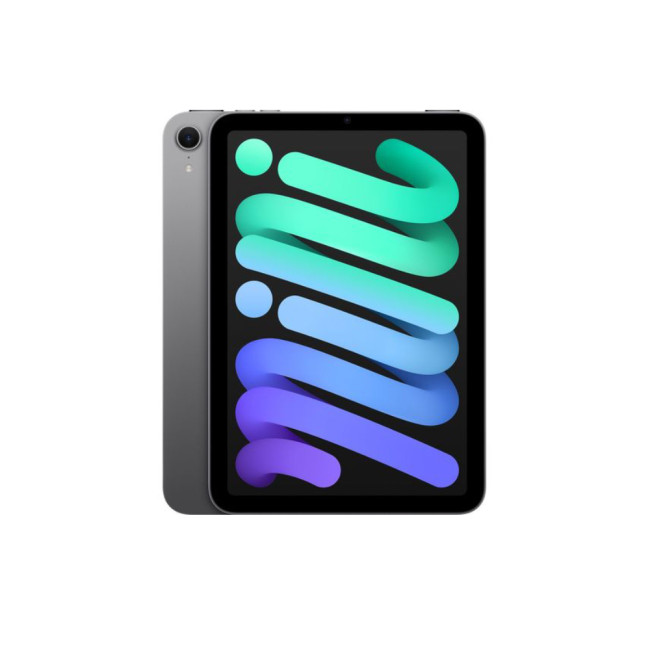
Highlights:
- Hexa Core Processor
- 8.3 in Liquid Retina Display, 2266 x 1488 Max. Resolution
- 128 GB Storage
- 12 MP Front Camera
- 5-Core Graphics
- USB-C
- Space Grey Colour
- 1 Year Warranty
- MXN63NF/A
The Apple iPad Mini (8.3-inch) is an excellent real-world example of how tablet screen size is measured and experienced. Although commonly grouped with 8 inch tablets, its 8.3-inch diagonal display highlights why precise measurement matters - even a small increase can noticeably improve usability.
Measured diagonally from corner to corner, the 8.3-inch display offers more screen space than traditional 8 inch tablets while remaining compact and easy to hold with one hand. This makes it ideal for users who want portability without sacrificing clarity.
Powered by the A17 Pro chip, this tablet delivers exceptional performance in a small form factor. The high-resolution display ensures text and images remain sharp, which is especially noticeable on a smaller screen size.
Why this tablet is a great size reference:
- Demonstrates how diagonal measurement defines tablet size
- Compact body with a slightly larger usable screen
- Ideal for reading, note-taking, and travel
This model clearly shows how an 8 inch tablet can feel spacious while remaining ultra-portable.
10 Inch Tablets – The Most Popular Size
10 inch tablets are widely considered the standard size for modern tablets. They offer ample screen space without becoming too bulky.
Best uses for 10 inch tablets:
- Work and productivity
- Streaming and gaming
- Video calls
- Keyboard accessories
Recommended:
Acer Iconia M10-11 (MediaTek MT8183, 4GB RAM, 128GB Storage)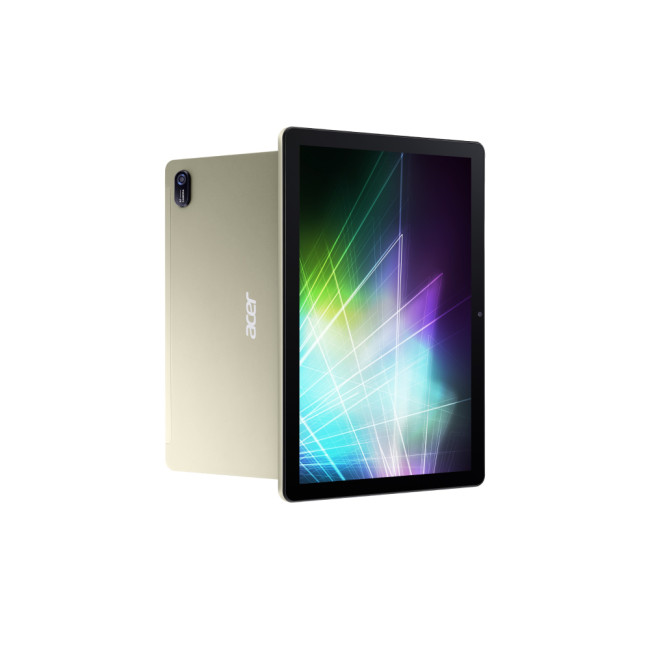
Highlight:
- MediaTek MT8183 Processor
- DDR4-SDRAM Memory
- 10.1" WUXGA Display, IPS, 1920 x 1200 Max. Resolution
- 4 GB RAM, 128 GB Storage
- 8 MP Front Camera
- 22.8 Wh Battery Capacity
- USB-C
- Champagne Colour
- 1 Year Warranty
- NT.LFUEE.001
The Acer Iconia M10-11 is a classic example of a 10 inch tablet, featuring a 10.1-inch screen measured diagonally. This size is widely considered the standard for tablets, offering a strong balance between portability and screen space.
When measured correctly from corner to corner, the 10.1-inch display provides noticeably more room than 8 inch tablets, making it more comfortable for watching videos, browsing the web, and light productivity tasks. It also demonstrates how a relatively small increase in diagonal measurement can significantly impact usability.
With its lightweight design and generous screen size, this tablet helps users understand why 10 inch tablets are often recommended for everyday use.
Why this tablet is a good size example:
- Clearly illustrates standard 10 inch tablet measurements
- Comfortable viewing area without becoming bulky
- Ideal for media consumption and casual productivity
This makes the Acer Iconia M10-11 a practical reference point when learning how to measure tablet screen size accurately.
11 Inch Tablets – More Space for Productivity
11 inch tablets provide a noticeable upgrade in screen real estate. They’re ideal for users who multitask or work with documents regularly.
Best uses for 11 inch tablets:
- Split-screen multitasking
- Office work
- Digital drawing
- Media consumption
Recommended:
Lenovo Tab K11 4G (MediaTek G88, 8GB RAM, 128GB Storage)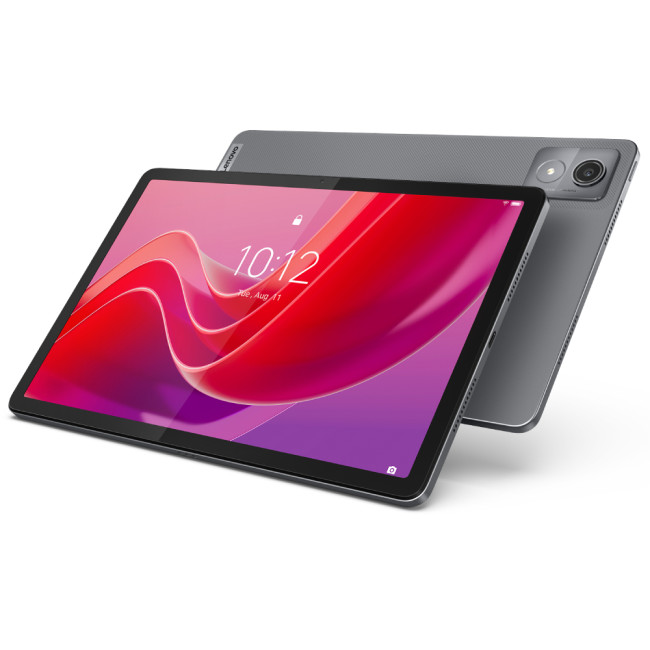
Highlights:
- 11" WUXGA Display, IPS, 1920 x 1200 Max. Resolution
- 8 GB RAM, 128 GB Storage
- 8 MP Front Camera
- 7040 mAh Battery Capacity
- USB-C | Pogo Pin Docking Connector | Audio in/out |
- Grey Colour
- 1 Year Warranty
- ZADK0093GB
The Lenovo Tab K11 is a strong example of an 11 inch tablet, offering a noticeable step up in screen size compared to 10 inch models. Its 11-inch WUXGA display is measured diagonally, following the same standard method used across all tablets.
An 11-inch screen provides additional vertical and horizontal space, which is particularly useful for split-screen multitasking, document reading, and video calls. When measured correctly, users can clearly see how the extra diagonal length translates into improved productivity.
This tablet also highlights how aspect ratio and bezel size can influence how large an 11 inch tablet feels in everyday use.
Why this tablet is a useful size reference:
- Demonstrates the jump from 10 to 11 inches clearly
- Ideal for multitasking and work-related tasks
- Larger screen without moving into laptop-sized territory
It’s a great example for readers comparing 10 inch tablets vs 11 inch tablets.
12 Inch Tablets – Laptop-Level Experience
12 inch tablets sit at the top end of the size spectrum. They’re often designed as laptop replacements with keyboard and stylus support.
Best uses for 12 inch tablets:
- Professional work
- Creative tasks
- Spreadsheet editing
- Desktop-style multitasking
Recommended:
Honor MagicPad 2 (Snapdragon 8s Gen 3, 12GB RAM, 256GB Storage)
Highlights:
- Qualcomm Snapdragon Processor
- 12.3 in , OLED, 3000 x 1920 Max. Resolution
- 12 GB RAM, 256 GB Storage
- 9 MP Front Camera
- Adreno Graphics
- 10050 mAh Battery Capacity
- USB-C
- Black Colour
- 2 Years Warranty
- 5301AKHY
The Honor MagicPad 2 is a premium example of a 12 inch tablet, featuring a large 12.3-inch display measured diagonally. This size sits at the upper end of the tablet spectrum and is often chosen by users looking for a laptop-like experience.
When measuring tablet screen size, this model clearly shows how diagonal measurement scales - the jump from 11 inches to 12.3 inches results in a significantly larger viewing area. This makes it ideal for multitasking, creative work, and professional use.
Despite its large screen, the tablet maintains a slim profile, showing how modern design can maximise screen size without excessive bulk.
Why this tablet is an excellent size example:
- Clearly demonstrates how 12 inch tablets are measured
- Large display ideal for productivity and creative tasks
- Highlights the difference between tablet and laptop-sized screens
This tablet is perfect for readers trying to visualise what a 12 inch tablet really feels like in real-world use.
Tablet Screen Size Comparison Table
|
TABLET SIZE |
PORTABILITY |
PRODUCTIVITY |
BEST FOR |
|
7 inch |
Very High |
Low |
Reading, travel |
|
8 inch |
High |
Medium |
Browsing, media |
|
10 inch |
Medium |
High |
Work & entertainment |
|
11 inch |
Medium |
Very High |
Multitasking |
|
12 inch |
Low |
Maximum |
Laptop replacement |
How Tablet Screen Size Affects Everyday Use
Choosing the correct tablet size impacts:
- Typing comfort
- Viewing distance
- Weight and fatigue
- Accessory compatibility
Smaller tablets excel in portability, while larger tablets shine in productivity and content creation.
Screen Size vs Resolution – What’s the Difference?
Screen size tells you how big the display is.
Resolution tells you how sharp it looks.
A smaller tablet with a high resolution can appear sharper than a larger tablet with a lower resolution. Always consider both when choosing a device.
Measuring Tablet Screen Size for Accessories
Knowing how to measure tablet screen size is essential when buying:
- Screen protectors
- Cases
- Keyboard covers
Accessories are designed specifically for diagonal screen measurements, not device dimensions.

Final Thoughts: How to Measure Tablet Screen Size Correctly
Understanding how to measure tablet screen size helps you choose the right device, avoid buying the wrong accessories, and compare tablets accurately. Always remember:
- Measure diagonally
- Measure screen only
- Ignore bezels and body size
Whether you’re looking at 7 inch tablets, 8 inch tablets, or larger 10, 11, and 12 inch tablets, knowing what those numbers mean makes tablet shopping far simpler.
To explore all available options, browse the full range of Tablets and find the perfect size for your needs.

Quick Answers To Measuring Tablet Screen Size
How do I measure tablet screen size accurately?
Tablet screen size is measured diagonally from one corner of the display to the opposite corner, excluding the bezels.
Why is tablet screen size measured diagonally?
Measuring diagonally provides a standard method that makes it easier to compare tablets of different shapes and brands.
Is an 8.3-inch tablet the same as an8 inchtablet?
An 8.3-inch tablet is slightly larger than a standard 8 inch tablet, but both are measured using the same diagonal screen method.
Does tablet screen size include the bezel?
No, tablet screen size only includes the active display area and does not include the bezel or outer frame.
Which tablet size is best for everyday use?
For most users,10 or 11 inch tablets offer the best balance between screen space, comfort, and portability.
Related Articles


Last Updated: October 24, 2025
If you seek a new tablet but find the price tag too steep, a refurbished tablet is the next best thing. Buying a refurbished tablet can be a smart choice as it gives you the advantage of owning a fully functional tablet without breaking the bank.
The key is understanding what to look for and where to find a trustworthy option. To guide you through this process, we'll outline the essential information you need when buying a refurbished tablet.
What is a Refurbished Tablet?
First, let's discuss what a refurbished tablet is. The refurbished computer tablets refer to previously pre-owned tablets that have been restored to a like-new condition by either the manufacturer or a retailer before being resold at a reduced price. These devices come from various sources, such as customer returns, display models, or units with minor cosmetic flaws. What sets them apart is that they undergo a thorough inspection, necessary repairs, and testing to ensure they function just like a brand-new tablet.
Some

Last Updated: September 24, 2025
So, you've got yourself a refurbished tablet. Maybe it was a bargain deal, or you wanted to be more eco-friendly. Either way, buying refurbished is a smart choice! Refurbished tablets are durable and deliver the same functionality and excitement as new ones. However, as with other electronics, a refurbished device needs proper care and attention to operate smoothly for years.
Think of your tablet like a car. If you drive it recklessly and never service it, it won't last long. But if you take good care of it, it can keep going for decades. Let's talk about some simple ways to maintain refurbished tablets' performance, ensuring they remain as efficient and reliable as brand-new ones.
Keep It Clean
Tablets are magnets for fingerprints, dust, and bacteria. Over time, dirt can accumulate and affect the touchscreen's performance. Regular cleaning is essential for maintaining the longevity of your device.
- Use lint-free cloths to clean the screen and body when cleaning your tablet.
- Avoid harsh
Last Updated: October 02, 2025
A tablet is more portable than a laptop but has a larger screen than a smartphone, making it a worthwhile purchase for many individuals. However, you might be reluctant to spend much money on one unless it's your main productivity device. Opting for a refurbished tablet lets you enjoy premium features at a fraction of the cost. The key? Buying from a trusted retailer and knowing what to look for.
At Laptop Outlet, we've done the hard work for you by evaluating and enlisting the best refurbished tablets that offer performance, reliability, and value for money. Whether you need a budget-friendly device for streaming or a powerhouse for multitasking, we've something in these refurbished tablets review.
Why Choose Refurbished Tablets?
Before diving into specific models, it’s important to understand why refurbished tablets such a popular choice in 2025 is.
Cost Savings Without Compromise
Refurbished devices are priced significantly lower than brand-new counterparts. This makes it easier to
Last Updated: October 02, 2025
New gadgets come out every year, and it's easy to get caught up in the excitement of using brand-new technology. However, behind each new device is a hefty price tag and an unspoken environmental cost. Manufacturing new electronics like phones, tablets, and laptops requires a lot of energy and raw materials, and discarded electronics, e-waste contributes to the ultimate global waste crisis.
One simple way to reduce this impact is to think reconditioned or used. More and more consumers are using refurbished devices. Although the word "refurbished" may sound concerning to some, these devices have several benefits that make them an excellent choice for those looking to save money while being environmentally conscious.
In this article, we'll discuss the key advantages of buying reconditioned tablets and why they are a worthwhile consideration over brand-new alternative.
1. Significant Cost Savings
One of the biggest reasons people choose reconditioned tablets is the price reduction. Brand-new

Last Updated: October 22, 2025
Tablet Frozen? It’s Time to Reboot
Your Samsung tablet acting up? Maybe it’s frozen, lagging, or just being plain weird? A reboot can fix a lot of issues fast. Whether you’re doing a quick restart or a hard reset, here’s how to reboot your Samsung tablet the right way—without losing your mind.
How to Do a Soft Reboot (Quick Restart)
This is the easiest and safest way to refresh your tablet without losing any data.
Steps:
- Press and hold the Power button (or Power + Volume Down, depending on model).
- When the Power menu appears, tap Restart.
- Wait for your tablet to turn off and reboot automatically.
Pro Tip: This method works when your screen is responsive and not frozen.
How to Force Restart a Samsung Tablet (If It’s Frozen)
If your tablet is completely unresponsive, try a force reboot:
Steps:
- Press and hold the Power + Volume Down buttons at the same time.
- Hold for around 10-15 seconds until the device vibrates or restarts.
- Release the buttons when you see the
Last Updated: September 19, 2025
Tired of the steep price tags that tablets usually carry? Worry not—these best budget tablets are the perfect solution.
Whether you're after a versatile entertainment device, a productivity companion, or a compact screen for on-the-go browsing, the best budget tablets prove that quality doesn’t have to come at a premium. And with such a wide range available, finding the right one to suit your needs is simple and hassle-free.
From affordable refurbished iPads to the reliable Lenovo tablet range and feature-packed Samsung tablets, it’s clear that affordable doesn’t mean underpowered. With budget-friendly refurbished iPads, Apple fans can enjoy sleek design, premium build quality, and the powerful iPadOS experience, all at a fraction of the original cost. Meanwhile, top Android tablets offer stunning displays, long-lasting battery life, and smooth performance without breaking the bank.
Android users also have plenty of choice when it comes to size—be it a compact 8 inch tablet, a travel-ready

Last Updated: April 02, 2026
Black Friday is nearly here, and if you’re hoping to pick up a reliable tablet without breaking the bank, this is the moment to start doing your homework. Every year, the market floods with “bargain” black Friday tablet deals under 250 pounds, and some are genuinely impressive, others barely worth unboxing. Knowing the difference can save you a lot of regret later.
This guide takes you through what to expect from a tablet in this price range, the standout models to look out for, and where Laptop Outlet fits into the picture with its Black Friday tablet deals.
What to Expect from a £250 Tablet in 2025

A few years ago, a £250 tablet meant a compromise on nearly every front. That’s no longer the case. Entry-level Android tablets have become much more capable, especially with MediaTek and Snapdragon mid-range chips powering smooth day-to-day use. At this price, you can expect decent performance for web browsing, streaming, social media, and light productivity tasks.
However, the specifications
Last Updated: December 08, 2025
Cyber Monday is here! It’s the perfect time to grab a fantastic deal on a new tablet, whether you need a simple device for streaming or a powerful machine to replace your laptop.
This year, Cyber Monday tablet deals are bigger than ever. With more people using tablets for work, learning, and entertainment, manufacturers have stepped up their game. You'll find great discounts on everything from high-end professional models to super-affordable budget picks.
Why a Tablet is a Smart Purchase This Cyber Monday
Tablets have become essential tools, bridging the gap between a smartphone and a laptop. They are brilliant for entertainment, perfect for students, and highly capable when paired with the right accessories.
- For Entertainment: A large, vibrant screen is ideal for catching up on your favourite shows. They're much more comfortable for long reading sessions than a phone.
- For Productivity: Add a keyboard case and a stylus, and suddenly your tablet transforms into a highly portable workstation.

Last Updated: December 05, 2025
Tablets are one of the most versatile and well-loved tech gifts you can give at Christmas. Lightweight, portable, and easy to use, they’re perfect for all ages - from kids who love educational games to adults who enjoy streaming, sketching, reading, or working on the go. With this year’s Christmas Tablet Deals, high-quality devices are more affordable than ever, making tablets and iPads a brilliant choice for anyone on your festive gift list.
Whether you're searching for a practical family device, a powerful tablet for a creative friend, or a budget-friendly option for a student, this guide will highlight the best tablets and iPads to gift this year, along with tips to help you choose the right one for every recipient.
Why Tablets Make the Perfect Christmas Gift
Gifting a tablet means giving someone a device they’ll use every single day. With a wide range of apps, entertainment options and productivity tools, tablets are more than just portable screens, they’re digital notebooks, drawing

Last Updated: December 31, 2025
New year, new goals, and the perfect new tablet to help you reach them. Whether you want to be more productive at work, excel in your studies, or simply enjoy better entertainment, the New Year tablet deals at Laptop Outlet are officially live.
This season, our New Year tech sale brings a massive shift in value, where "budget" no longer means "basic." From the latest iPads at great prices and cheap tablets running Android to the best Microsoft Surface tablet PC deals, there has never been a better time to upgrade.
If you have been waiting for the right moment to grab a bargain, your wait ends here.
Top New Year Tablet Deals for 2026
We have curated a list of the top six tablets available right now. These devices represent the best balance of price, performance, and features.
1. TCL NXTPAPER 11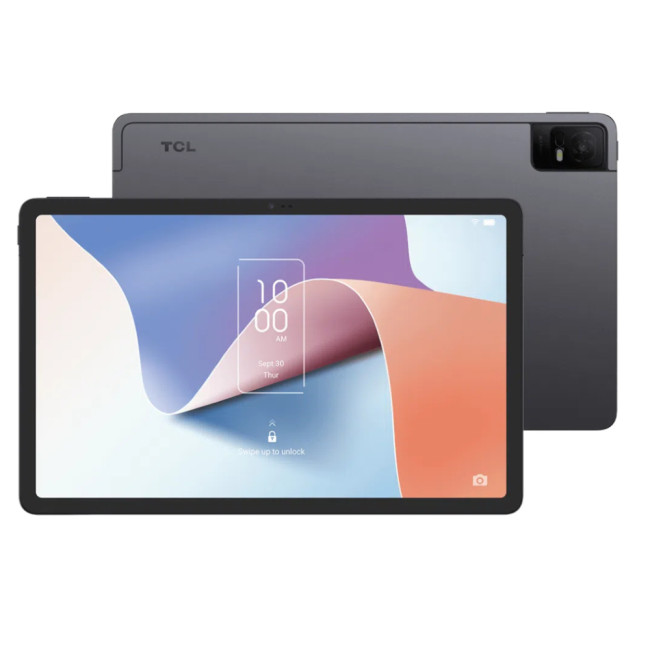
- Processor: MediaTek Helio P60T Octa-core
- Memory: 4GB RAM
- Storage: 128GB
- Display: 10.9-inch 2K (2000 x 1200) NXTPAPER 2.0 Technology
- Graphics: PowerVR GE8320
- Cameras: 8MP Rear, 8MP Front

