



Dell OptiPlex 7050 MFF Desktop PC Intel Core i7 – Review
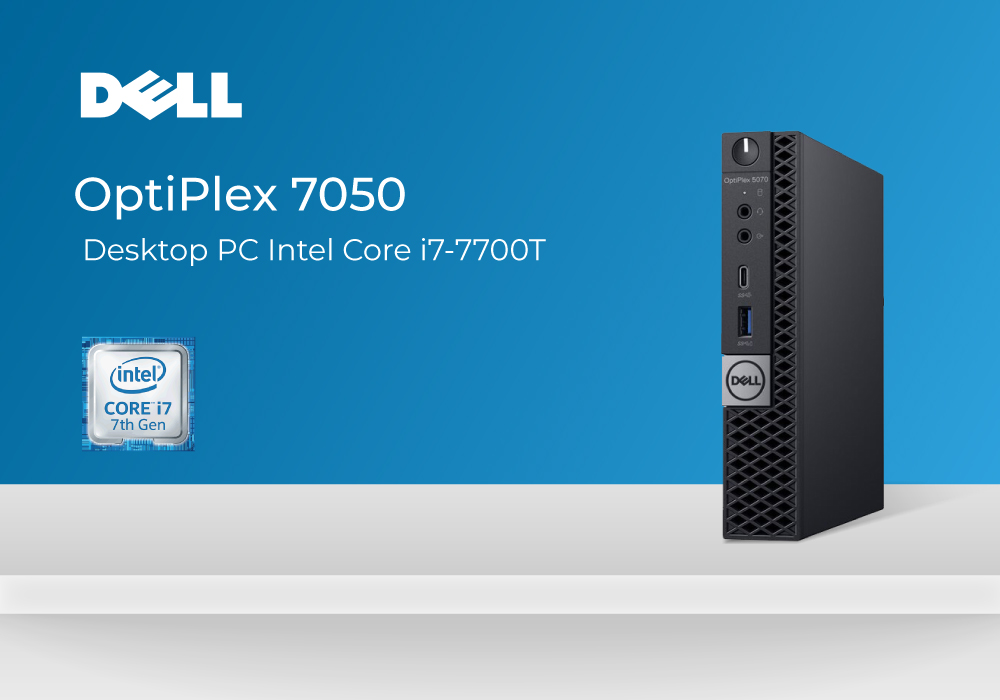
Dell OptiPlex conveys miniature style with a plentiful of power, owing to its rock-solid specs and extra features. The trimmed build of this Dell Desktop PC makes it one of the most convenient PCs in the tech space, while the performance of it matches the heavier powerful systems. To put in simple words, Dell makes sure of letting the OptiPlex contain maximum power within its compact build.
This perfectly sized Dell PC comes powered with the latest Intel Core i7 and advanced storage options, which validates the fact that you aren’t going to have issues in managing several files. Consequently, this one also provides better upgradability options and allows you to insert the desirable components in the hardware, without any fuss.
To dig a little deeper into the specs and overall features of this PC, you must read on our Dell OptiPlex 7050 review.
Specs List
- 7th Gen - Intel Core i7 Processor | 2.90GHz
- 16GB RAM
- Integrated/On-Board Graphics
- Windows 10 OS
- 128GB SSD
- USB 3.1, HDMI
- Weight: 1.17 kg
- DVD/RW drive
Design & Casing
Most of the users expect PCs to always be bigger in size and power. But if you haven’t still seen or used the one which is tiny in size but bigger in power, the Dell Optilex 7050 is the one. You get a sleek, long, and slim build with Dell OptiPlex 7050 in classic black colour theme with red stripe contrast on the front. The measurement of this PC follows around the width of 3.6 cm, depth of 17.8 cm and height of 18.2 cm. This makes it one of the thinnest PCs, however the ports selection included in this PC are sufficiently enough for modern use.
Keeping in mind the space-saving design of this PC, its great for corporations and office setups that need several PCs to set up easily with aligned desks. Additionally, the PC weighs just around 2.9 pounds, making itself portable to move around easily for any work setup. The material structure is made with reinforced metal, hence making it sturdier for accidental drops.
The small-form-factor (SFF) PCs are always good to have in your desk space for lesser hurdle or any hassle. There is also a removable side panel which allows inserting or adding up several upgradations without much of a physical work. You can easily put up the slots just through the sliding wall and remove it any time you need.
Performance – RAM, SSD, Core i7 & Graphics
To say the least, the Dell OptiPlex 7050 is made to manage multiple files, data, hefty programs, or applications, without any gaps. It features the 7th Gen Intel Core i7 processor that takes up any task you throw at it with modest speed. The base speed of the processor takes off with the 2.90 GHz and can go up to the maximum turbo speed of 3.8 GHz. While you run several tabs on Google Chrome for regular surfing, you can inevitably run heavy programs or applications all along it.
The RAM inserted in this PC is massive, and one could totally perform any multitasking without a second thought. You get 16GB RAM and that too with a solid-state drive storage of 128GB. If you need a larger storage, you have easy upgradable options for enhancing your storage. However, as per the SSD storage, you are already getting an adequate choice for storing, downloading, and executing couple of files every day.
The GPU integrated in this Dell PC is the on-board/ Integrated graphics, for decent visuals and nice graphics. Although, the dedicated graphics are always the better option, the Intel’s Integrated graphics acts enough for daily computing or work files. In case you are a multimedia professional or creative user, you can upgrade the graphics and insert the NVIDIA one, easily.
Ports
All the ports that are inserted on to the Dell OptiPlex 7050 are majorly on the front and there are no shortages made with them according to the size dimensions. The power button can be seen on the top spot, while all ports below include 2 USB 3.0 ports, 3 USB 3.1 ports, universal audio jack, a display port and Wired NIC. You also get the DVD/RW drive which is attached up-front, allowing you to share and watch data as easily as you can.
Verdict
The Dell OptiPlex 7050 makes itself stand in the list of sufficiently powerful small-form-factor PCs. From its core i7 processor speed, SSD convenience and massive RAM, one thing you are sure of is a reliable and durable overall execution. The highlighting factor of this device stays to be its smaller design and more upgradable options in this size and style. One more amazing factor about this desktop PC is its affordable price tag, which enable budget buyers to buy Dell OptiPlex 7050 in budget-friendly cost.
Read more:
| Why choose a Refurbished Desktop? |
| Choosing the Right Thin Client Desktop PC: Factors to Consider |
| How to Connect Two Monitors to a Laptop? |
Related Articles

Last Updated: September 22, 2026
Last Updated: March 30, 2026
Last Updated: September 09, 2025
The modern technology era is filled with a significant number of brands and latest products. Brands like Lenovo, HP and Dell are unquestionably the first ones to come in mind when you think of buying a new product. Whether its laptops, desktop PCs or accessories, you can count on these leading manufacturers.
There are number of work requirements and digital routines to follow when you need to use laptops or computers. Some are professionals who have to perform technical tasks while others are businessmen who aim to manage multiple projects through their device. On the other side, some casual users also need their devices for basic computing and average surfing. Another prominent field of using desktop PCS or laptops is ‘Gaming’ that requires good amount of loading and power. For each of these requirements, choosing a good brand can play a vital role in how your device is going to perform.
Even if you are very sure of the specs and features you need from your device, you may not be
Last Updated: July 01, 2025
The Dell XPS laptops-range has earned a great popularity among users in the past few years. And there are many valid reasons behind this astonishing success. Dell XPS laptops have been attracted a lot of customers due to their ultra-portable body, reasonable battery, and a pocket friendly price tag.
Coming to the Dell XPS 13, it is another wonderful edition onto the famous Dell XPS laptops line up. Dell XPS is offering you several top-notch features in a mid-range budget bracket. Let’s explore the various state-of-the art features that Dell XPS 13 has for you.
Design and Display
The first impression that you perceive of Dell XPS 13 laptop is mesmerising. XPS 13 features an eye-catchy and business look like metal body. A weight of 2.91 pounds and a compact shape body are enough to make this Dell XPS 13 one of the most portable laptop available on the commercial stores.
To deliver you an immersive visual experience, Dell XPS 13 features a 13.4” large and FHD (Full High Definition)
Last Updated: July 01, 2025
The Microsoft owned Windows platform is one of the most popular operating systems, holding a whopping 76% market share as for November 2022. Windows has achieved this much popularity by targeting normal everyday users who mainly prefer a platform providing productivity-packed tools rather than targeting security.
On the other hand, Dell is one of the largest technology brands and counts for more than 18% of global PC shipments. Dell laptops are specifically popular for providing reliable and long-lasting performance at quite affordable price tags. While the icing on the cake is the excellent customer support which Dell always provides for its customers.
Top Dell Laptops with Windows 10
If you are looking for a laptop to cater to your day-to-day tasks without costing you a hefty amount of money, then a Dell laptop with Windows 10 OS is one of the best options to go for. Dell Windows laptops come packed with a range of state-of-the-art features to elevate your user experience.
Let’s
Last Updated: April 03, 2026
Are you looking for power and durability packed in a single device? Fortunately, this article has got you covered!
Whether you are a student taking your laptop on the bus or an engineer who uses a computer in a construction site, it is crucial to have a laptop that can handle this all efficiently and effectively. Not every computer is designed to withstand extreme temperatures, dust, water, drops, and daily bumps. Thankfully, many laptop brands, such as Dell, have started to pass their devices against military durability standards.
These laptops are slim, lightweight, and designed to stay productive during the worst environments, including extreme weather, accidents, spills, rain, spray, dust, and dirt.
The endurance and capability of Dell rugged laptops make them a top-notch choice for every type of user, like hospital workers, first responders, armed forces, industrial workers, farm workers, and industry workers.
So, to help you decide , we have tested and reviewed the best

