



Lenovo Tab M10 Plus 10.3" Tablet with Smart Charging - Review
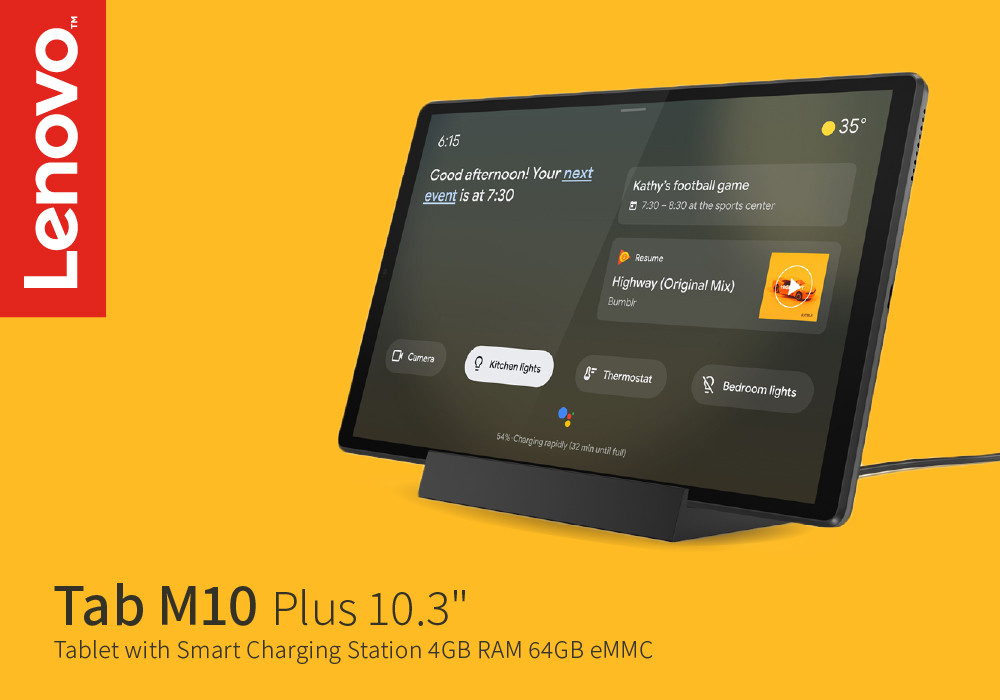
The Lenovo Tab M10 Plus is one device that strikes with its appearance, attractive colors, and an overall engaging build. You can be certain after you buy it and use it just like any other tablet performing regular tasks. The first impressions of this device are pretty good considering a slim, matte grey appearance and engaging display.
This tablet although has to offer a few unique features that other of its competitors might not contain. However, in some factors like battery or speed, it may lack behind a little when compared to its rivals. The Google Assistant Ambient mode in Lenovo M10 is an interesting feature that lets your display turn into a smart display.
This Lenovo tab is surely a powered device that nurtures a smooth flow in day to day tasks, regardless of minor casual slowdowns. In our Lenovo Tab M10 Plus review today, we are going to underline important specs and let our audience know how well they can perform.
Specs
- Octa Core Processor - 2.30 GHz
- 10.3-inch FHD Screen
- 4 GB RAM
- Android
- 64 GB Storage
The M10 Plus Display
The display of the M10 was the most intriguing feature of the tablet. It comes with a 10.3-inch screen with a Full HD panel, making it a good-quality screen for movies and games. The 1920 x 1200 pixel resolution of the display is nicer to watch HD seasons on Netflix and Youtube videos. The 87% screen-to-body ratio of the screen is pleasantly enough for viewing enjoyable visuals.
The 99% of sRGB color gamut has this screen for a much colorful display and vivid, bright colors on your screen. Whether or not you are fond of displays, the screen of this Lenovo Tab is rather fun to have watched. Well, when we tested the brightness level of the M10 Plus, the maximum brightness it could reach was up to 322 nits. It’s not amazing, but not lesser for a tablet.
Performance factor
The MediaTek Helo processor equipped in the Lenovo Tab M10 Plus does not have the best processing speed in the range of Android tablets. However, it justifies the price factor and plays a good role in running everyday tasks without any major delay. With a 2.6 GHz speed, you are able to fetch usage from regular applications or programs.
The 4 GB RAM is good enough for tablets, and this RAM in this Tab combines with the 64GB storage to provide its users a decent practice. Multitasking is not as smooth as one would imagine but have said that you can still multitask in a limited way.
The Design & Look
To call a tablet sexy might not be what you could expect when it should be technically spoken of. But with Lenovo M10, we couldn’t hold back calling it sexier with its slimmer bezels.
The M10 is built in a way that makes the audience look at it right away when someone is holding it. Apart from the top and bottom slimmest bezels, the metal body with rounded edges keeps the overall device minimal to be packed in a backpack. Whatever the size of your bag is, this tab will most definitely fit your backpacks or side bags owing to its well-contained size.
The back cover of M10 is majorly comprised of aluminum with a slate-grey look that makes it even more appealing. You do not get a cheap vibe when you handle this tablet and use it all along. So, even in a price that is budget-friendly, the M10 gives a somewhat premium feel to hold it.
Battery
Well, the battery of the Lenovo M10 Plus doesn’t quite hold the dilemma of the best battery ever. It is quite below-average according to our experimentation. The Tab was able to last lesser than a day, which means it’s decent for regular all-day usage. However, the 5000 mAH battery is lesser than the usual tab batteries that usually surround between 6000 to 7000 mAH.
Verdict
Following the overview of the specs, the Lenovo M10 Plus seems like a good overall device on the paper. However, the real analysis cleared out some factors on how great the performance and other features are.
The most we liked was a good quality display, a classy exterior, and decent memory. The performance is mediocre, not more, not less and you can perform everyday tasks like any other. This tab comes in a perfect budget for students, young digital users, or even casual users. Underlying with £229.99, this is a budget tablet that can be purchased at an affordable price factor.
Read more:
| How to Reboot a Samsung Tablet |
| Help me decide between Android tablet and Windows tablet |
| Future of Mobile Phones in 2025 |
Related Articles

Last Updated: September 23, 2026

Last Updated: April 06, 2026
Although refurbished tablets cannot be compared to their brand-new counterparts for eye-catching style and multitasking power, they offer vibrant displays and long-lasting battery life, arguably the two essential features to look for when buying a tablet without breaking the bank.
In this guide, we'll explore the best refurbished tablets available. We have curated a list of the best refurbished tablets that combine affordability with excellent features. Whether you need a tablet for streaming, gaming, or productivity, there's a refurbished option tailored to your needs. Let's dive in and help you find your ideal tablet while keeping your wallet happy!
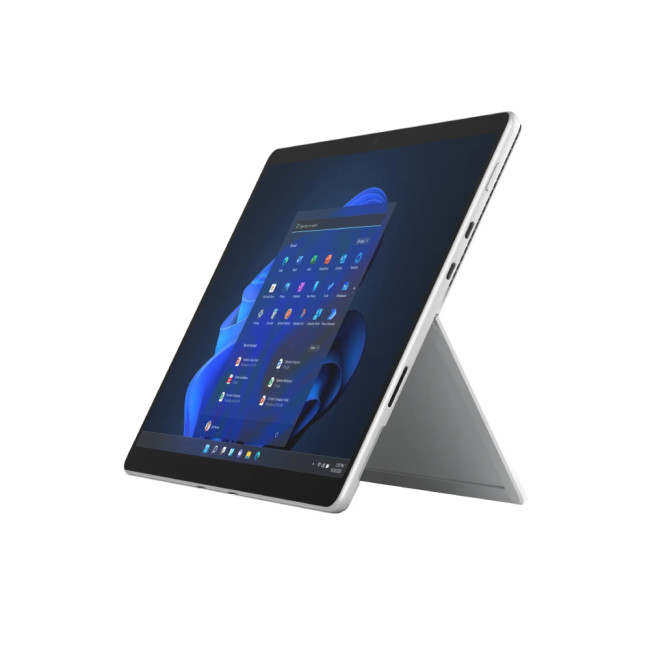
Microsoft Surface Pro 8: The Best 2-in-1 Tablet!
Specifications
- Intel Core i5 Processor
- LPDDR4x-SDRAM Memory
- 13 in Full HD Display, PixelSense, 2880 x 1920 Max. Resolution
- 8 GB RAM, 512 GB Storage
- 5 MP Front Camera
- Intel Iris Xe Graphics
- Windows 11 Home
- USB | Surface Connect
- Graphite Colour
- 1 Year Warranty

Last Updated: October 24, 2025
If you seek a new tablet but find the price tag too steep, a refurbished tablet is the next best thing. Buying a refurbished tablet can be a smart choice as it gives you the advantage of owning a fully functional tablet without breaking the bank.
The key is understanding what to look for and where to find a trustworthy option. To guide you through this process, we'll outline the essential information you need when buying a refurbished tablet.
What is a Refurbished Tablet?
First, let's discuss what a refurbished tablet is. The refurbished computer tablets refer to previously pre-owned tablets that have been restored to a like-new condition by either the manufacturer or a retailer before being resold at a reduced price. These devices come from various sources, such as customer returns, display models, or units with minor cosmetic flaws. What sets them apart is that they undergo a thorough inspection, necessary repairs, and testing to ensure they function just like a brand-new tablet.
Some
Last Updated: October 02, 2025
A tablet is more portable than a laptop but has a larger screen than a smartphone, making it a worthwhile purchase for many individuals. However, you might be reluctant to spend much money on one unless it's your main productivity device. Opting for a refurbished tablet lets you enjoy premium features at a fraction of the cost. The key? Buying from a trusted retailer and knowing what to look for.
At Laptop Outlet, we've done the hard work for you by evaluating and enlisting the best refurbished tablets that offer performance, reliability, and value for money. Whether you need a budget-friendly device for streaming or a powerhouse for multitasking, we've something in these refurbished tablets review.
Why Choose Refurbished Tablets?
Before diving into specific models, it’s important to understand why refurbished tablets such a popular choice in 2025 is.
Cost Savings Without Compromise
Refurbished devices are priced significantly lower than brand-new counterparts. This makes it easier to

Last Updated: October 22, 2025
Tablet Frozen? It’s Time to Reboot
Your Samsung tablet acting up? Maybe it’s frozen, lagging, or just being plain weird? A reboot can fix a lot of issues fast. Whether you’re doing a quick restart or a hard reset, here’s how to reboot your Samsung tablet the right way—without losing your mind.
How to Do a Soft Reboot (Quick Restart)
This is the easiest and safest way to refresh your tablet without losing any data.
Steps:
- Press and hold the Power button (or Power + Volume Down, depending on model).
- When the Power menu appears, tap Restart.
- Wait for your tablet to turn off and reboot automatically.
Pro Tip: This method works when your screen is responsive and not frozen.
How to Force Restart a Samsung Tablet (If It’s Frozen)
If your tablet is completely unresponsive, try a force reboot:
Steps:
- Press and hold the Power + Volume Down buttons at the same time.
- Hold for around 10-15 seconds until the device vibrates or restarts.
- Release the buttons when you see the

Last Updated: September 19, 2025
Tired of the steep price tags that tablets usually carry? Worry not—these best budget tablets are the perfect solution.
Whether you're after a versatile entertainment device, a productivity companion, or a compact screen for on-the-go browsing, the best budget tablets prove that quality doesn’t have to come at a premium. And with such a wide range available, finding the right one to suit your needs is simple and hassle-free.
From affordable refurbished iPads to the reliable Lenovo tablet range and feature-packed Samsung tablets, it’s clear that affordable doesn’t mean underpowered. With budget-friendly refurbished iPads, Apple fans can enjoy sleek design, premium build quality, and the powerful iPadOS experience, all at a fraction of the original cost. Meanwhile, top Android tablets offer stunning displays, long-lasting battery life, and smooth performance without breaking the bank.
Android users also have plenty of choice when it comes to size—be it a compact 8 inch tablet, a travel-ready

