



Top Games You Can Play on an AMD Ryzen 7 Gaming Laptop: Ryzen 7 Games Guide
The best Ryzen 7 games span competitive titles such as Valorant, Counter-Strike 2 and Fortnite, plus demanding releases including Cyberpunk 2077, Baldur’s Gate 3 and Forza Horizon 5. A Ryzen 7 processor is usually strong enough for them, but actual frame rates depend mainly on the laptop’s graphics card, power limits, cooling, memory, resolution and chosen settings and updates.
Looking for the best games to play on a Ryzen 7 gaming laptop? AMD Ryzen 7 processors offer strong performance for everything from fast-paced esports titles to demanding AAA adventures, but the experience depends on more than the CPU alone. Your graphics card, RAM, cooling, display resolution, and power limits all influence frame rates and visual settings. In this guide, we cover popular Ryzen 7 games, explain what hardware matters most, and show what to expect from different laptop configurations before you start playing.
Which Specifications Determine Ryzen 7 Gaming Performance?
The following components determine whether a Ryzen 7 laptop is suitable for light gaming, competitive play, or demanding AAA releases.
|
Component |
Why It Matters |
Practical Guidance |
|
Ryzen 7 processor |
Handles game logic, simulation, physics and background tasks |
Check the full model number and generation, not only the Ryzen 7 brand |
|
Graphics card |
Has the greatest effect on image quality and frame rate in most games |
Use a dedicated GPU for modern AAA games, 1440p or ray tracing |
|
GPU power limit |
Controls how much power a laptop GPU can use |
Two laptops with the same GPU can perform differently if their power limits differ |
|
Video memory |
Stores textures, geometry and rendering data |
More demanding settings and higher resolutions require more VRAM |
|
System memory |
Affects multitasking, asset loading and frame-time consistency |
16GB is a sensible baseline; 32GB can help with streaming and heavily modified games |
|
Memory configuration |
Integrated graphics share system memory |
Dual-channel or suitably configured memory can materially improve integrated-GPU performance |
|
Storage |
Influences installation capacity and loading behaviour |
Use an NVMe SSD and consider 1TB or more for a multi-game library |
|
Cooling |
Helps the CPU and GPU sustain their intended performance |
Keep vents clear and use the laptop on a firm, flat surface |
|
Display |
Determines the visible resolution and maximum useful refresh rate |
A 144Hz screen benefits competitive play only when the system produces sufficiently high frame rates |
If you are comparing high-performance Ryzen 7 laptops, check the GPU specification, video memory, display resolution, refresh rate, RAM configuration and cooling design alongside the processor.
Integrated Graphics Versus a Dedicated GPU
Integrated Radeon graphics are built into the processor and share the laptop’s system memory. They can be suitable for Valorant, Rocket League, Minecraft and other relatively light games, particularly at 1080p low settings or a lower resolution.
A dedicated GPU has its own processing resources and video memory. It is the better option for Cyberpunk 2077, Helldivers 2, high-quality Fortnite settings, demanding texture packs and other visually complex games.
This distinction matters when browsing gaming laptops with AMD processors. The presence of an AMD CPU does not mean the laptop necessarily uses an AMD GPU, as many Ryzen systems are paired with NVIDIA GeForce graphics.
What Games Ryzen 7 Systems Can Run?
The table below provides sensible starting points rather than guaranteed performance figures. Exact results depend on the processor model, GPU, power profile, cooling, game version and graphics settings.
|
Game |
Type |
CPU Demand |
GPU Demand |
Sensible Hardware Starting Point |
|
Valorant |
Competitive shooter |
Moderate |
Low |
Recent Radeon integrated graphics or a dedicated GPU |
|
Counter-Strike 2 |
Competitive shooter |
High at very high FPS |
Low to moderate |
Dedicated GPU preferred for high-refresh competitive play |
|
Fortnite |
Battle royale |
Moderate to high |
Scales from low to very high |
Integrated graphics for reduced settings; dedicated GPU for higher presets |
|
Rocket League |
Competitive sports |
Low to moderate |
Low to moderate |
Recent integrated or entry-level dedicated graphics |
|
Minecraft |
Sandbox |
Varies widely |
Low without shaders; high with shaders |
Integrated graphics for standard play; dedicated GPU for demanding shaders |
|
Forza Horizon 5 |
Open-world racing |
Moderate |
Moderate to high |
Dedicated GPU with adequate VRAM |
|
Baldur’s Gate 3 |
Role-playing game |
Moderate to high in busy areas |
Moderate to high |
Dedicated GPU and 16GB RAM |
|
Elden Ring |
Action role-playing game |
Moderate |
Moderate to high |
Dedicated GPU and stable cooling |
|
Cyberpunk 2077 |
Open-world action RPG |
High |
High to very high |
Dedicated GPU; stronger hardware for ray tracing |
|
Helldivers 2 |
Cooperative shooter |
High in busy battles |
High |
Dedicated GPU and at least 16GB RAM |
The Best Games for Ryzen 7 Gaming Laptops
1. Valorant
Valorant is one of the most accessible esports games for Ryzen 7 laptops. Its relatively modest graphics requirements make it suitable for many systems with integrated Radeon graphics as well as dedicated GPUs.
The Ryzen 7 processor becomes particularly useful when the aim is a high and stable frame rate. Competitive shooters process frequent player inputs, networking updates and game-state changes, so CPU performance can matter more once the GPU is no longer fully occupied.
For the clearest competitive experience:
- Use a wired connection or reliable low-latency Wi-Fi
- Select a full-screen display mode
- Reduce distracting visual effects
- Enable the laptop’s performance profile
- Set an FPS limit the system can maintain consistently
- Use a 120Hz, 144Hz or faster display where available
Chasing the highest number is not always the best approach. A stable frame rate with consistent frame times can feel more responsive than a higher average that frequently drops.
2. Counter-Strike 2
Counter-Strike 2 is another strong choice for a Ryzen 7 gaming laptop. It is visually more demanding than the original Counter-Strike: Global Offensive and can also place considerable load on the CPU during high-frame-rate play.
A dedicated GPU is recommended if you want to combine high resolution, detailed visuals and a fast refresh rate. Recent integrated Radeon graphics may still run the game at reduced settings, but results vary by processor and memory configuration.
Start by lowering:
- Shadow quality
- Ambient occlusion
- Shader quality
- Particle detail
- Anti-aliasing
Do not automatically set every option to its lowest value. Some players find that retaining useful shadows or higher texture clarity makes opponents and environmental details easier to read.
3. Fortnite
Fortnite is unusually scalable. It can run on relatively modest hardware using Performance Mode, while its higher visual presets can use advanced lighting and place far greater demands on the GPU.
Epic Games lists 16GB of RAM and an NVMe SSD in its recommended specification. Its Epic quality specification is considerably higher, demonstrating why the selected rendering mode matters as much as the game title itself.
Choose your settings according to how you play:
- Competitive play: Use Performance Mode or reduced DirectX settings to favour frame rate and visual clarity.
- Casual Battle Royale: Use medium or high settings if your dedicated GPU has enough headroom.
- High-quality visuals: Use DirectX 12 features selectively and monitor VRAM consumption.
- Integrated graphics: Start with Performance Mode, a lower quality preset and a sensible resolution.
Fortnite updates frequently. A configuration that works well in one season may need adjustment after a new map, graphics feature or engine update.
4. Rocket League
Rocket League is a suitable option for Ryzen 7 laptops with either integrated or dedicated graphics. Its fast matches also make it a useful game for testing display response, controller latency and frame-rate stability.
Visual quality is less important than smooth motion for competitive play. Start with the display’s native resolution, then reduce effects such as motion blur, bloom and weather detail if the frame rate is inconsistent.
A Ryzen 7 processor provides ample general capability for the game in most configurations. The practical limit is more likely to be the GPU, cooling system or display refresh rate.
5. Minecraft
Minecraft can be either easy or surprisingly difficult to run. Standard Bedrock or Java gameplay is relatively light, but long render distances, complex worlds, large mod packs and shader packs can sharply increase CPU, GPU and memory requirements.
Mojang’s updated 2026 Java Edition guidance targets 1080p at 60fps using the Fancy preset for its recommended specification. It also notes that future technical development is moving towards Vulkan support, making current official requirements more relevant than older advice found online.
The Ryzen 7 processor is useful for:
- Chunk generation
- Redstone-heavy builds
- Large numbers of entities
- Modded gameplay
- Hosting a local world
- Running background tools or recording software
Integrated Radeon graphics can handle standard play in many cases. Real-time shaders, high-resolution texture packs and extensive visual mods may require a capable dedicated GPU.
6. Forza Horizon 5
Forza Horizon 5 combines an open world with detailed vehicles, weather effects and high-speed streaming of environmental assets. It is a good match for a Ryzen 7 processor paired with a dedicated gaming GPU.
The built-in benchmark is particularly useful. Run it after changing settings and check the reported GPU memory usage, average frame rate and minimum performance.
For a balanced starting point:
- Select the native display resolution.
- Begin with the medium or high preset.
- Run the built-in benchmark.
- Lower shadows, reflections and environmental geometry if performance is inconsistent.
- Reduce texture quality only if VRAM usage is too high.
- Apply an upscaler if available and image quality remains acceptable.
Stable performance is more valuable than an unnecessarily high maximum frame rate in an open-world racing game. Sudden drops while driving can make steering feel less predictable.
7. Baldur’s Gate 3
Baldur’s Gate 3 is one of the best games for Ryzen 7 systems if you enjoy story-driven role-playing, tactical combat and cooperative campaigns. Its turn-based battles do not require esports-level frame rates, but complex locations can still load both the CPU and GPU.
Larian Studios lists 16GB of RAM, an SSD and an 8GB-class graphics card in its recommended Windows specification. The game also requires substantial storage space.
A sensible goal is a stable 60fps rather than sacrificing image quality to reach very high frame rates. If performance drops in crowded areas, reduce settings that affect scene complexity, shadows and view distance before lowering textures.
8. Elden Ring
Elden Ring suits Ryzen 7 gaming laptops with a dedicated GPU and stable cooling. The game’s combat depends on consistent input response, but the PC version is normally capped at 60fps without unofficial modifications.
This cap changes the optimisation goal. There is little benefit in reducing every setting to chase performance far beyond the game’s normal limit.
Instead, aim to hold 60fps consistently. Reduce resolution, shadows, effects and grass quality if demanding outdoor areas cause drops.
9. Cyberpunk 2077
Cyberpunk 2077 is one of the more demanding AAA games for Ryzen 7 laptops. CD Projekt Red describes it as both processor-intensive and graphics-intensive, particularly under the requirements introduced for Update 2.0 and Phantom Liberty.
A Ryzen 7 processor is generally a suitable foundation. The GPU, VRAM and selected ray-tracing features will determine the practical experience.
Use the following order when optimising:
- Select an appropriate non-ray-traced preset.
- Test performance in a busy city area.
- Enable an upscaler using its quality mode.
- Adjust crowd density if the processor becomes heavily loaded.
- Add ray tracing only when adequate GPU headroom remains.
- Consider frame generation only after achieving an acceptable base frame rate.
Upscaling renders the game internally at a lower resolution and reconstructs the final image. Frame generation creates additional displayed frames, but it does not replace the need for a responsive underlying frame rate.
10. Helldivers 2
Helldivers 2 can place substantial pressure on both the processor and graphics card. Large enemy groups, particle effects and multiplayer battles make it a useful example of why sustained laptop performance matters.
A Ryzen 7 CPU is well suited to the simulation and background workload in many configurations. A dedicated GPU and 16GB or more of system memory are sensible starting points.
If performance falls during larger battles, reduce volumetric effects, shadows, render distance and reflection quality. Test settings during an active mission rather than relying only on quiet areas aboard the ship.
Is Ryzen 7 Good for 1080p Gaming?
Yes, Ryzen 7 for 1080p gaming is generally a strong processor choice. At this resolution, a balanced laptop with a modern dedicated GPU can run esports games and many AAA titles smoothly at appropriate settings.
The exact GPU still matters. A Ryzen 7 paired with integrated graphics cannot be expected to match one paired with a dedicated mid-range or high-end GPU.
For most users, 1080p is the safest laptop gaming resolution because it provides:
- Lower GPU demand than 1440p or 4K
- Better prospects for high-refresh gameplay
- Clear image quality on typical 15-inch and 16-inch displays
- More flexibility when using high or ultra settings
- Less reliance on aggressive upscaling
A common mistake is buying a high-resolution screen without checking whether the GPU can drive modern games at its native resolution. The sharper panel may then require reduced settings or upscaling.
Is Ryzen 7 Good for 1440p Gaming?
Ryzen 7 for 1440p gaming can be highly capable, but the graphics card becomes more important as the resolution increases. Moving from 1920 × 1080 to 2560 × 1440 raises the number of pixels rendered in every frame by approximately 78%.
For demanding 1440p play, prioritise:
- A capable dedicated GPU
- Sufficient VRAM
- Effective laptop cooling
- A suitable GPU power limit
- 16GB or more of system memory
- Upscaling support in demanding games
Medium or high settings often provide a better balance than ultra. The visual difference between high and ultra may be small on a laptop screen, while the performance cost can be significant.
Review current model specifications carefully when comparing top gaming laptops. The screen resolution should be considered alongside the GPU rather than as an isolated premium feature.
How Much AMD Ryzen 7 FPS Should You Expect?
There is no single AMD Ryzen 7 FPS figure. A processor name cannot predict frame rate without knowing the GPU, laptop power limits, resolution, settings, memory and game version.
The following targets are more useful than unsupported universal estimates:
|
Use Case |
Practical Frame-Rate Target |
Why It Matters |
|
Turn-based and slower strategy games |
30 to 60fps |
Consistency is usually more important than rapid response |
|
Story-driven action and RPG games |
Stable 60fps |
Provides smooth motion without excessive hardware demand |
|
Racing and fast action games |
60 to 120fps |
Higher rates can improve clarity and responsiveness |
|
Competitive shooters |
120fps or more where practical |
Better matches 120Hz, 144Hz and faster displays |
|
Ray-traced AAA games |
Stable base frame rate before frame generation |
Helps preserve responsiveness and image consistency |
These are practical targets, not guarantees. Some games have built-in frame-rate caps, while others may be limited by the CPU at low settings and by the GPU at high resolutions.
Average FPS is Not the Whole Story
An average of 80fps could still feel uneven if the game repeatedly falls to 30fps. Look at low-percentile performance and frame times where benchmarking tools provide them.
Frame time is the time required to produce each frame. Consistent frame times generally create smoother motion, even when the average FPS is not exceptionally high.
Is Ryzen 7 Good for Streaming?
Ryzen 7 for streaming is generally a sensible choice because modern models provide multiple processor cores and threads for gaming, voice chat, browser tools and broadcast software.
However, streaming quality depends on the complete system. A laptop with 32GB of RAM, a capable dedicated GPU and effective cooling will manage simultaneous workloads more comfortably than a thin integrated-graphics model.
For a reliable setup:
- Use the GPU’s hardware video encoder where supported
- Start with a moderate output resolution and bitrate
- Connect through Ethernet where possible
- Close unnecessary browser tabs and launchers
- Record a short local test before broadcasting
- Monitor CPU, GPU, memory and temperature levels
- Use headphones to prevent microphone feedback
Hardware encoding moves much of the video-encoding workload to a dedicated part of the GPU. This can preserve more CPU capacity for the game, although image quality and supported formats vary by graphics hardware and software.
Do not assume that more CPU cores eliminate every streaming limitation. Upload speed, network stability, cooling and the selected game can all affect the result.
Can You Play Games Using Only Ryzen 7 Integrated Graphics?
Yes, provided the processor includes active integrated Radeon graphics and the game’s requirements are modest enough. Esports games, independent titles, older releases and standard Minecraft gameplay are the most suitable starting points.
Integrated graphics have several limitations:
- They share system memory instead of using dedicated VRAM
- Performance is sensitive to memory speed and configuration
- High resolutions place additional pressure on limited graphics resources
- Ray tracing is usually impractical in demanding games
- Laptop power and thermal settings still affect sustained speed
Start with 1080p low settings. If performance remains inconsistent, reduce the render resolution or use a supported upscaler.
A dedicated GPU is the safer choice if your priorities include new AAA releases, high-resolution texture packs, 1440p, ray tracing or high-refresh gaming. Laptop Outlet’s wider AMD Ryzen series range can help illustrate how Ryzen systems span everyday laptops as well as dedicated gaming models.
How to Improve Gaming Performance on a Ryzen 7 Laptop
1. Connect the Charger
Gaming laptops frequently reduce CPU and GPU power on battery. Connect the original compatible charger and select the manufacturer’s performance mode before assessing the laptop.
Gaming on battery can also drain the charge quickly. Repeated heavy battery use generates heat and is unlikely to provide the laptop’s full performance.
2. Confirm the Game Is Using the Dedicated GPU
Some laptops contain integrated and dedicated graphics. Windows or the manufacturer’s software may occasionally assign a game to the lower-power GPU.
Check the Windows graphics settings and GPU control panel. Confirm that demanding games use the high-performance graphics option.
3. Update Drivers Carefully
Install current stable graphics drivers from AMD, NVIDIA or the laptop manufacturer. Driver updates can improve compatibility with new games and address known faults.
Avoid assuming every new driver will improve every title. If a new version introduces instability, check the manufacturer’s release notes and approved rollback process.
4. Choose Balanced Graphics Settings
Ultra settings often have a disproportionate performance cost. High settings usually retain most of the intended visual quality while providing more consistent performance.
Reduce these options first:
- Ray tracing
- Shadow quality
- Volumetric lighting
- Reflections
- Ambient occlusion
- Crowd density
- View distance
- Hair or fur simulation
Texture quality mainly depends on VRAM capacity. Lower it when the game reports excessive video-memory use, texture loading problems or severe stuttering.
5. Use Upscaling Appropriately
AMD FidelityFX Super Resolution, NVIDIA DLSS and Intel XeSS can improve performance by rendering at a lower internal resolution and reconstructing the image.
Begin with the Quality mode. More aggressive modes may create visible softness, instability or fine-detail artefacts, particularly on a 1080p screen.
6. Set a Sustainable FPS Limit
An FPS cap can reduce heat, fan noise and power consumption. It can also improve consistency if the laptop repeatedly swings between very high and low frame rates.
Match the cap to performance the laptop can maintain. There is little value in setting 144fps if demanding scenes repeatedly fall far below it.
7. Keep Air Vents Clear
Use the laptop on a firm desk rather than bedding, a sofa or a thick carpet. Soft materials can obstruct intake vents and cause temperatures to rise.
Clean accessible external vents according to the manufacturer’s instructions. Do not dismantle the laptop if doing so could affect its warranty or if you lack the necessary experience.
8. Check RAM and Storage
Sixteen gigabytes of RAM is a practical baseline for current gaming. Thirty-two gigabytes may help with streaming, large mod packs and heavy multitasking, but it does not automatically increase FPS when memory capacity is not the bottleneck.
Keep reasonable free space on the SSD. Modern games, downloadable content and texture caches can make a 512GB drive feel restrictive.
9. Test Repeatably
Use the same game area, graphics preset and power mode when comparing changes. Built-in benchmarks are useful because they create a more repeatable workload.
Record average FPS, low-percentile performance and temperatures where possible. Changing several settings at once makes it harder to identify which adjustment helped.
Common Ryzen 7 Gaming Mistakes
Assuming the CPU Guarantees Performance
“Ryzen 7” identifies a processor tier, not a complete gaming specification. The GPU, cooling and power configuration can be more important.
Comparing Laptop and Desktop Components Directly
Laptop processors and graphics cards operate within tighter power and thermal limits. A laptop GPU may not perform like a desktop card with a similar name.
Using Ultra Settings Automatically
Ultra settings are designed to maximise image quality, not value or consistency. High settings frequently provide a more balanced experience on a laptop display.
Gaming in Battery-Saver Mode
Battery-saver settings can reduce processor speed, GPU power and display refresh behaviour. Benchmark and play demanding games while connected to mains power.
Ignoring GPU Wattage
Two laptops containing the same graphics processor may use different GPU power limits. The better-cooled, higher-power implementation may sustain higher performance.
Expecting Integrated Graphics to Behave Like a Dedicated GPU
Integrated Radeon graphics can be capable, but shared memory and lower graphics resources remain important constraints. Set realistic resolution and quality expectations.
Treating System Requirements as Guaranteed Performance
Minimum requirements usually indicate that a game should launch and operate at reduced settings. Recommended requirements provide a better target, but they still do not guarantee a particular frame rate on every laptop.
Are Ryzen 7 Gaming Laptops Future-Proof?
No laptop is completely future-proof. Game engines, graphics features and hardware requirements continue to change.
A balanced Ryzen 7 gaming laptop can nevertheless remain useful for several years if it has:
- A capable dedicated GPU
- Adequate VRAM
- At least 16GB of RAM
- Upgradeable memory or storage where possible
- A 1TB or larger SSD
- Effective cooling
- A suitable 1080p or 1440p display
The GPU is likely to become restrictive before a recent Ryzen 7 CPU in many graphically intensive games. Buying a stronger processor while accepting a much weaker GPU can therefore be a poor trade for a gaming-focused system.
Future games may also depend more heavily on upscaling and frame-generation technologies. These features can extend useful performance, but they should not be treated as replacements for adequate underlying hardware.

Conclusion
The most suitable Ryzen 7 games range from accessible esports titles such as Valorant and Rocket League to demanding releases including Cyberpunk 2077, Baldur’s Gate 3 and Helldivers 2. A modern Ryzen 7 processor is generally capable enough for these workloads, but the graphics card, cooling, GPU power limit, memory and selected resolution determine the real experience.
For competitive gaming, prioritise stable frame times and a high-refresh display. For AAA games, favour a capable dedicated GPU, sufficient VRAM, and balanced graphics settings. Always check the full laptop specification and current game requirements rather than relying on the Ryzen 7 name alone.

FAQs
Can a Ryzen 7 Laptop Run All Games?
A Ryzen 7 processor can support virtually every current PC game, but the complete laptop may not. GPU performance, VRAM, RAM, cooling and operating-system compatibility determine whether demanding titles will run smoothly at the chosen settings.
Is Ryzen 7 Good Enough for AAA Gaming?
Yes, a recent Ryzen 7 is generally powerful enough for AAA gaming. Pair it with an appropriate dedicated GPU and at least 16GB of RAM. Resolution, ray tracing and ultra-quality settings will determine how much graphics performance is required.
Is Ryzen 7 Better for Gaming Than Ryzen 5?
Ryzen 7 often provides more processing cores or performance headroom, which can help with streaming and CPU-heavy games. A Ryzen 5 laptop with a stronger GPU may still outperform a Ryzen 7 model with weaker graphics.
Can Ryzen 7 Integrated Graphics Run Fortnite?
Recent Ryzen 7 integrated Radeon graphics can run Fortnite using Performance Mode or reduced settings, although results depend on the exact processor and memory configuration. A dedicated GPU is preferable for higher presets, resolutions and frame-rate targets.
How Much RAM Does a Ryzen 7 Gaming Laptop Need?
Sixteen gigabytes is a sensible baseline for modern gaming. Thirty-two gigabytes may benefit streaming, extensive modding and heavy multitasking. More RAM will not necessarily improve frame rates when the GPU or processor is the main limitation.
| Read More: |
| What Is AMD Ryzen 7 X3D and Why Is It Better for Gaming |
| Top 5 Best Gaming Consoles for Every Type of Gamer in 2026 |
| How Mobile Games and Handheld Gaming PCs Are Changing the Landscape |
Related Articles


Last Updated: December 02, 2025
If you’re hunting for the best gaming laptops of 2025, you’re in luck; this year has delivered some of the most powerful, portable, and genuinely budget-friendly machines we’ve seen in years. With GPUs becoming more efficient, CPUs offering console-level performance, and cooling systems finally catch up. Gaming laptops in 2025 aren’t just powerful - they’re smart, stylish, and surprisingly accessible.
Whether you’re a casual player looking for smooth 1080p gaming, a competitive esports enthusiast chasing those 300+ FPS moments, or a hardcore creator-gamer hybrid who needs workstation-level power, there’s a machine built for you. The best part? You no longer need a king-sized budget to get impressive performance.
Welcome to your complete guide to the best gaming laptops of 2025 - sorted by budget, playstyle, and performance needs.
Budget Gaming Laptops (Under £800)

Perfect for casual gamers, students, first-time buyers, and those who want reliable FPS without blowing the bank.
1. Acer

Last Updated: February 26, 2026
Before diving into specs and comparisons, it’s important to understand where HyperX fits in the gaming laptop ecosystem. HyperX started as a premium gaming accessory brand known for headsets, keyboards, and memory modules. Their products were built for competitive players and quickly gained global traction.
Today, HyperX’s gaming DNA influences HP’s gaming ecosystem. Many of the performance standards and design philosophies seen in HyperX products carry over into HP’s Omen series. This is why HyperX laptops are often associated with, or based on, Omen builds, because HP owns HyperX and integrates their performance-first design approach.
If you’ve ever researched gaming laptops, you’ve likely come across HP, widely recognised as a top tech brand with strong, long-lasting hardware. Their Omen series, featured here at HP laptops, is built on the same principles that define HyperX: high performance, durability, smart cooling, and competitive-edge engineering.
So, when we talk about HyperX

Last Updated: December 12, 2025
For years, HyperX has been one of the most recognised names in gaming, known for high-performance headsets, keyboards, memory modules and accessories trusted by both casual players and esports professionals. But as HyperX’s influence expands into the laptop world through the HP products ecosystem, many buyers are now asking the big question:
Are HyperX Gaming Laptops Worth It?
The short answer: Yes, if you want strong performance, gaming-focused features, durable build quality, and reliable long-term value.
For the detailed answer, you need to scroll down and read it all. Below, you’ll find a complete analysis of HyperX laptop pros and cons, performance, features, durability, and how HyperX compares to other brands. We’ll also examine whether these laptops deliver genuine value, and offer a full HyperX laptop guide to help you decide if they’re right for you. Let’s explore what makes these laptops unique and when they might not be the best option.
What Are HyperX Gaming Laptops? Understanding

Last Updated: December 12, 2025
Setting up your new HyperX gaming laptop is one of the most exciting parts of stepping into PC gaming. If you've just unboxed your device and you're unsure where to begin, this beginner-friendly breakdown will walk you through everything you need to know. From optimising software to boosting cooling performance, you’ll find everything you need to unlock the full potential of your new machine. Many first-time gamers skip key setup stages, leaving their devices underpowered or inefficient. This guide ensures you’re not one of them.
1. Getting Started: The Essential First Steps
Before diving into settings and performance tweaks, it’s important to take care of the basics. Begin by connecting your laptop to a reliable power source. Gaming laptops, especially HyperX devices designed for high performance, require stable power for initial configurations and updates. Allow your system to complete its first-time boot optimally, as this ensures firmware, BIOS settings, and essential drivers are
Last Updated: March 04, 2026
The world of competitive gaming moves fast. If you are serious about rising through the ranks in 2026, your gear must keep pace. This is where high-performance HyperX Gaming Laptops come into their own.
HyperX, known for engineering some of the best memory and peripherals in the world, has become central to the OMEN and Victus gaming lines. These machines combine reliable, high-speed components with premium display technology. They offer the raw power needed for modern AAA titles and the precision required for esports.
If you are hunting for serious hardware, this guide explores the best options for 2026. We look at HyperX gaming laptop specs to ensure you find the ultimate machine for competitive dominance.
Understanding the HyperX Ecosystem
When you search for the best HyperX laptops, you are primarily looking at the pinnacle of HP’s gaming division: OMEN and Victus.
It is crucial to understand the relationship between these brands:
- HyperX: This is a premium gaming brand renowned
Last Updated: February 26, 2026
DOMINATE THE BATTLEFIELD. UPGRADE YOUR WEAPON.
The arrival of Call of Duty: Black Ops 7 is a massive event. This game promises some of the most intense, visually spectacular, and competitive FPS action we’ve seen yet.
To truly dominate the leaderboards, you need more than skill; you need a machine that can keep up. That’s where a high-performance laptop comes in.
To help you secure your victory, we’ve put together 8 best gaming laptops for Call of Duty: Black Ops 7 Season 01. Get ready to experience this game with crystal-clear visuals and lightning-fast frame rates.
Why the Right Gaming Laptop Matters for Black Ops 7
Call of Duty titles are known for their demanding hardware requirements, and Black Ops 7 pushes those boundaries even further. Your laptop needs to render massive maps, intense firefights, and stunning visual effects instantly.
Here is why you need to invest in the right machine:
- Higher FPS: In competitive FPS games, a higher frame rate (FPS) translates directly to a smoother,

Last Updated: March 12, 2026
If you’re preparing to dive into Europa Universalis V (EU V), you already know you’re in for hundreds of hours of territory expansion, diplomacy, micro-strategy, and historical sandbox storytelling. Grand strategy titles may not appear graphically intense, but they rely heavily on CPU power, AI simulations, late-game processing, and stable performance during long sessions. With modern visuals, expansions, and large campaign data, reliable hardware becomes essential, especially when comparing the best laptops for Europa Universalis V.
In this guide, we highlight the top gaming laptops for multi gaming, outline the EU V recommended specs laptop needs, and help you choose from the most capable RTX laptops for strategy games available today.
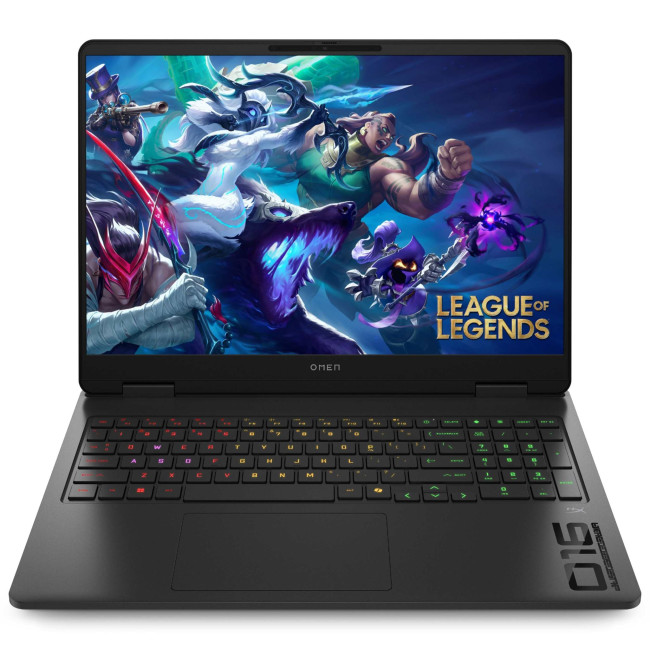
1. HP OMEN Gaming 16 AP0301NA
Technical Specifications
- AMD Ryzen 9 8940HX 16-Core Processor
- 16" WQXGA Display, IPS, 2560 x 1600 Max. Resolution
- 24 GB RAM, 1 TB SSD
- Dedicated NVIDIA RTX 5070 Graphics
- USB 3.2 | HDMI | USB-C
- Black Colour
- 1 Year

Last Updated: June 05, 2026
Football Manager 26 is finally here, built on a new Unity-powered 3D match engine with richer lighting, animations and stadium detail.
The good news? Sports Interactive has kept the minimum specs low, so older systems can still load up the game. The less good news is that the new engine leans more heavily on both CPU and GPU, especially during 3D matches and busy transfer windows.
If you want fast simulations, big databases and smooth 3D on high settings, you need the right hardware. This guide walks through Football Manager 26 recommended specs, then highlights the best gaming laptops and PCs for Football Manager 26 available from Laptop Outlet – from budget-friendly picks to powerhouse rigs.
Which Hardware Matters More for Football Manager 26?
Before choosing your machine, it is vital to understand what Football Manager 26 actually is. It is a detailed management simulation, not a graphics-intensive action game.
When you hit the 'Continue' button, the game is not just rendering a stadium.
Last Updated: February 24, 2026
Looking for the best budget gaming laptops and PCs for Sonic Rumble? You’re in the right place. At Laptop Outlet, we’ve scoured our range of powerful yet affordable gaming laptops, so you can find the perfect gear to jump into Sonic’s newest adventure without breaking the bank. Whether you’re after cheap gaming PC deals Sonic, gaming laptops with entry-level GPUs, or compact rigs that punch above their weight, we’ve got you covered. Let’s dive into the best options that’ll give you smooth gameplay, popping visuals, and long-lasting performance.
Recommended Specs to Play Sonic Rumble
By balancing these core specs, you’ll enjoy Sonic Rumble with the performance it deserves:
Processor (CPU)
A modern multi-core processor (such as Intel Core i5/i7 or AMD Ryzen 5/7) is great for entry-to-mid-range gaming. For high-end gaming, you would need an i9 or AMD Ryzen 9.
Graphics (GPU)
To play Sonic Rumble smoothly, aim for at least an entry-level dedicated GPU, something like NVIDIA’s RTX 4070 or
Last Updated: July 10, 2026
If you’re gearing up to explore the beautifully crafted, action-packed world of Where Winds Meet, choosing the right hardware is just as important as mastering your combat skills. This visually rich open-world action RPG blends fast-paced combat, sweeping landscapes and cinematic storytelling, all of which demand capable, well-balanced hardware.
In this guide, we’ll break down the recommended specs for Where Winds Meet, explain what really matters when it comes to performance, and highlight excellent-value options, including gaming deals for Where Winds Meet that won’t stretch your budget.
Recommended Specs for Where Winds Meet
Before diving into specific systems, let’s outline the core specifications you should be aiming for.
Processor (CPU)
Open-world RPGs rely heavily on CPU performance for AI, physics and world simulation. A modern Intel Core i5 / i7 or AMD Ryzen 5 / 7 is ideal. This ensures stable performance during exploration and combat-heavy sequences.
Graphics Card (GPU)
A dedicated

