



Review - Lenovo V15 Full HD Laptop Intel Core i5 8GB RAM 256GB SSD
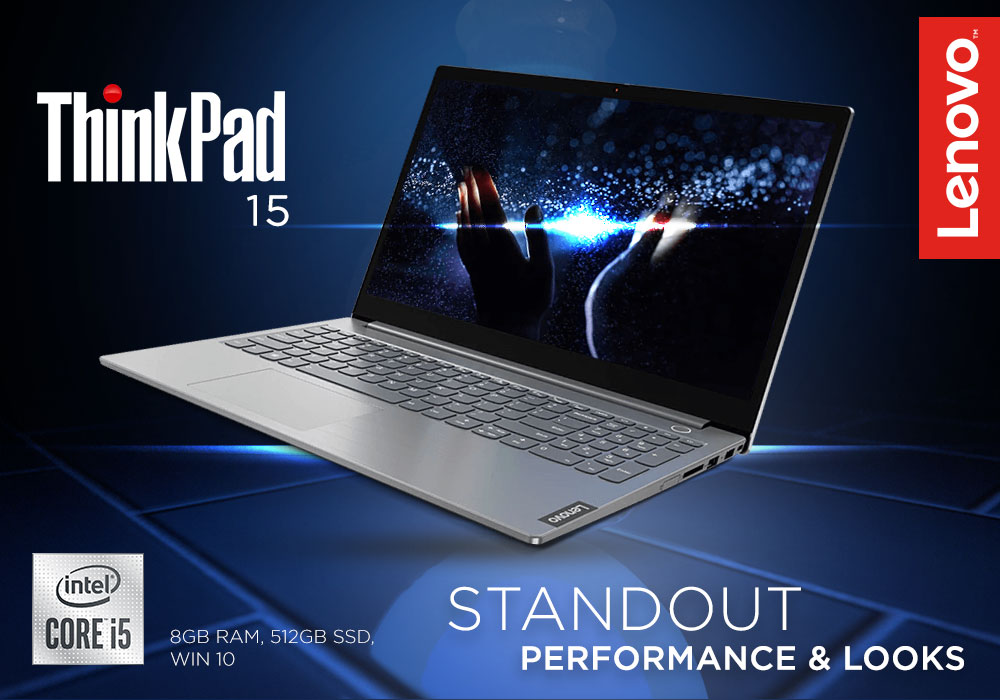
Lenovo V15 is an Intel Core i5 laptop that is designed to get work done. It maintains the never-ending streak of Lenovo laptops always performing the best, thanks to its impressive features. With its 8th generation Intel Core i5 processor, that can be upgraded up to 3.9 GHz using Turbo Boost, and Full HD display, with integrated graphics, it can handle whatever tech-life throws your way. But is it as good as Lenovo laptops are? Is its Intel Core i5 processor capable of handling business-oriented and gaming-related tasks without slowing down?
We decided to perform an in-depth Lenovo V15 review to find out what’s the deal about this laptop. We tested it for its performance, functionality, processing speeds, usability, and reliability. The Lenovo V15 Intel Core i5 laptop was made to pass through various tests to check its portability and durability. So, keep on reading our Lenovo V15 review to find out about this latest release by Lenovo Laptops and whether you should spend your time and money on it or not:
SPECIFICATIONS SHEET
Processor: Intel Core i5 (8th Gen) 8265U
Processor Speed: 1.6 GHz, Max Turbo Speed Up to 3.9 GHz
Display Size: 15.6 inch
Resolution: 1920 x 1080
RAM: 8 GB
Storage Type: SSD
Storage Capacity: 512 GB
Graphics: On-Board/Integrated Graphics
Operating System: Windows 10, Home
Most Suitable For: Casual Computing
Colour: Grey
POWERFUL PROCESSOR
Lenovo V15 features a powerful Intel Core i5 processor that delivers unmatched responsiveness no matter how complex and demanding the task at hand is. With its ultra-fast processing speeds, you can multitask easily. Design a presentation, watch a movie, and edit photos at the same time without experiencing any kind of slow down. You can always count on Lenovo laptops for lightning-fast processing speeds that get multiple tasks done simultaneously. Do not hold back with Lenovo V15 because it makes lag time appear a thing of the past.
The intuitive Intel Core i5 processor boasts a fast speed of 1.6 GHz which can be boosted to a jaw-dropping 3.9 GHz with the help of Turbo Boost technology. So, if you want to experience faster speed while working those long hours, boost your PC and enjoy a processing speed of 3.6 GHz. Therefore, if you are someone who has to work on complex projects every day, then this laptop will offer you the performance that you need to, get your tasks done on time, and meet deadlines. Lenovo V15 will truly give your productivity a boost with its incredible performance.
DESIGN AND DISPLAY
Just like every Lenovo laptop ever launched, Lenovo V15 checks every single box when it comes to style. It boasts a beautiful grey colour that looks really good especially when you are dressed formally to attend an international meeting. Not just that, owing to its classic design it will also look good on your tabletop because of its thinner, smaller build that is complemented by the narrower side bezels that give it an even more professional and clean look. So, get your work done whilst staying in style.
ENTERPRISE-GRADE SECURITY
Work without worrying about your privacy or the security of your important data, thanks to Lenovo V15’s security features. Lenovo laptops always feature over-the-top security measures that come in handy when you have to deal with sensitive data and passwords that you cannot risk getting leaked or stolen.
While, on one side of the curtain, Lenovo V15’s optional NVIDIA® dedicated graphics and dual storage options increase your productivity, its integrated firmware Trusted Platform Module (TPM) 2.0, on the other side of the curtain, ensures that no hacker can crawl his way inside your system by protecting your device against malware theft and viruses. It also encrypts your passwords and data for added security. Though there is one thing that you should know before you purchase this Intel Core i5 laptop that you can only access the Trusted Platform Module on the 8th Generation Intel® Core™ platform.
GRAPHICS AND VISUALS
Lenovo V15 comes with a 15.6-inch display screen that offers, Full HD graphics and, a resolution of 1920 x 1080 that allows you to work, and play, with crystal clear clarity in vivid and vibrant colours. This sleek laptop has a contemporary design, and a slim body, that not only gives the laptop a premium feel and look, but it also makes it easy for you to take it with you when you are on the move. With side bezels and optional FHD to enhance the view, you can binge-watch your favorite show in bright colors and expanded contrast.
RELIABILITY AND DURABILITY
Lenovo V15 is extremely reliable and durable owing to the fact that every single V15 laptop has to pass through rigorous tests, and quality checks, before it is sent out to the market for people to purchase it. Tested for durability and reliability, Lenovo V15 can handle extreme conditions and tests ranging from keyboard in-system test, shock test, hinge life test, and vibration test to operating temperature test, panel scuff test, pressure test, and fan reliability test, etc. This laptop can stand every single test of time and it is ready to face every condition that your company, or business, can put it through.
WINDOWS CORTANA
With Windows 10 Home, you get to work with your very own digital personal assistant in the form of Windows Cortana. Windows Cortana will do your work for you from hunting your files, or photos, to arranging meetings for you. Let Cortana work on your commands to decrease your workload a little. All you have to do is to integrate Windows Cortana with your calendar and you won’t have to set reminders for yourself ever again. Moreover, you will not even have to remember file names anymore because with Cortana you can just look up when and whom you worked on a file, or a project, with.
OUR VERDICT
So, is Lenovo V15 just as good as Lenovo laptops are? Can its Intel Core i5 processor handle your business-oriented, and gaming-related, tasks without slowing down? Yes, and Yes! Lenovo V15 is the perfect laptop for getting things done efficiently. Its amazing features, that will keep your business productive and your data secure, prompted us to perform its detail analysis before putting forward our Lenovo V15 review. Consider Lenovo V15 your office manager and execute your daily tasks with efficiency. We hope that you find the laptop that you have been looking for with the help of our Lenovo V15 review.
Read More:
| Review – Lenovo V15 Ada 15.6 Inch Business Laptop Amd Ryzen 5 |
| Product Overview: Lenovo V14 Vs Lenovo V15 |
| Best Budget Laptops for Everyday Use: Affordable Choices for 2025 |
Related Articles

Last Updated: September 22, 2026
In the present world, laptops have become our go-to devices to tackle all our day-to-day computing tasks. These intelligently crafted portable computing machines come packed with certain avant-garde features to provide you with the best user experience.
When talking about laptops, Lenovo and HP are two of the leading manufacturers. Both market-best technology companies hold worthy expertise in the manufacturing of best-of-the-best laptops. Both Lenovo laptops and HP laptops bring certain advanced specs on the table.
With the sheer number of choices available in the market for the best laptop by both brands, one can easily confuse in choosing the best option. However, you don’t need to worry. Our experts have prepared this detailed guide that will certainly help you to decide whether you should buy a Lenovo laptop, or an HP laptop to best cope with your needs. So, let’s get started!
Lenovo Laptops
Lenovo is a Chinese multinational company specialising in manufacturing market-best
Last Updated: September 03, 2026
There is no single Lenovo laptop that makes sense for every business user. Someone spending most of the day in Microsoft Teams and browser-based tools needs something very different from an analyst working with complex spreadsheets or an engineer running graphics-intensive applications.
If you are comparing the best Lenovo laptops for business, start with your workload rather than the series name. The current Laptop Outlet range includes everything from straightforward office systems to portable ThinkPads and professional mobile workstations, so this guide compares five options based on what you actually need them to do.
Lenovo Laptop Comparison: Which One Fits Your Work?
| Business Need | Lenovo Laptop to Consider | Why It Stands Out |
| Everyday admin and office work | 16GB RAM, Windows 11 Pro and practical 15.6-inch display | |
| Remote work and independent professionals | 24GB RAM, 1TB SSD and compact 14-inch design | |
| Hybrid and corporate working |
Last Updated: September 09, 2025
Introduction
In this digital age, laptops and TVs have become essential to our daily lives. It allows users to stream their favourite shows and play video games either on the small screen of a laptop or on a large TV screen. Connecting your Lenovo laptop to a TV can open many possibilities, whether you want to enjoy your favourite movies on a larger screen, share presentations during a meeting, or enjoy gaming with a more expansive display.
Lenovo laptops have various connectivity options, allowing you to connect them to modern TVs easily. This guide will explore instructions and methods for establishing connections and making the most of your Lenovo laptop's capabilities.
Whether you're using HDMI, wireless technologies, or other interfaces, we'll provide comprehensive instructions to enhance your multimedia and productivity experiences.
So, let's get into it!
Methods to Connect the Lenovo Laptop to a TV
There are several methods to connect your Lenovo Laptop to a TV to enhance your viewing
Last Updated: April 02, 2026
Fun Fact about Lenovo: Did you know that Lenovo is at the forefront of groundbreaking technology, recently unveiling the world's first foldable PC, the ThinkPad X1 Fold?
Now, let's explore another aspect of Lenovo's technology prowess: ensuring the longevity and efficiency of your Lenovo laptop's battery.
In the fast-paced digital era, laptops have become indispensable companions, ensuring optimal performance is paramount. One key aspect that often takes a backseat in our tech-conscious minds is the health of the laptop's battery. For proud owners of Lenovo laptops, understanding how to check and maintain battery health is crucial for a seamless computing experience.
In this comprehensive guide, we will explore the various methods to check the battery health of your Lenovo laptop. Whether you're a seasoned tech enthusiast or a casual user, these insights will empower you to maximise your device's battery life and performance. Let's dive into the Lenovo laptop battery health world and
Last Updated: September 22, 2026
Choosing a new laptop can feel like navigating a sea of technology, especially with diverse options like Lenovo PCs and Chromebooks. Both have unique strengths, leaving you wondering: "Which path should I take? The power-packed PC or the streamlined Chromebook?
With technological advancements, each device seems the best with its unique features and benefits, catering to different preferences and requirements.
This blog will explore the key differences between Lenovo PCs and Chromebooks, helping you decide based on your specific needs and priorities. Whether you're a student, professional, or casual user, understanding the differences between these two categories of devices will allow you to choose the perfect Lenovo device for your lifestyle and workflow.
So, let’s get to it!
Lenovo PCs
Desktop computers are known for their impressive power but have limitations, primarily due to their size. However, finding a laptop that matches a desktop's performance takes a lot of work. This matters

