



Review: Lenovo IdeaPad Duet 2 in 1 Chromebook Mediatek 4GB 64GB
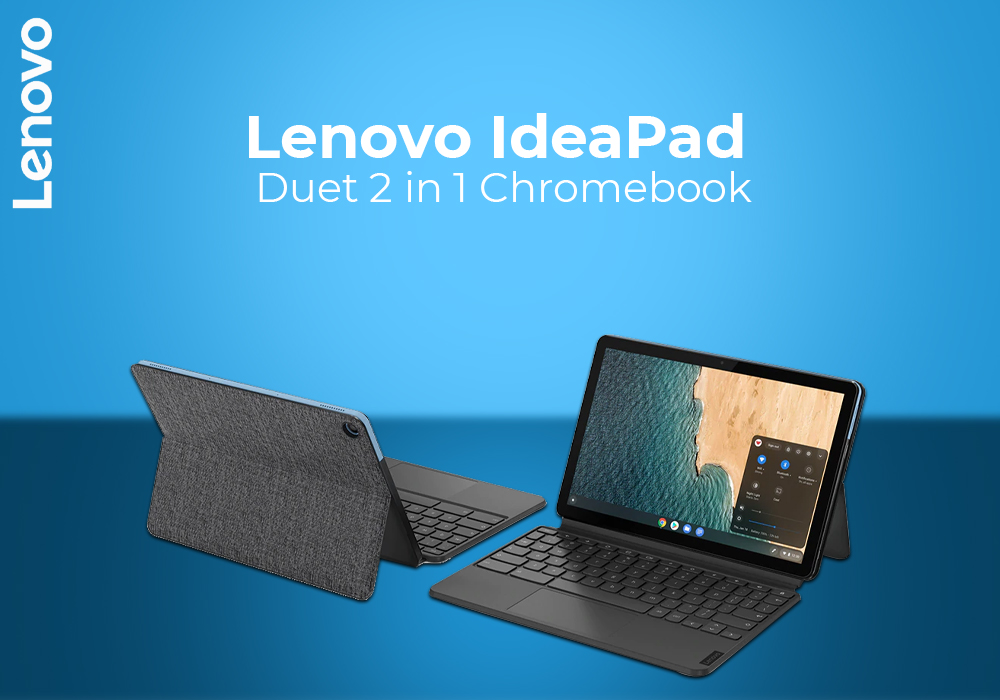
Chromebooks are making their way among everyday users, thanks to their affordable prices and portability. These are perfect devices for students, small to medium industry owners, and writers. The variety of sizes and hardware make Chromebooks even more versatile devices. Today, we are going to review one of the best 2-in-1 Chromebooks.
Lenovo IdeaPad Duet is a convertible Chromebook that strikes the perfect balance. It has the size of a tablet and the specs of a good laptop. However, what makes it so special is its 2-in-1 form factor. In fact, this is a budget choice for users who cannot afford Microsoft Surface Pro.
Our Lenovo IdeaPad Duet 2-in-1 review includes detailed analysis of this Chromebook. We have evaluated its design, display quality, hardware, and performance in detail. So, if you are thinking to buy this convertible Chromebook, read our detailed review below.
Lenovo IdeaPad Duet 2-in-1 Specs Review
CPU: Mediatek P60 / 2.0GHz Octa Core
GPU: Arm Mali-G72 MP3
Display: 10.1 inches IPS Full HD (1920 x 1200)
RAM Size: 4 GB
Storage Capacity: 64 GB
OS: Chrome
Design & Build
As highlighted, Lenovo IdeaPad Duet is a 2-in-1 Chromebook that comes with detachable keyboard. This is an ideal pick for anyone who wants to savour the best of both worlds. For a low price, you can have a laptops that can be turned into a tablet.
During our Lenovo IdeaPad Duet 2-in-1 review, we found its design to be on the modest side. This is no surprise as Lenovo has put a low price tag on this convertible laptop. The lid comes with a magnetic kickstand which is attached firmly to its body.
Display Quality
The display quality on Lenovo IdeaPad Duet is surprisingly low. We are not implying that this is a bad display. The screen resolution is a bit low considering other 2-in-1 Chromebooks. However, it fits well within its price range. This is a 10.1 inches display that offers a resolution of 1920 x 1200p.
On the bright side, the screen is equipped with the IPS technology. So, you do not have to worry about distorted visuals or black images. You can use it comfortably as you deem fit and will receive clear picture from all angles. The touch gestures works just fine on this display but you must not get your expectation high.
Keyboard & Touchpad
Lenovo IdeaPad Duet comes with a detachable keyboard deck which makes it a small convertible laptop. Unfortunately, the presence of a small display means small keyboard with less space for keys. This simply means congested deck with keys that are closer to each other. So, it will take you some time before you get used to this keyboard.
The touchpad is also small and we found it lackluster. Although it is functional, we found it less responsive as compared to its competitors. Dedicated mouse buttons are also merged with the trackpad to provide more area.
Hardware Selection
Lenovo has equipped the IdeaPad Duet with Mediatek P60 chipset. This is a budget processor for smart devices and tablets that can deliver up to 2.0GHz clock speed. It runs on the Chrome OS which means the user will have complete access to Google Play Store. So, not only you can store files on cloud but can also download thousands of useful apps.
Additionally, there is Arm Mali-G72 MP3 integrated with the processor. The RAM on this 2-in-1 Chromebook is 4 GB whereas the storage capacity is 64 GB. However, you can extend the storage using an SD card and also there is cloud storage option. The convertible laptop promise a battery life of up to 10 hours on a single charge.
Conclusion
All in all, Lenovo IdeaPad Duet is a budget Chromebook. You can have a 10-inch convertible laptop with modest specs without breaking your bank. Let us know what intrigued you the most while reading our Lenovo IdeaPad Duet 2-in-1 review. Would you recommend this Chromebook to your friends for work or study?
Read more:
| Best Laptops for Education 2023 |
| Top 3 ASUS Chromebooks for Students |
| How to Factory Reset a Laptop |
Related Articles

Last Updated: September 09, 2025
Last Updated: April 01, 2026
Last Updated: April 02, 2026
Last Updated: April 01, 2026
Last Updated: September 09, 2025
Last Updated: September 09, 2025
Last Updated: September 09, 2025
Last Updated: October 08, 2025
It's a big deal to get a new computer. Not only is it a significant financial expenditure, but there are so many possibilities that finding the correct one can be difficult. Do you want something suitable for the office, school, or something more enjoyable to play with? Which brand should you go with? Do you want a desktop computer, a ThinkPad, or an Ideapad, for example?
Lenovo laptops have lately improved significantly in key areas. With strong processors and graphics cards becoming the norm, their graphics are greater than ever. All of this is happening while computers have dropped in size, making them far more portable and convenient than ever before.
Now when you have chosen the Lenovo brand, the next step is to choose between the Thinkpad and Ideapad. Investing in Ideapad is a way better option as compared to the ThinkPad. The Ideapad is better for regular users who don't require all of the Thinkpad's features. If all you want to do is browse the internet, the inexpensive Ideapad

