



Lenovo ThinkCentre M920z All-in-One Desktop PC V/S Lenovo IdeaCentre 3 Best All-in-One PC
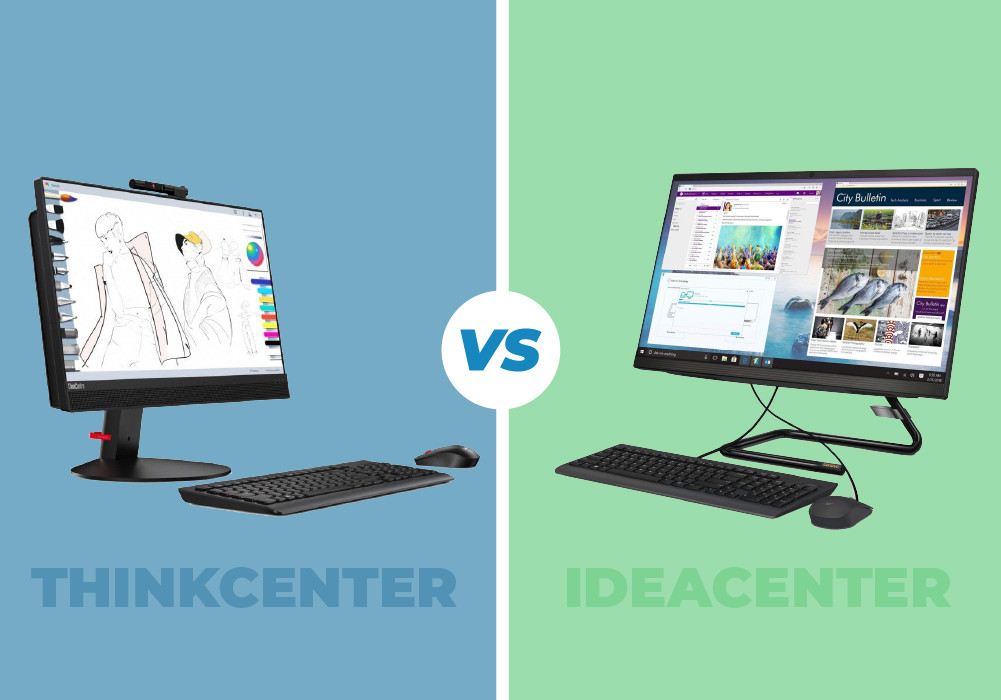
Lenovo ThinkCentre M920z and Lenovo IdeaCentre are considered one of the best PCs. Lenovo ThinkCentre is a core i5 PC while IdeaCentre, which is also Lenovo all in one PC, is a Ryzen PC with AMD Ryzen 3. Both PCs are known for their performance and productivity. Whether you are a businessman or a graphic designer or you are an engineer, the Lenovo laptops including the Lenovo all in one PC range, will increase your productivity and enhance your performance as an individual. Both these PCs; the Core i5 PC and the Ryzen PC, are made for casual computing. Both of them have the same quality of features that Lenovo laptops are known for. So, which one of these is better? Is Lenovo ThinkCentre the better one or does Lenovo IdeaCentre take the lead here? Read our detailed comparison of the Core i5 PC and the Ryzen PC to find out which one is better and which one of these laptops from the Lenovo all in one PC series meets your needs and work requirements the best?
SPECIFICATIONS |
LENOVO THINKCENTRE |
LENOVO IdeaCentre 3 21.5" |
|
Processor |
Intel Core i5 9th Gen Processor |
AMD Ryzen 3 Processor |
|
Processor Speed |
3.00GHz |
2.60GHz |
|
Display Size |
23.8 in |
21.5 in |
|
RAM |
8GB RAM |
4GB RAM |
|
Storage |
256GB SSD |
1TB HDD |
|
Graphics |
Dedicated Graphics |
On-Board/Integrated Graphics |
|
Operating System |
Windows 10, Professional |
Windows 10, Home |
PROCESSOR AND PERFORMANCE
Lenovo ThinkCentre boasts a very fast performing Intel Core i5 9th Gen Processor that delivers unprecedented processing power and speed. It lets you edit photos; audit Excel sheets, prepare presentations, and download apps without showing any signs of lag or slow down. So, with this Intel Core i5 PC, you can multitask seamlessly even when you have to work with the most intensive and demanding tasks. Expect high responsiveness from the ThinkCentre owing to its PCIe SSD, 3D NAND technology and optional Intel® Optane™ Memory.
IdeaCentre offers the best performance for daily computing. Owing to its AMD Ryzen 3 processor, this all in one PC makes it easy to get done with simple everyday tasks including working on essays, browsing the web, streaming TV on demand, editing photos, and watching movies, etc. This Ryzen PC is great for studying. Moreover, with this laptop, you also get your very own digital virtual assistant that lets you focus on your work by taking care of your daily tasks. So, with the help of Windows Cortana, you will not have to remember everything on your family’s to-do-list because Cortana will take care of it. Cortana not only takes care of your reminders but it also opens your applications on your voice commands, tracks any incoming parcels, search files for you based on when and whom you worked on a file with, and much more.
Security
The Lenovo ThinkCentre has a very complex security system that makes sure that your data remains safe and hackers cannot crawl their way inside your operating system. This Core i5 PC keeps your enterprise-critical data and passwords safe with the help of its embedded Trusted Platform Management (TPM) 2.0 data encryption that enables the user to work stress-free without worrying about your data getting leaked or stolen. Moreover, with the BIOS-based Smart USB protection, you can stay assured that your data will not end up in wrong hands. The BIOS-based Smart USB protection technology allows you to configure Lenovo ThinkCentre’s USB ports to respond only to specific devices decided by you. This prevents unauthorized personnel from gaining access to your files and copy whatever they want.
Lenovo IdeaCentre, unfortunately, is not very clever when it comes to security and privacy. This intuitive Lenovo all in one PC does not possess the security features that come with the Lenovo ThinkCentre. When you purchase the Lenovo IdeaCentre, you do not get the full version of Microsoft Office or any Internet Security Software. But you do not have to worry about this because it is not an issue. You can easily purchase great MS office deals and amazing security bundles that will save you a lot of money such as the Microsoft Office Home & Business 2019 and the BullGuard Identity Protection, etc.
DISPLAY
Lenovo ThinkCentre M920z comes with a 23.8-inch display screen that delivers Dedicated Graphics. It features an antiglare display panel that scatters light. Thus, it remains flicker-free and reduces eye strain. Moreover, your eyes will stay comfortable even when you have to work those long office hours, thanks to ThinkCentre’s Eye Comfort and Low Blue Light certifications.
On the other hand, IdeaCentre has a 21.5-inch display that delivers On-Board/Integrated Graphics. Watch movies and TV shows with crystal-clear clarity. Its Full HD screen with 1080p resolution is perfect for movie nights. So, if you are not into the same Netflix documentaries as the rest of your siblings, you can use your IdeaCentre to watch your favorite show.
THE VERDICT
Keeping all the important features in view, including processing power, speed, graphics, connectivity options, performance and most importantly security measures, it is safe to say that Lenovo ThinkCentre M920z is a better all in one PC as compared to Lenovo IdeaCentre. Lenovo IdeaCentre is perfect for light computing. You can use it to deal with your daily tasks but if you want to meet deadlines and complete power intensive tasks then you will need Lenovo ThinkCentre.
Read More:
| Explore the Latest Trends and Advancements in Desktop Computing Technology |
| Why Lenovo is the Top Choice for PCs: A Comprehensive Guide |
| Choosing the Right Thin Client Desktop PC: Factors to Consider |
Related Articles

Last Updated: April 01, 2026
Last Updated: April 01, 2026
Last Updated: April 01, 2026
Last Updated: October 08, 2025
Last Updated: April 01, 2026
Last Updated: July 01, 2025
Lenovo ThinkPad X1 line of business laptops are quite popular due to their characteristics ThinkPad design. These Lenovo laptops are quite popular among multi-taskers, featuring several inventive features. Lenovo ThinkPad X1 Yoga is a top notch 2-in-1 business laptop from Lenovo ThinkPad series.
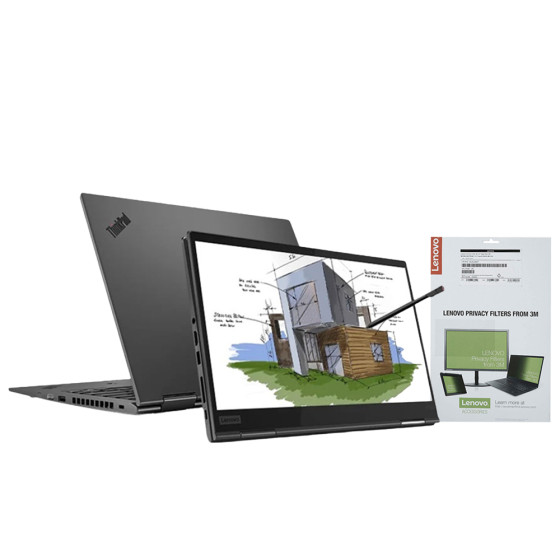
Let’s review this feature-packed machine to see what features this laptop has to offer you.
For
- Ultra-portable and compact business notebook
- Carries a good array of ports
- Smooth keyboard and built-in Stylus
- High-end security features
- Speedy performance
Against
- Subpar battery life
Design and Security
This Lenovo X1 Yoga laptop comes with an ultra-portable body, weighing only 3lbs. Hence, you can easily take your laptop anywhere outside without any hassle. The touchscreen IPS display of Lenovo ThinkPad X1 delivers a resolution of 1920 x 1080, providing you with an immersive visual experience. If we look at the back of the display screen, we can see the blacked-out ThinkPad

