



Review: Lenovo ThinkPad X1 Extreme
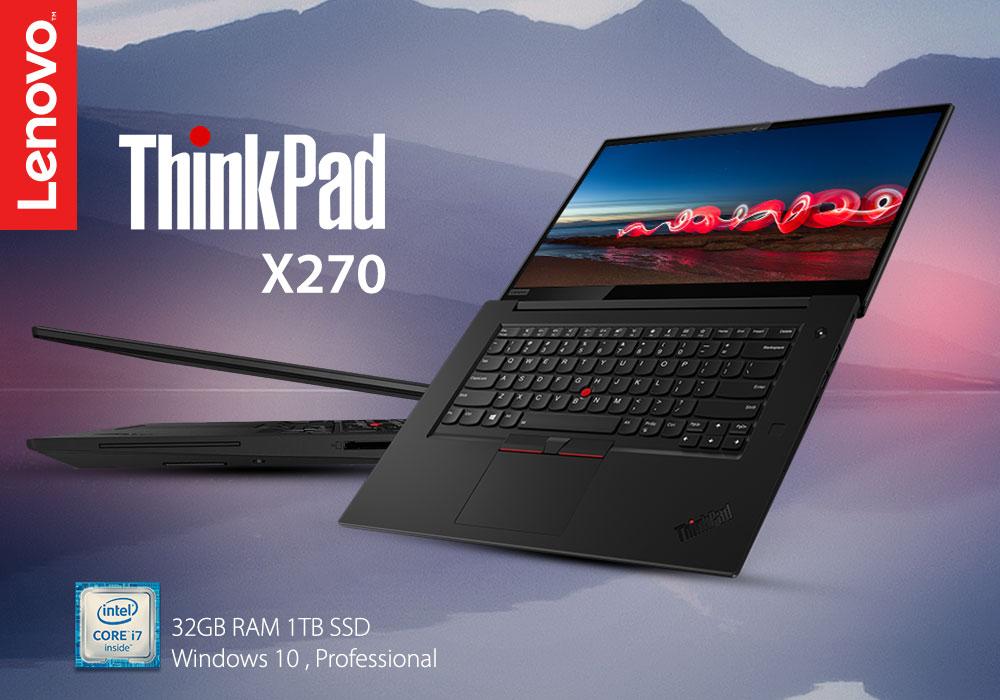
The Lenovo ThinkPad X1 series has long been well-known for its excellent build quality and top features. Today, we’re going to be looking at the ThinkPad X1 Extreme, which shares a similar design with its predecessors. However, this model has a larger 15.6-inch chassis and its specifications blow others out of the water.
The ThinkPad X1 Extreme starts out with a 1080p IPS display. You’ll get lots of panel options that reach their upper limit at 3840x2160 UHD with a maximum brightness of 500 nits and DolbyVision HDR certification. There’s also a 4K OLED version if that’s your thing.
The extra space due to the chassis allowed Lenovo to put in a 9th generation Intel Core i7 processor. And that’s not all. The ThinkPad Extreme X1 can also support up to 64 GB RAM and 1 TB NVMe SSD. But the highlight is definitely the Nvidia GeForce GTX 1650 with 4 GB of GDDR5 memory.
There’s a lot more to a laptop, so let’s dig a bit deeper, shall we.
Specifications
|
Processor |
Intel Core i7 9750H / 2.6 GHz |
|
Display |
15.6-inch Full HD Display (1920 x 1080) Resolution |
|
RAM |
32 GB |
|
Storage |
1 TB SSD |
|
Graphics |
NVIDIA GeForce GTX 1650 4 GB GDDR5 |
|
Operating System |
Windows 10 Pro |
Design
The X1 Extreme’s design is pretty similar to the X1 Carbon. Its colour is black, and it’s got the carbon fibre weave look going on. As for the lid, it’s a standard clamshell laptop that opens 180 degrees.
You can see a good-looking ThinkPad logo and the X1 logo on the lid. The ThinkPad logo is black and glossy, which indicates that it’s a premium machine as other ThinkPads use a grey logo. You’ll only find the P1 having this type of logo outside the X1 series.
Lenovo doesn’t cut corners when it comes to ports and the ThinkPad X1 Extreme has a fair amount of them. Keep in mind that this is a business PC meant for power, so it’s not out of the realm of possibility that you might need to plug in some peripherals.
You’ll find a power port, two Thunderbolt 3 ports, an Ethernet connector, HDMI 2.0, and a 3.5mm combo audio jack on the left side of the machine. The laptop uses Lenovo’s proprietary power port and comes with a 135W charger.
If you want to plug in a couple of external monitors then do so without any worry. Its Thunderbolt 3 ports support up to two 4K monitors. You can even plug in a 5K monitor. The HDMI 2.0 port can also be used for a 4K monitor. Never underestimate those Thunderbolt 3 ports as they are capable of 40Gbps data transfer speeds.
You’ll find two USB 3.1 Gen 1 Type-A ports, with an SD card slot on the right side. We would’ve preferred if Lenovo used Gen 2 since they are twice as fast as Gen 1. But that’s just a minor complaint that doesn’t hold weight when looking at the bigger picture.
If you’re feeling adventurous or just want to swap out things like RAM and SSD, you can access the internals by removing the bottom panel with seven Philips-head screws. However, we recommend reading the user guide or maintenance manual if you want to replace and upgrade some parts. One can never be too sure when it comes to opening a laptop’s internals.
Display
For the ThinkPad X1 Extreme, Lenovo offers three to four panels to pick from; FHD, 4k IPS matte, or glossy 4K OLED with touch. This unit comes with a 15.6-inch Full HD Display (1920 x 1080) Resolution. The screen is sharp and the colours are bright. Backlight bleed is negligible and the panel uniformity is excellent.
Performance
With a 9th Generation Intel Core i7 processor, 32 GB RAM, 1 TB SSD, and NVIDIA GeForce GTX 1650 4 GB GDDR5 graphics card, we would’ve been surprised if the ThinkPad X1 Extreme didn’t perform extremely well. We threw everything we could at this beast of a laptop and it didn’t even break a sweat.
There was no noticeable lag as we loaded 15 Google Chrome web pages, five of which played full GD videos in the background. Even when we streamed a UFC fight between Jorge Masvidal and Kamaru Usman, the X1 Extreme didn’t have to turn its fans on.
On our gaming test, the ThinkPad X1 Extreme breezed through Dirt 3 with over 150 frames per second. It wasn’t able to reach the same heights with Hitman but still managed to hit near 50 frames per second.
Battery Life
The ThinkPad X1 Extreme has an 80 Wh battery. Combine this with the relatively less power consuming full HD screen and you’ll easily get over 8 hours of battery life. In short, The X1 Extreme won’t have any problem lasting a full day of work.
Verdict
The Lenovo ThinkPad X1 Extreme is an excellent all-rounder. It’s pretty good for both work and play and is worth every penny. All in all, this device has everything that you could ever want from a modern notebook
Read more:
| Why Top Executives Rely on the Lenovo ThinkPad Laptops |
| Review: Lenovo ThinkPad X1 Carbon 14in 4G LTE Ultrabook Core i7 |
| Best ThinkPad Laptops for Business and Home Use |
Related Articles

Last Updated: April 01, 2026
Last Updated: November 12, 2025
Last Updated: April 01, 2026
Last Updated: September 09, 2025
Are you a business executive looking for the perfect laptop for your everyday tasks?
Well, looking at the business market provides you with a bunch of laptop options. It can get overwhelming to choose from the wide range of options. Even after reading the reviews and doing research, you might still feel unsure about what to pick. However, when you talk about business laptops, there is only one name that pops into the mind of a professional: the Lenovo ThinkPad.
Top executives are constantly on the move, making critical decisions,, and ensuring the success of companies. To excel in this demanding role, they require a tool that is not only powerful and reliable but also a reflection of their professionalism.
Lenovo ThinkPad laptops are a name that resonates with corporate leaders and provides quality, performance, and prestige.
But have you ever wondered what makes the Lenovo ThinkPad laptop a top choice for professionals? This article will provide some of the best reasons why businesses

Last Updated: December 15, 2025
Lenovo is a top name in personal computers, and the Lenovo ThinkPad series is a fantastic choice for almost anyone. Why? Because it brings together three major benefits: toughness (durability), power (performance), and a great price (affordability).
ThinkPads are known worldwide for being strongly built and reliable over many years. If you need a powerful computer with a typing experience that can’t be beat, a ThinkPad delivers every time.
These laptops don't just look good; they are built with strong parts, have keyboards that can handle spills, and meet military-grade standards for being tough. This means they can survive common accidents like drops and spills better than most.
This blog will look closely at the features that make ThinkPads a continuous favourite. We will also explore five top models, carefully chosen to cater to different personal use needs.
Key Features: Strength, Speed, and Value
ThinkPads are built to last and to perform quickly. This successful combination is achieved

