



Hp Printers
Finance available
Free Delivery *
Finance available
Finance available
Free Delivery *
Finance available
Free Delivery *
Finance available
Free Delivery *
Finance available
Finance available

Finance available
Free Delivery *
Finance available
Free Delivery *
Finance available
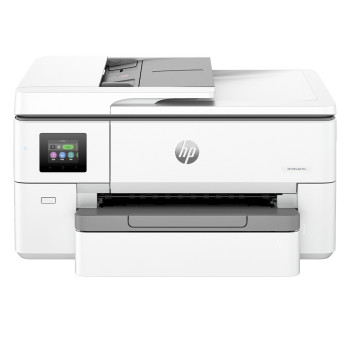
Finance available
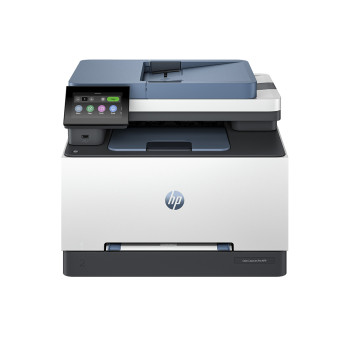
Finance available
Free Delivery *
Showing 15 of 15 Items
HP Printers for Work, Home and Everything In Between
Some printers are just there when you need them. HP printers tend to be the ones that make everyday printing feel easier from the start. Whether you are printing schoolwork, invoices, shipping labels, family documents, or crisp colour pages for work, HP has built a reputation around making printing simple, reliable, and refreshingly straightforward.
That is what makes this category so easy to shop. From compact home models to more capable office-ready machines, HP printers UK customers rely on are designed for real routines, not just spec sheets. If you want cleaner setup, dependable performance, and features that make printing less of a chore, this is a strong place to start.
Smart printing without the faff
A good printer should not feel like a weekly argument with your Wi-Fi network. It should connect easily, print clearly, and keep up when you need it most. That is why so many people choose hp and printer solutions for home, work, and everything in between. HP focuses on the kind of features that actually matter in daily use: wireless convenience, mobile printing, reliable document output, and models that suit both light and regular print demands.
For users who want a printer that slips naturally into everyday life, an hp wireless printer can make a big difference. It gives you more freedom to print from laptops, tablets, and phones without being tied to one desk or one cable. And if you are browsing across the wider printer range before making your choice, you can explore our full selection of buy printers options to compare what suits your setup best.
A strong fit for home, study and office use
The best thing about HP is that the range covers a lot of ground without making things complicated. Need something compact for occasional home printing? There is an option for that. Want something a little more capable of regular admin, schoolwork, or home office use? HP handles that too.
That is why affordable hp printers appeal to such a wide mix of buyers. They work well for:
- home users printing forms, tickets, and family documents
- students tackling coursework and revision materials
- home offices managing day-to-day paperwork
- small businesses printing invoices, reports, and internal documents
- users who want easy wireless printing without overcomplicating the setup
If most of your printing happens at home, it is also worth browsing our affordable home printers to compare more everyday-friendly models.
Wireless, flexible and built for modern routines
Printing is no longer just about connecting one computer with one cable in one room. Today, people print from phones, tablets, work laptops, and shared family devices. That is where modern hp computer printers really come into their own. Wireless connectivity, app-based printing, and smooth everyday use make them a practical choice for households and workspaces that need a little flexibility.
An hp printer setup might sound simple on paper, but what users really want is convenience: easy connection, consistent results, and less time spent fixing issues that should never have happened in the first place. HP printers are popular because they understand that balance between smart features and no-nonsense usability.
And if you already like the brand and want to explore more beyond this category, you can browse the wider HP range for more devices and accessories.
Inkjet or laser? HP gives you both routes
One of the strengths of this category is choice. Not every print job needs the same type of machine, and HP covers both ends well. If you want versatile everyday printing with strong colour output for documents and photos, inkjet printers are often the natural fit. They suit homes, students, and users who want flexibility in a compact setup.
If your priority is sharper text, faster document output, and frequent black-and-white printing, laser printers may be the better call. They work especially well for offices, admin-heavy tasks, and users who print in larger volumes.
That is why the best hp printer is not one single model. It is the one that matches the way you print. For some, that means inkjet convenience. For others, it means laser efficiency. HP gives you both without making the decision feel overwhelming.
More than just printing
For some buyers, a printer is only one part of the setup. If you also need to digitise paperwork, archive documents, or organise home-office admin more efficiently, it is worth looking beyond the printer itself. Pairing your device with one of our scanners can help create a complete and more practical workspace, especially if your routine includes forms, signed documents, or regular document storage.
This is part of what makes hp printers such a dependable category. They fit into everyday routines easily, whether you are printing a single page at home or building a more organised desk setup around regular work.
Why buy HP printers from Laptop Outlet?
At Laptop Outlet, we make it easier to shop for hp printers that fit real day-to-day use. Whether you want something compact, wireless, family-friendly, office-ready, or simply easy to live with, our range is built around practical performance and sensible value.
From first-time buyers to people replacing an older machine, we offer straightforward options across the HP range without turning the buying process into hard work. So if you are looking for affordable hp printers, dependable wireless features, and a trusted place to shop, Laptop Outlet is a smart place to start.
You can also spread the cost of your purchase. Pay monthly with Klarna or PayPal Credit, or split your order into three interest-free payments using PayPal Pay in 3, all available at checkout.
Read More:
Why Is My Printer Not Working? Easy Fixes for Common Issues
Read more