



ChromeBooks
Shop Chromebooks for study, work, streaming and everyday browsing at Laptop Outlet. Compare affordab...
Finance available
Free Delivery *
Finance available
Free Delivery *
Finance available
Free Delivery *
Finance available
Free Delivery *
Finance available
Free Delivery *
Finance available
Free Delivery *
Showing 6 of 6 Items
Chromebooks for Work, Study and Everyday Use
Chromebooks offer a simple, portable option for browsing documents, video calls and streaming. Students can choose affordable models for coursework, while home and remote users can compare more powerful Chromebook laptops for cloud-based productivity.
For commuting or travel, look for a compact screen, dependable battery and lightweight design. Our lightweight laptops provide more portable options across different operating systems and specifications.
Chromebook vs Laptop: What’s the Difference?
A Chromebook runs ChromeOS, while most traditional laptops use Windows or macOS. ChromeOS laptops are designed around web applications, cloud storage and Google services, making them practical for everyday online tasks.
Windows and macOS devices offer broader compatibility with specialist desktop software and PC games. Choose a Chromebook if your main applications work through a browser or ChromeOS, but confirm software compatibility before ordering.
Chromebook vs Chromebook Plus
Standard Chromebooks are suitable for browsing, emails, streaming and basic study or office tasks. They are often the better choice for buyers prioritising simplicity and a lower price.
Chromebook Plus models meet higher hardware standards, including at least 8GB RAM and 128GB storage. Choose Chromebook Plus for smoother multitasking, regular video calls and more demanding productivity or creative work.
How to Choose a Chromebook
Compare these key features before selecting your Chromebook:
- Processor and RAM: 4GB RAM can support light everyday use, while 8GB or more is better for multitasking and numerous browser tabs.
- Storage: 64GB may suit cloud-based users, while 128GB or more provides additional room for apps, downloads and offline files.
- Display: Compact screens improve portability, while larger Full HD displays provide more workspace for documents and entertainment.
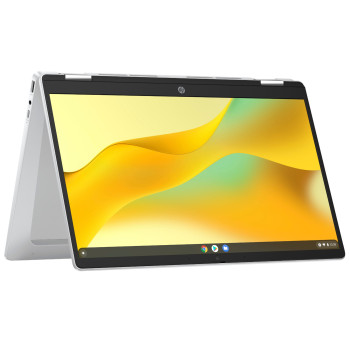
- Touch and 2-in-1 designs: Touchscreen Chromebooks offer direct control, while 2-in-1 Chromebooks can also be used in tent or tablet mode. Compare more touchscreen laptops if display flexibility is a priority.
- Battery: Consider the advertised runtime when choosing a Chromebook for lessons, commuting or travel.
- Connectivity: Check for the USB-C, USB-A, HDMI, audio and microSD connections required for your accessories.
Check Chromebook Update Support
Chromebooks receive automatic ChromeOS and security updates for a set period. Before buying, check the specific model’s Automatic Update Expiration date to see how much update support remains.
This is particularly important when comparing older or refurbished Chromebooks. A longer remaining update period can provide better security, software compatibility and long-term value.
Top Chromebook Brands
Laptop Outlet stocks Chromebook models from leading manufacturers across different screen sizes, designs and price points.
- ASUS Chromebooks include slim clamshells and flexible Flip models for home use, commuting and entertainment.
- Lenovo Chromebooks cover practical everyday devices, student-friendly options and touchscreen convertible designs.
- Acer Chromebooks range from compact education models to larger-screen and Chromebook Plus options.
- HP Chromebooks include everyday clamshells and versatile x360 models for work, study and video calls.
Compare each model by specification and features, as available ranges can change.
New and Refurbished Chromebooks
New Chromebooks provide access to current hardware, features and a longer remaining update period. They are well suited to buyers who want the latest ChromeOS experience and plan to keep their device for several years.
For a lower purchase price, consider refurbished Chromebooks. Compare the listed condition, specification, warranty and remaining update support to find the right value Chromebook for your needs.
Buy Chromebooks from Laptop Outlet
Find Chromebooks for school, work, home and travel at Laptop Outlet. Our range includes affordable Chromebooks, Chromebook Plus devices, touchscreen models and 2-in-1 designs from ASUS, Lenovo, Acer and HP.
Compare current Chromebook deals by processor, RAM, storage, screen size and price. Flexible payment options, including PayPal Credit, PayPal Pay in 3 and Klarna, are also available to eligible customers.
Every Chromebook comes with a standard one-year warranty, backed by fast UK delivery and reliable customer support. Choose the specification that fits your needs and order online with confidence.
Read More
Read more