



Monitors
Shop monitors at Laptop Outlet for work, gaming, creative tasks and everyday use. Compare gaming monitors, Full HD and 4K monitors, curved and widescreen displays, portable monitors and refurbished options from leading brands for every setup and budget.
Finance available
Finance available
Finance available
Finance available
Finance available
Finance available
Free Delivery *
Showing 6 of 6 Items
Find the Perfect PC Screens for Work, Gaming and Entertainment
Need a screen that actually matches your setup? Our range of monitors covers everything from workday essentials and high-refresh gaming displays to crisp 4K upgrades and creative-friendly screens. From everyday PC screen monitors and pro-ready screen computer monitors to portable displays, touchscreen options, and sharper high-resolution models, there is something here for every kind of user.
Shop PC Monitors for Everyday Work and Home Use
For general office work, email, spreadsheets, web browsing and admin, the best monitor is usually one that balances screen comfort, resolution and value. For most users, a 24-inch or 27-inch Full HD or Quad HD screen offers enough workspace for daily productivity without overcomplicating the setup.
This is where desktop monitor UK buyers often start, especially if they want a screen that feels comfortable for longer sessions without taking up too much desk space. A good everyday display monitor screen should offer clear text, reliable brightness, and enough screen area to work across documents, browser tabs and video calls more comfortably than a laptop alone. Want a cleaner desk and smoother video calls? Laptop Outlet offers monitors with built-in speakers that deliver clear visuals and everyday audio without requiring separate desktop speakers.
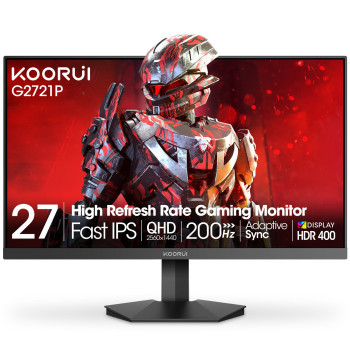
Compact computer screens, such as a 20-inch PC monitors, suit smaller desks, while a 27 inch monitor gives you more room for documents, browser tabs and video calls.
If you are building or upgrading a wider desk setup, you can also browse our affordable PC components to support a more complete workstation.
Desktop Monitors for High Refresh Rate Performance
If gaming is the priority, resolution alone is not enough. A strong gaming monitor should also match your preferred refresh rate, response time and screen size. For competitive play, many users look for Full HD or Quad HD screens with higher refresh rates and smoother motion handling. For immersive single-player gaming, a larger panel or sharper resolution may matter more.
This part of the category is ideal for shoppers looking at computer monitors with stronger visual performance, better motion clarity and more responsive gameplay. If you want a more premium panel type with richer contrast and stronger visual depth, you can also buy OLED displays for a higher-end viewing experience.
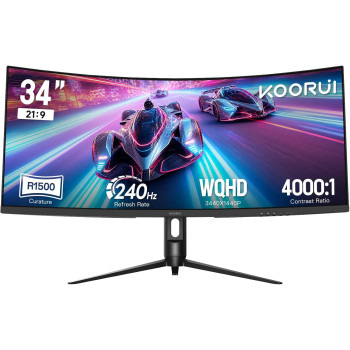
A 32-inch gaming monitor can suit immersive setups when your desk has enough depth for a comfortable viewing distance. For a more enveloping format, compare our curved computer screens.
4K Computer Screens for Creative Work and Entertainment
For users working with detailed visuals, larger spreadsheets, photo editing, design tasks or sharper media viewing, higher resolution makes a real difference. High-resolution computer monitors are especially useful when screen clarity, workspace depth and content detail matter more than entry-level pricing. A 4K computer monitor can give you:
- sharper image detail
- more workspace on screen
- cleaner text rendering
- better visual clarity for editing and multitasking
This is often the right direction for users comparing screen computer monitors for business, design, data-heavy tasks or premium home setups. For a balance of sharpness and performance, high-resolution 1440p displays offer more detail than Full HD while remaining less expensive than 4K displays.
Portable Computer Monitors for Work, Travel and Study
Not every monitor has to stay on one desk. If you need extra screen space while travelling, hot-desking or working between locations, a portable screen for a laptop can be a smart addition to your setup. These displays are ideal for users who want a second screen without committing to a full-size desktop monitor. A lightweight laptop monitor or portable display screen is useful for:
- hybrid workers
- sales teams
- students
- remote professionals
- users who multitask across documents and video calls
Touchscreen Monitors for Interactive Workspaces
For more hands-on workflows, a touchscreen monitor can add flexibility to how you navigate, present, or interact with content. These displays are especially useful in collaborative workspaces, education environments, retail setups and more interactive desk arrangements.
Shoppers looking for touchscreen displays and monitors often prioritise ease of use, direct interaction, and a more responsive on-screen experience. If your workflow benefits from tapping, swiping or presenting directly from the screen, this type of monitor can be a more practical choice than a standard display.
Dual Monitor Setups that Give You More Room to Work
A single screen works for many users, but dual-monitor setups can transform productivity. Dual monitors and multi-display setups are ideal for users who regularly work across spreadsheets, chats, browser tabs, dashboards, meetings, or creative tools simultaneously. This is one of the biggest upgrade paths for professionals who want:
- better multitasking
- less window switching
- more workspace for complex tasks
- a cleaner workflow across apps and documents
For many users, upgrading from a single laptop screen to two external Visual Display Units and monitors delivers a greater day-to-day productivity improvement than upgrading the laptop itself.
If you prefer a single continuous canvas rather than two separate screens, browse our widescreen displays for wider timelines, spreadsheets, and multitasking layouts.
Slim Monitors that Make More of Your Desk Space
For users with tighter desks or cleaner setup goals, slim or lightweight monitors offer a more streamlined look without giving up screen space. Narrow bezels, lighter profiles and more compact stands make them especially appealing for minimalist desks, home offices and multi-monitor layouts.
If aesthetics matter as much as performance, this part of the category is worth exploring alongside spec-driven decisions like panel type, refresh rate and resolution.
Select the Right Monitor Panel for Your Viewing Style
IPS Monitors
Choose IPS monitors for consistent colours, wide viewing angles and sharp everyday visuals. They are a strong option for office work, content creation, study and gaming.
OLED Monitors
Experience deeper blacks, vivid colour and rapid response times with OLED monitors. They suit premium gaming, entertainment and colour-focused creative work.
LED Monitors
Our LED computer monitors combine bright visuals, efficient performance, and a broad choice across Full HD, QHD, and 4K resolutions. They are suitable for home, business and gaming setups.
LCD Monitors
Explore LCD monitors for dependable picture quality across work, browsing, study and general home use. Available specifications vary by screen size, panel technology and resolution.
Buy Monitors by Brand and Use Case
Browse monitors by brand to find the right fit for your setup. Alongside ViewSonic and Lenovo monitors, we stock leading brands including ASUS, BenQ, LG, AOC, Dell, HP, Philips, Samsung, Acer and iiyama, giving you more choice across gaming, business, creative and everyday displays. You can browse ViewSonic Displays for work and entertainment setups, shop HP Monitors for dependable business and home-use screens or explore MSI monitors for high-performance gaming features.
Factors to Consider Before Buying the Right Monitor
Before buying, focus on the specs that will actually change your experience:
- Screen size: 24-inch and 27-inch are the most versatile for everyday use
- Resolution: Full HD works well for everyday use, but Quad HD and 4K can offer a sharper picture if you want more detail for creative work, films or larger displays.
- Refresh rate: More important for gaming and fast-moving visuals
- Panel type: Impacts colour, contrast and viewing angles
- Ports and connectivity: Important if you are connecting laptops, desktops or consoles
- Use case: Work, gaming, creative tasks and travel all call for different monitor strengths
The best monitors are not simply the biggest or the most expensive. They are the ones that match your workflow, viewing habits, and workspace most effectively.
Ready to Buy Yourself a Portable Screen?
At Laptop Outlet, we make it easier to compare monitors by screen size, resolution, use case and budget. Whether you are searching for business displays, gaming screens, portable options or everyday computer monitors, our range is designed to help you find the right model without guesswork. With monitor prices starting around £50, upgrading your setup does not have to stretch your budget.
From best PC monitor deals to more specialised categories like portable displays, OLED models, and touchscreen screens, this page gives you a clearer route to the monitor type that fits how you work, play, or create. What’s more? You can also spread the cost of your purchases with PayPal Pay in 3 or PayPal Credit at checkout. Find the right screen for the way you work, play or create and order online from Laptop Outlet today!
Read More:
The Benefits of Dual Monitors: How It Can Improve Your Productivity
Read more